***** IMPORTANT: These instructions have been updated for the latest iPhone firmware. Please follow the up to date instructions here *****
These are instructions on how to jailbreak your iPhone 3GS on the 3.0.x firmware using RedSn0w for Mac. The Windows version of this tutorial is here. The iPhone 3G version of this tutorial is here. The iPhone 2G version of this tutorial is here
This tutorial can be used to jailbreak before applying the UltraSn0w unlock. You can find instructions on how to apply the unlock here.
** If you would like to jailbreak on the 3.0.1 firmware you can follow these exact instructions; however, in Step Two restore using this 3.0.1 iPhone firmware file instead of the 3.0 one. Continue with the instructions as indicated.**
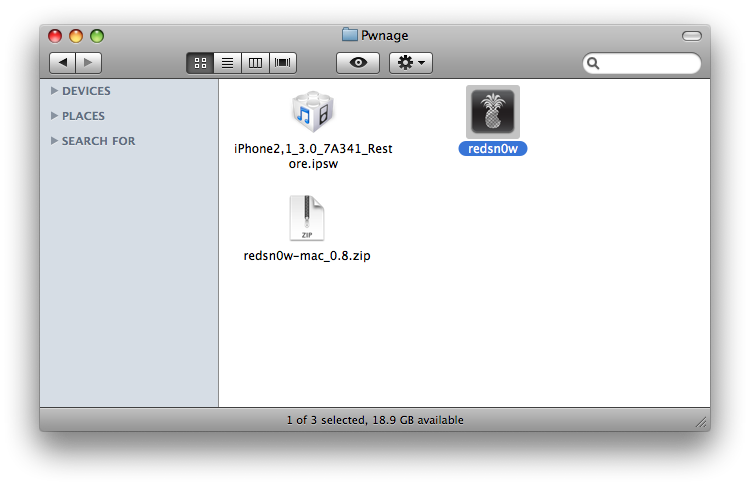
Step One Create a folder on your desktop called Pwnage
Download RedSn0w from here and place it in the Pwnage folder. Likewise, download the latest 3.0 firmware from below and place it in the same folder.
Extract the redsn0w application from the RedSn0w zip file to the Pwnage folder.
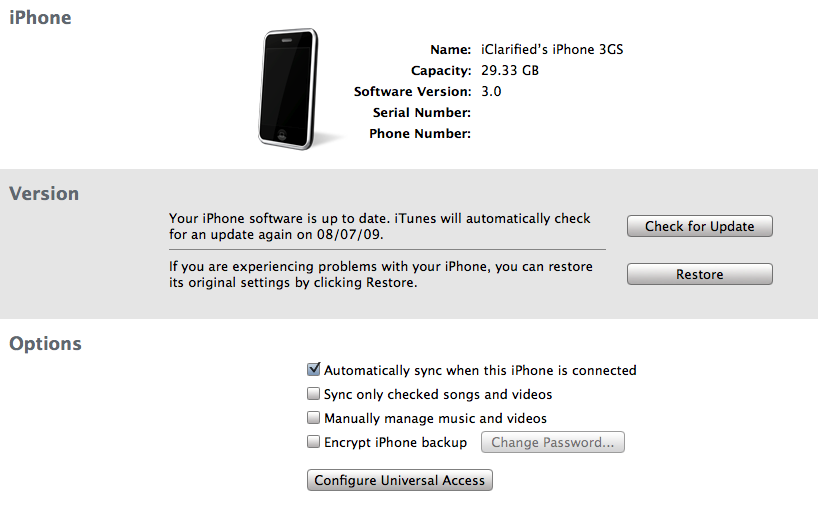
Step Two Connect your iPhone to the computer and launch iTunes.
Select your iPhone from the list of devices on the left. Now hold down Option and click the Restore button. Restore is preferred as it won't create any wasted space on your iPhone.
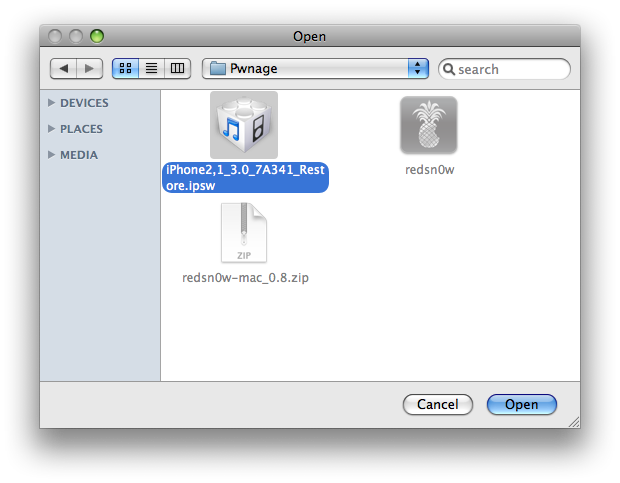
Navigate to the Pwnage folder on your desktop and select the firmware ipsw. Click the Open button to continue.
*Note: If you are already on the 3.0 firmware and have not jailbroken then you may skip this step.
Step Three Once iTunes has finished updating your iPhone to the desired firmware you may launch redsnw0w.app from the Pwnage folder on your desktop.
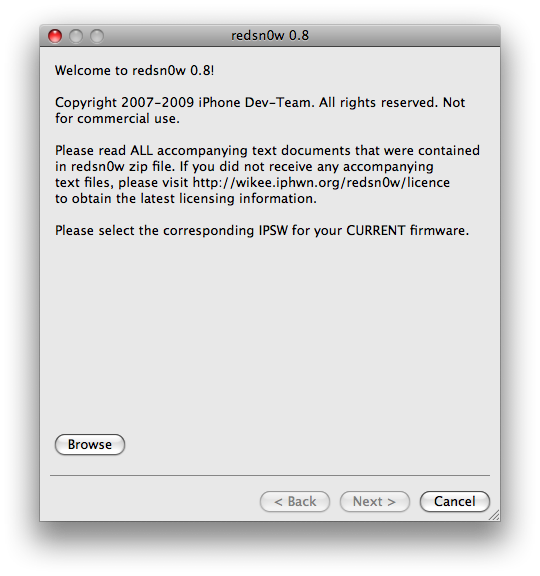
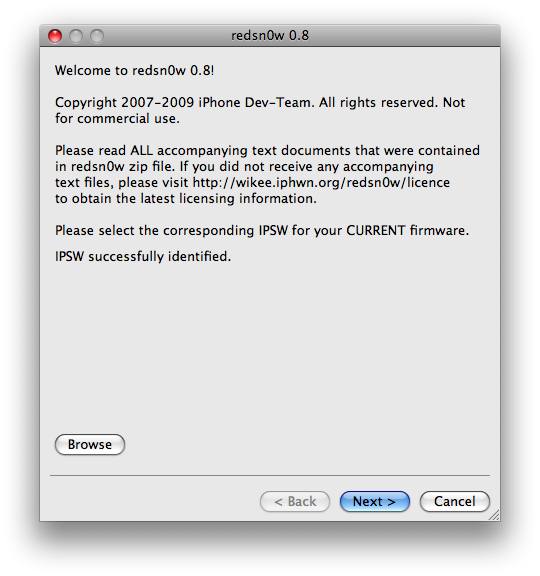
Step Four Once RedSn0w opens click the Browse button
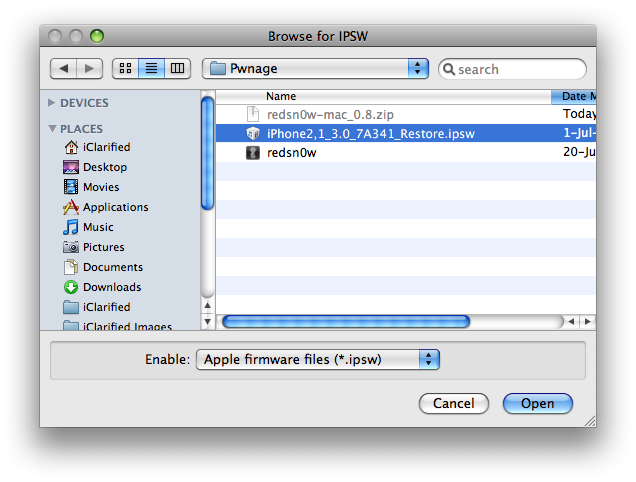
Step Five Select the firmware ipsw we placed in the Pwnage folder on our desktop then click Open
Step Six Once the firmware has been verified click the Next button to continue.
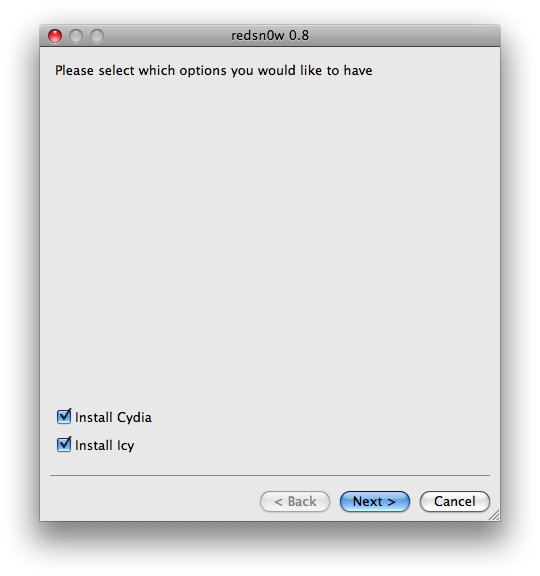
Step Seven Make sure Cydia is selected and click the Next button.
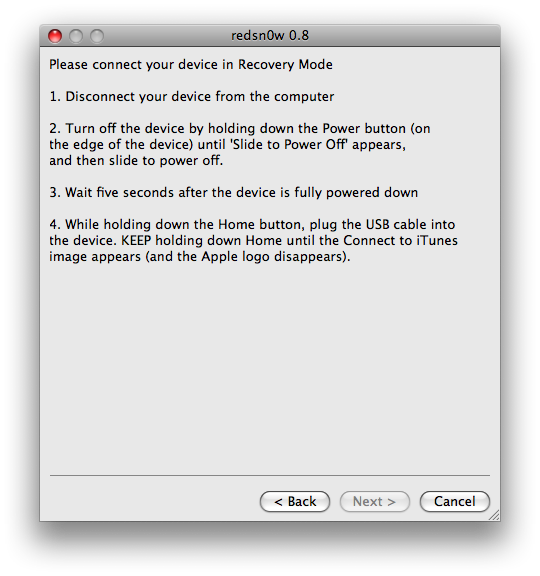
Step Eight RedSn0w will now instruct you on how to put your iPhone into recovery mode. Disconnect you iPhone 3GS from the computer then power it off. Then hold down the Home button while reconnecting the device to the computer. Don't let go of the button until RedSn0w detects the iPhone and begins installation.
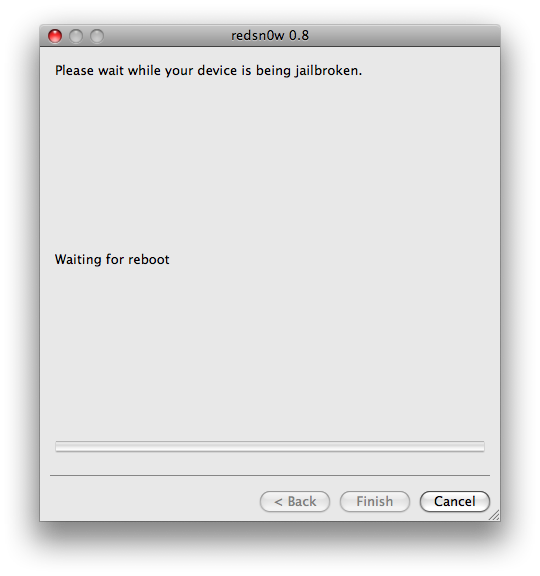
Step Nine Your iPhone will now reboot
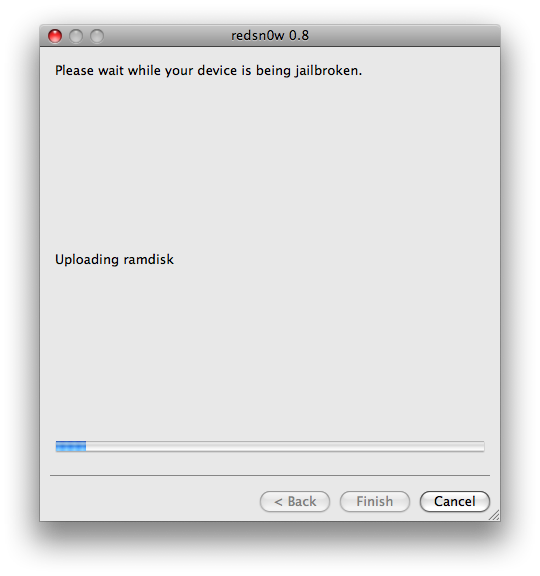
Step Ten RedSn0w will then begin uploading the new RAM Disk and kernel.
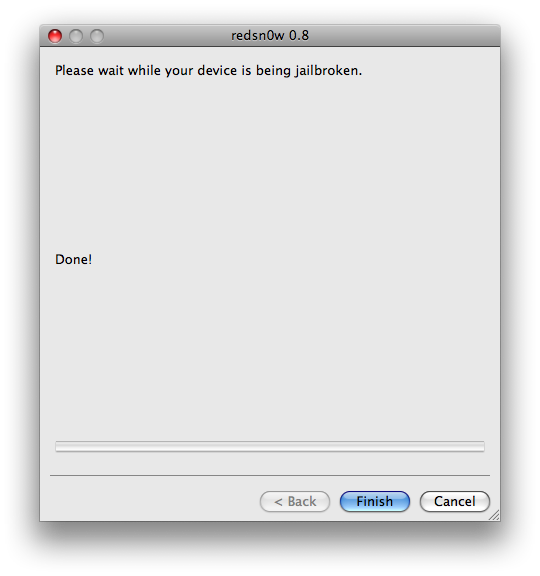
Step Eleven Once this is complete you will be notified that RedSn0w is done. Click the Finish button. When your iPhone finishes rebooting (5 minutes or so) it will be jailbroken with Cydia on the SpringBoard.
Get the iClarified Daily Newsletter
Apple news, rumors, tutorials, price drop alerts, in your inbox every evening, free.
Unsubscribe at any time.
Success!
You have been subscribed.
Add Comment
Would you like to be notified when someone replies or adds a new comment?
Yes (All Threads)
Yes (This Thread Only)
No
Notifications
Would you like to be notified when we post a new Apple news article or tutorial?
I've tried this three times but, after I finish each time the screen on my iphone goes black and won't respond so then I have to restore it using iTunes and Cydia is never there. Why won't it work?
Who ever can help me: Can i jail brake my Iphone 3G (3.0) using this tutorial which says that is made for iphone 3GS????? please if anyone can help, i will really appreciate it.
how can jailbreake my iphone 3gs version 3.1 i try many times whit this tutorial but says unable to recognize specified IPSW, i'm using redsn0w 0.8 and firmware iphone2,1_3.0.1_7A400 any help please
I just got my iphone 3GS and it came with 3.0.1 FW.
I want to Jailbreak and unlock it however I have a doubt. I have a mac and I know I should use RedSn0w, the only doubt I have is regarding if I should just go ahed open RedSn0w and select the 3.0.1 firmware (I already downloaded) and follow the steps or should I restore to 3.0 FW and then open RedSn0w an select 3.0.1 firmware?
Thanks for all the help!
The comment in the article:
** If you would like to jailbreak on the 3.0.1 firmware you can follow these exact instructions; however, in Step Two restore using this 3.0.1 iPhone firmware file instead of the 3.0 one. Continue with the instructions as indicated.**
Is not true. redsn0w only works with the 3.0 firmware. If you select the 3.1 firmware with it, it will say "Unable to recognize specified IPSW". So it appears that the only solution is to downgrade to 3.0.
To make matters worse, iTunes no longer allows restoring to an IPSW of a version less than 3.1. So to downgrade or even install a new IPSW, you'll have to downgrade iTunes if you're using the latest version. I *assume* that downgrading iTunes will let you install older IPSWs, but I didn't test that myself. I'm hoping that the DevTeam releases a new redsn0w soon that accepts the 3.0.1 firmware.
wow, cant say that uve made it easier enough!! ive had troubles in the past with this following alll the other guides on the net and i got a new iphone 2day, luckly enough i came over your guide! no problems what so ever done in minutes first go... thank you very much!!!!!
For the people having problems unlocking their 3G w/ 3.0.1, I tried following the instructions with no luck, so I downgraded from 3.0.1 to 3.0 and the it all worked perfectly JB and unlock!
good luck
iPhone 3G on 3.0.1 I'm stuck in step 2. I've downloaded the A400 restore Ispw gile. I/\'ve resyored my Iphone via iTunes and have the 3.0.1 with 04.26.08 band. How do we use the A400 file in the second step, it says to open it, while the iTunes is restoring the phone, will the iPhone use this file from my computer to restore?
On steps 3 and 5 it indicates to select the A341 restore file, do we, 3G 3.0.1 users, use this A341 files or select the A400 file on these steps???
Sorry but I need help////////
Hey,
I've got a 3GS 16Gb, bought outright from apple. It was on 3.0.1 when I bought it.
I was successfully able to jailbreak it using redsn0w, without the need to restore in itunes 9 (it wouldn't let me restore to 3.0.1 anyways).
The jailbreak works like a charm, with cydia and icy installed and all, but the battery life is a nightmare now!!
It goes from full charge to power-off in less than 7 hours on standy!! The iPhone is also constantly heated as if it was processing something... (3G, wifi and bluetooth are all off)
Any idea or similar cases? Your thoughts are most appreciated, as it's impossible to leave the house now that my battery dies on me every couple of hours :)
Cheers.
I have the same problem. Talking to a "pro" TOMORROW AT 5.00 EST.. WILL KEEP YOU POSTED - PLEASE LET ME KNOW IF YOU FIND A WAY- Apparently the way to do it is redirect the itunes apple responce to auriks server! good luck ( we have the exact same problem!)
It's true. Apple has effectively disallowed using iTunes to restore any firmware except 3.1.
A solution may be to downgrade iTunes to 8.2, which is available here:
http://www.ihackintosh.com/2009/06/download-all-versions-of-itunes-for-windows-mac/
I haven't tried that. Back up your music folder if you do.
Hello! I have a problem like this when I try to restore firmware 3.0 on 3GS. I don't know why? So I restore firmware 3.1, it should be OK but can't jailbreak? Can you send back a message?
Hi, so i got through every step fairly easily. But my iphone wouldnt reboot itself after i had clicked finish. I waited over an hour, and it still hadn't rebooted with cydia. So i restarted my phone, and it was functioning properly, except without cydia. Why doesnt it reboot more quickly? or am i doing something wrong..
Hi to the Dev. Team from Augsburg, Germany
Many thanks for your tutorial and instructions.
Just jailbreaked my new iPhone 3GS and unlocked it (bought in the US).
SIM from non tied operator in Germany just works fine. I am glad I do not need to use Deutsche Telekom and I am happy with good plan of BASE (eplus) which provides Internet Flat Rate for just 10 / month.
Keep on helping the free world of Telco users.
I have all the downloads and almost in the final of the step two(watching the bar in the iphone), the itunes displays that the iphone will be restored with the original form. I tried tw times and itunes diplay the same thing
What can I do?
Its an iphone 3gs with the version 3.0.1 (7A400)
It's recognize the firmware "iPhone 2,1_3.0.1_7A400_Restore" and start the process but did no t finish this second step.
Someone can help me to fix it?
Thank you in advance
Thank you. I tried with the 3.0FW for redSn0w and the itunes displays before finish the restore : "..this device isn't eligible for the requested build"
i have a 3gs on 3.0.1, downloaded the 3.0 firware and restored, but i still get the error in redsn0w- "unable to recognize specified ipsw." i downloaded in firefox and it is a .ipsw file. any ideas? thanks.
My 3GS has not been activated yet, hence when I connect to ITunes it asks to install the original sim. I cannot therefore get past step 2. What can I do?
I'm stuck on step four.
I browse to "iPhone2,1_3.0.1_7A400_Restore.ipsw" and open it.
Then redsn0w says "Unable to recognize specified IPSW"
What can be wrong? Thanks in advance.
You should use 3.0 firmware. 3.0.1 is needed only in step TWO. Just done it with my iPhone 3GS and worked great. As noted in 3rd paragraph:
** If you would like to jailbreak on the 3.0.1 firmware you can follow THESE EXACT INSTRUCTIONS; however, in Step Two (AND ONLY IN STEP TWO) restore using this 3.0.1 iPhone firmware file instead of the 3.0 one. Continue with the instructions as indicated.**
I'm stuck at step 1 or 2 where you restore in iTunes by pressing Option then clicking on Restore. I selected the downloaded firmware but I'm getting an error message that says "blah blah blah because Firmware is not Compatible" Please help
by the way I currently have an iPhone 3GS with FW 3.0.1 and I had it jailbroken and unlocked somewhere. I just wanna jailbreak and unlock it again because there are issues with the battery, it gets depleted quite quickly so I want to do it all over again.





![Calif Demonstrates iPhone Duo Jailbreak on Launch Day [Video]](/images/news/103008/103008/103008-160.jpg "Calif Demonstrates iPhone Duo Jailbreak on Launch Day [Video]")
![iPhone Duo Launches in Stores Worldwide [Photos]](/images/news/102993/102993/102993-160.jpg "iPhone Duo Launches in Stores Worldwide [Photos]")

![How To Back Up Your iPhone to an External Drive on Mac [Video]](/images/tutorials/72786/72786/72786-160.jpg "How To Back Up Your iPhone to an External Drive on Mac [Video]")

![How To Find Your IP Address on iPhone [Video]](/images/tutorials/496/496/496-160.jpg "How To Find Your IP Address on iPhone [Video]")

![New Fire TV Stick 4K Drops to $29.99 (50% Off) [Deal]](/images/news/102984/102984/102984-160.jpg "New Fire TV Stick 4K Drops to $29.99 (50% Off) [Deal]")
![Apple's iPhone 18 Pro and Pro Max Cases Are Up to 37% Off [Deal]](/images/news/102978/102978/102978-160.jpg "Apple's iPhone 18 Pro and Pro Max Cases Are Up to 37% Off [Deal]")
![16-Inch MacBook Pro With M5 Pro Drops to $2,429 ($570 Off), Lowest Price We've Seen [Deal]](/images/news/102957/102957/102957-160.jpg "16-Inch MacBook Pro With M5 Pro Drops to $2,429 ($570 Off), Lowest Price We've Seen [Deal]")
![16-Inch MacBook Pro With M5 Max Drops to $3,499 ($900 Off), Lowest Price We've Seen [Deal]](/images/news/102900/102900/102900-160.jpg "16-Inch MacBook Pro With M5 Max Drops to $3,499 ($900 Off), Lowest Price We've Seen [Deal]")
