These are instructions on how to create a stack of recently accessed applications in your dock.
Step One Launch Terminal from your Applications:Utilities folder
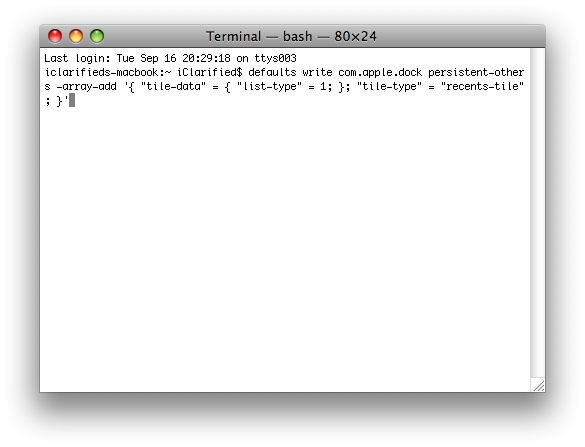
Step Two Type in the following command to add the stack to your dock: defaults write com.apple.dock persistent-others -array-add '{ "tile-data" = { "list-type" = 1; }; "tile-type" = "recents-tile"; }'
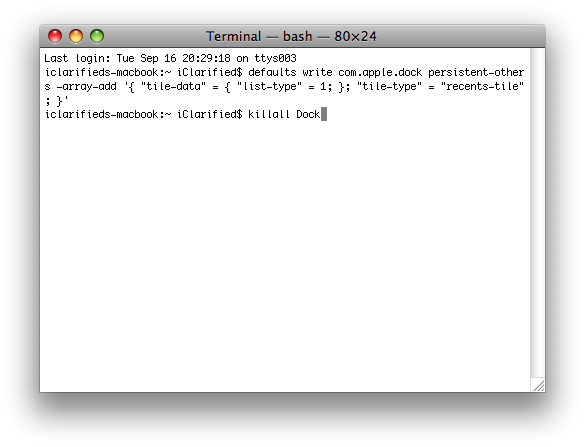
Step Three Enter the following command to restart your dock: killall Dock
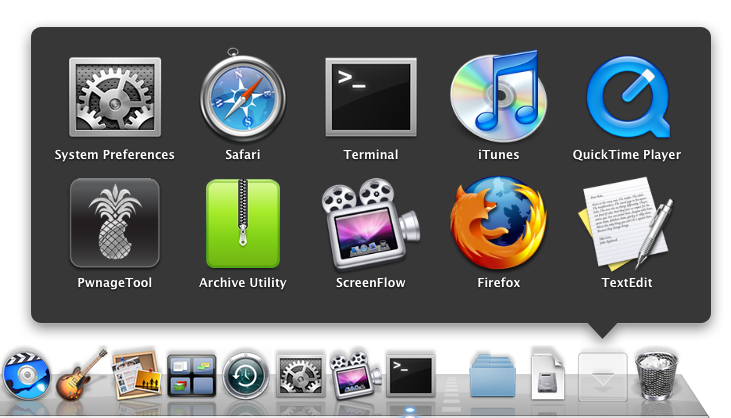
Step Four Notice you will now have a convenient stack of your most recently accessed applications. If you no longer want the stack you can just drag it off the dock!
Thanks***: Thanks to TUAW who first posted this hint
Get the iClarified Daily Newsletter
Apple news, rumors, tutorials, price drop alerts, in your inbox every evening, free.
Unsubscribe at any time.
Success!
You have been subscribed.
Add Comment
Would you like to be notified when someone replies or adds a new comment?
Yes (All Threads)
Yes (This Thread Only)
No
Notifications
Would you like to be notified when we post a new Apple news article or tutorial?
Just tried this, and it didn't work :-( but looks like I'm not the only one. Guessing maybe only works with Leopard and/or Snow Leopard? I'm running Lion
I also tried this and it also killed my dock - it will not appear, even after restart and everything else I can think of. I have tried a bunch of searching and can't get the dock back. I would not recommend this "tweak".
Update: somehow the dock preferences file got corrupted. I didn't have a backup of it so I just trashed the preferences file and set up dock up the way I liked it again.
To find the dock preferences file go to home/library/preferences/ the two preferences files are com.apple.dock.db and com.apple.dock.plist
i tried it and my dock completely disappeared and didnt come back after a restart..
anybody have a solutuion for this? i tried "killall dock" and nothing happened.. also widgets dont work anymore and programs dont minimize either