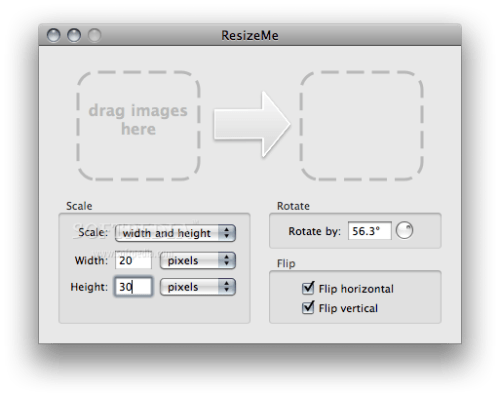
Dare to be Creative has announced the release of ResizeMe 2.1, an update to its batch image and photo editor for Mac OS X. ResizeMe supports creating drop shadows, setting "shiny table" reflection effects and adding text watermarks in addition to the bread-and-butter operations of scaling, rotating and cropping images. The new version allows users to batch rename images and edit images in-place.
Rename files: In the new version, users can rename files with search & replace when editing images. For example, users can rename photos ending with "JPEG" to "jpg" when they resize these photos. ResizeMe supports advanced renaming with regular expressions, and by allowing users to restrict renaming to only the file name or extension.
Edit images and photos in-place: The new version allows users to edit images in-place. To prevent users from inadvertently overwriting existing images, ResizeMe previously only edited copies of the original images. While this is still the default behavior, power users can now opt to edit images in-place.
Pricing and Availability: ResizeMe is $26 (USD), and available as a free download from the ResizeMe website. It runs initially in a 15-day trial mode with all features active. This update is free to all registered users.
Get the iClarified Daily Newsletter
Apple news, rumors, tutorials, price drop alerts, in your inbox every evening, free.
Unsubscribe at any time.
Success!
You have been subscribed.
Add Comment
Would you like to be notified when someone replies or adds a new comment?
Yes (All Threads)
Yes (This Thread Only)
No
Notifications
Would you like to be notified when we post a new Apple news article or tutorial?









![How To Change Wallpaper on Mac [Video]](/images/tutorials/90512/90512/90512-160.jpg "How To Change Wallpaper on Mac [Video]")
![How To Turn Off Always On Display on iPhone [Video]](/images/tutorials/87524/87524/87524-160.jpg "How To Turn Off Always On Display on iPhone [Video]")





![16-Inch M5 Max MacBook Pro Drops $900 to New Low of $3,499 [Deal]](/images/news/102438/102438/102438-160.jpg "16-Inch M5 Max MacBook Pro Drops $900 to New Low of $3,499 [Deal]")
![Magic Keyboard for iPad Air Drops to $200 on Amazon [Deal]](/images/news/102402/102402/102402-160.jpg "Magic Keyboard for iPad Air Drops to $200 on Amazon [Deal]")
