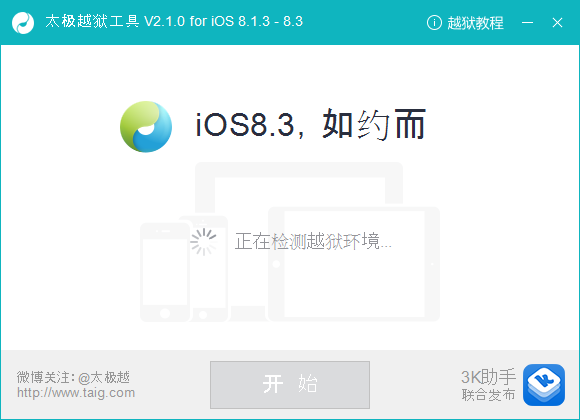
The TaiG 2.1 jailbreak utility for iOS 8.3 has been leaked and it fixes Cydia Substrate.
The build was found on TaiG's website by reddit user seiterseiter1.
CHINESE VERSION WORKED FOR ME AFTER DOING A RESTORE IN ITUNES. CAN CONFIRM THIS INCLUDES SUBSTRATE FIX
Please note that this version was likely being tested and may not be ready for prime time. While users have successfully installed it, do so at your own risk.
There's also a .deb file which can be installed via iFile for those who have already jailbroken. You can find the downloads below: ● Chinese Version ● English Version (TaiGJBreak_EN_2100.zip download no longer available) (May be down) ● DEB File (taiguntether83x.deb download no longer available)
We'll let you know as soon as the official versions are available to download.
Please follow iClarified on X, Facebook, or RSS for updates.
Get the iClarified Daily Newsletter
Apple news, rumors, tutorials, price drop alerts, in your inbox every evening, free.
Unsubscribe at any time.
Success!
You have been subscribed.
Add Comment
Would you like to be notified when someone replies or adds a new comment?
Yes (All Threads)
Yes (This Thread Only)
No
Notifications
Would you like to be notified when we post a new Apple news article or tutorial?
Yes
No
Comments (32)
Comments are closed for this article.
0
Light - July 2, 2015 at 7:49pm
Anyone can tell me whether winterboard working or not? it did appear in my settings but not applying any theme.
0
Iphone6 - June 26, 2015 at 2:15am
Hey can somebody help me? After jailbreak and I stallation of taig 2.1 im unable to use appstore or to even download new apps. How do I fix it?
0
Light - July 2, 2015 at 7:48pm
its only because your are signed out of appstore.
Try logging in to appstore using ur apple id. then u will be able to download and update your apps via appstore.
0
NickeNalle - June 25, 2015 at 7:03pm
Do you guys experience the same thing as me in cydia where it says "this product is not supported on your ios version"? Springtomize 3, intelliscreen, auxo 3, itouchsecure and several other common tweaks are not working.
0
Netsam2k - June 25, 2015 at 7:56pm
yes, I also get the same msg, but you are still able to install those apps, I personally bought itouchsecure, slices and other tweaks that have this msg, and they all install and work fine, the msg is there simply because the app has not officially tested on iOS 8.3 and its unknown it it works correctly with it
As of right now I have no issues with any of my tweaks, I installed the updated taigi 2.1 deb with file to make mobile substrate work so all those apps/teawks could work
0
Free_man - June 25, 2015 at 2:13pm
Taig official 2.1 JB released, available to update in cydia for all those who already jailbroken. All of the tweaks are working.
0
kenpuzz - June 25, 2015 at 2:34pm
I dont see the official release even on their website...
0
Free_Man - June 25, 2015 at 2:37pm
I just opened cydia on my iphone 6, and it asked me to update.
0
kenpuzz - June 25, 2015 at 2:39pm
Oh, did it update the Substrate? Are all of your tweaks working?
0
Free_Man - June 25, 2015 at 2:40pm
Yes :)
0
stevenlacross - June 25, 2015 at 5:13pm
I'm not seeing a Cydia substrate update, just a Cydia update. And the tweaks are still not working
0
Guest - June 25, 2015 at 1:46pm
I just tried the Chinese (version 2.1)
itunes version (12.1) everything worked absolutely flawless, on my iPhone 6
0
Peic - June 25, 2015 at 1:42pm
hello, i found a way around the icon disappearance !!!!
1- connect your iPhone on USB
2- open iFunBox
3- click on SSH Terminal
4- type uicache
5- wait 2 minutes and all of the apps magically appear again !!!!!
0
Guruwan - June 25, 2015 at 12:59pm
Please show me where I can download the new Taig 2.1 update . Please
0
mohsinmmp - June 25, 2015 at 12:00pm
no repo or any tweeks Woking on 8.3
0
NickDawwg - June 25, 2015 at 12:38pm
Did you use TaiG 2.0.0 or 2.1?
I used the first one an none of my tweeks work either..
0
Rej - June 25, 2015 at 10:30am
Yahoo!!!not it worked ^_^ thanks iClarified
0
Sona - June 25, 2015 at 7:54am
also be aware that 2.1.1 fixes couple of issues from 2.1 version.
0
Farani - June 25, 2015 at 7:51am
Mac version is not out yetyou can use virtua machine for windows on ur mac to do it. Now im done with taig2.1 and now cydia works flawlessly. Bridge, ifile, swipeselection, biolockdown, safaridownloader all working great without crash.
0
NYYankees925 - June 25, 2015 at 7:02am
I was answering you Farani. I was asking where the Mac version of the jailbreak was.
0
NickDawwg - June 25, 2015 at 7:01am
If I have ITunes 12.1 installed on my mac and do a complete restore. Then I plug in my i6 to a PC to jailbreak will that work? I don't understand were ITunes plays it's roll in this, is it when I do a restore or proceed with the jailbreak on the PC, on which computer should I have iTunes 12.0.1?
0
Farani - June 25, 2015 at 7:52am
Brother, do a clean restore from mac and then plug ur device to Pc on which u got itunes 12.0.1.26 and then open taig utility soft and jailbreak it, it worked for me.
0
NickDawwg - June 25, 2015 at 8:11am
Sorry man for being such a noob in your eyes :)
I've been JB since I got my first iphone 3... The past years JB has been so simple, I just didn't get this iTunes downgrade thing this time. But thanks for your answer, now I know!
0
Farani - June 25, 2015 at 6:59am
.deb file throught mac? I downloaded it in tdownloader and through extensions i opened in ifile and tried to install.
0
NYYankees925 - June 25, 2015 at 6:54am
Mac Version....they always do this.
0
Farani - June 25, 2015 at 6:52am
I tried toninstall deb file through ifile but its says process is locked by another user.
0
enve - June 25, 2015 at 7:10am
Try closing any open apps, restart the device, go back into ifile and install the .deb again
That should fix the problem.
0
PNHUNTER - June 25, 2015 at 6:15am
I have jailbroken my iPad and my i6. I followed the instructions from iClarified. I downgraded iTunes to 12.0.1 and went perfect.
0
Kevin McCarthy - June 25, 2015 at 4:48am
Hasn't fixed the freezing at 20% for me
0
vanimox - June 25, 2015 at 4:47am
I installed the deb file, its successfully working!
0
stevenlacross - June 25, 2015 at 4:38am
Why can't they wait 4 more hours or so, saruik updated Cydia pretty damn fast, and then updated it again same day, it'll come out really soon, I promise
0
Wow..... - June 25, 2015 at 5:54am
Because they don't know much about jailbreaking. They just want it done.






![Apple Previews August Apple TV Lineup With 'Ted Lasso,' 'Dark Matter,' and More [Video]](/images/news/101644/101644/101644-160.jpg "Apple Previews August Apple TV Lineup With 'Ted Lasso,' 'Dark Matter,' and More [Video]")