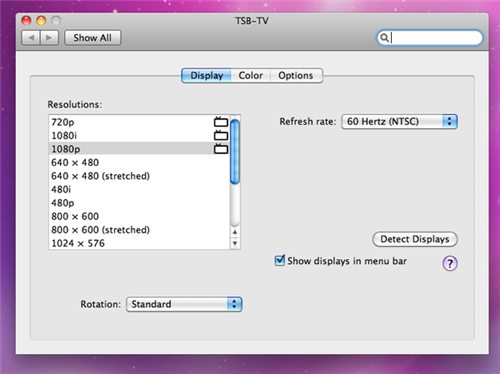
Mac OS X Snow Leopard adds support for 720p, 1080i, and 1080p when hooking your computer up to a HDTV.
TUAW discovered that this feature works using the DisplayPort to HDMI adapter. They were unable to duplicate it using a DVI to VGA adapter.
You can head over to System Preferences to try it out for yourself.
Get the iClarified Daily Newsletter
Apple news, rumors, tutorials, price drop alerts, in your inbox every evening, free.
Unsubscribe at any time.
Success!
You have been subscribed.
Add Comment
Would you like to be notified when someone replies or adds a new comment?
Yes (All Threads)
Yes (This Thread Only)
No
Notifications
Would you like to be notified when we post a new Apple news article or tutorial?
Yes
No
Comments (4)
Comments are closed for this article.
0
Jay - August 31, 2009 at 2:01pm
Who makes a Display port to HDMI for Apple? Obviously not them since its not in their store.
0
BlackWolf - August 31, 2009 at 2:28pm
I would like to know the same thing. Have been looking for a displayport->hdmi cable for a while for my macbook, but couldn't find one in the apple store.
0
bane - September 1, 2009 at 8:58am
...try CPustuff, Monoprice or Circuit Assembly.
0
Mr. Q - August 31, 2009 at 1:14pm
Wow, they finally have this feature? Isn't it suppose to be the most advanced OS in the world and to now have this feature completes the claim? Windows has been outputting 1080P for years now.










![How To Change Wallpaper on Mac [Video]](/images/tutorials/90512/90512/90512-160.jpg "How To Change Wallpaper on Mac [Video]")
![How To Turn Off Always On Display on iPhone [Video]](/images/tutorials/87524/87524/87524-160.jpg "How To Turn Off Always On Display on iPhone [Video]")





![16-Inch M5 Max MacBook Pro Drops $900 to New Low of $3,499 [Deal]](/images/news/102438/102438/102438-160.jpg "16-Inch M5 Max MacBook Pro Drops $900 to New Low of $3,499 [Deal]")
![Magic Keyboard for iPad Air Drops to $200 on Amazon [Deal]](/images/news/102402/102402/102402-160.jpg "Magic Keyboard for iPad Air Drops to $200 on Amazon [Deal]")
