Posted February 12, 2010 at 8:51am by
Yoav Levytam
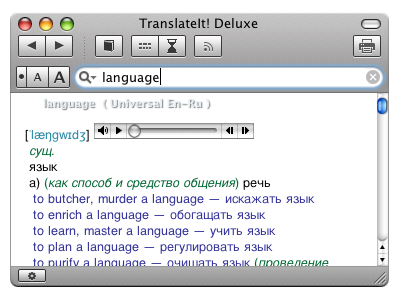
TranslateIt! Team has announced the release of TranslateIt! 12, an update to their multilingual dictionary for Mac OS X. TranslateIt! for Mac is a multilingual dictionary that allows you to look up words on the fly! Just hover the pointer over an unfamiliar word and you will see its translation in a pop-up window.
Till 17 February you can get discount of 20% using a coupon «discount»!
Changes list: * Added on-the-fly translation functionality to Microsoft Office 2008 for Mac products: Entourage, Word, Excel, PowerPoint * Added support for Babylon dictionary format (BGL) * Added support for SDICT dictionary format * Enhanced morphology modules for English, Russian, French, and German * Enhanced quality and formatting of full-text translations * New line-by-line translation mode * Fixed memory leaks and various minor bugs * Updated DictBuilder and the core scripts * Updated the TranslateIt! Dashboard widget * Updated profiles of some online translation services * Added new dictionaries to our repository
Main features: * Translate words in any applications by just moving the pointer over them * Full text translation * Support for most widely known online dictionary/translation services * Lots of free dictionaries * Translation Methods: translation from clipboard, drag-and-drop translation, manual input of queries in the main window, double-click translation of words in dictionary entries displayed in the main window * Morphology support * Built-in utility for easy creation of custom dictionaries * Words Quiz (a game for easy learning of new words) * Multilingual user interface
Get the iClarified Daily Newsletter
Apple news, rumors, tutorials, price drop alerts, in your inbox every evening, free.
Unsubscribe at any time.
Success!
You have been subscribed.
Add Comment
Would you like to be notified when someone replies or adds a new comment?
Yes (All Threads)
Yes (This Thread Only)
No
Notifications
Would you like to be notified when we post a new Apple news article or tutorial?









![How To Change Wallpaper on Mac [Video]](/images/tutorials/90512/90512/90512-160.jpg "How To Change Wallpaper on Mac [Video]")
![How To Turn Off Always On Display on iPhone [Video]](/images/tutorials/87524/87524/87524-160.jpg "How To Turn Off Always On Display on iPhone [Video]")





![16-Inch M5 Max MacBook Pro Drops $900 to New Low of $3,499 [Deal]](/images/news/102438/102438/102438-160.jpg "16-Inch M5 Max MacBook Pro Drops $900 to New Low of $3,499 [Deal]")
![Magic Keyboard for iPad Air Drops to $200 on Amazon [Deal]](/images/news/102402/102402/102402-160.jpg "Magic Keyboard for iPad Air Drops to $200 on Amazon [Deal]")
