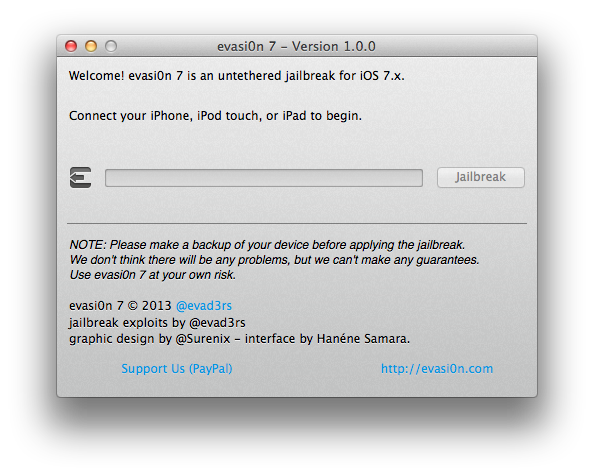
Sunday is funday! Out of nowhere, the evad3rs have released the iOS 7 untethered jailbreak for all iOS devices.
evasi0n 7 as it is called, supports all iOS devices running iOS 7 (including the latest 7.1 betas). All iOS 6 users are free to upgrade to iOS 7 now, however this release has even caught saurik (Jay Freeman) the maintainer of Cydia off guard as he claims Cydia has not been tested thoroughly and Mobile Substrate do not work correctly. So all of our favorite tweaks probably do not work yet. As always, please backup your device first.
If you want an iOS 6.1.3+ jailbreak, hold tight as iH8sn0w is planning to release a tool with these exploits to jailbreak those devices (evasi0n7 does not support anything below iOS 7).
So, I got no lead time on evasi0n7, nor was I asked for an official iOS 7 Cydia; I was not given builds, nor was I asked for things to test.
In fact, @evad3rs didn't even try my testing build of Substrate I gave core developers, so they didn't notice a fundamental incompatibility.
This means they are going to have to push a new version of their untether to fix this oversight before I can push newer builds of Substrate.
Description: - evasi0n7 1.0 is an untethered jailbreak for all iPhone, iPod touch, iPad and iPad mini models running iOS 7.0 through 7.0.4
System Requirements: - MacOSX 10.5/10.6/10.7/10.8 - Windows (XP minimum)
WARNING: It appears as though in China, instead of Cydia being installed by default, the evad3rs have preloaded a Chinese 'app store' called TaiG which contains cracked applications. Not much is known about this store and besides piracy there are concerns that it may access user data. We highly recommend those in China do not install it until more details are known. Please see this article for updates.
Two things to note, if you updated OTA, you must do a full restore first before applying evasi0n7. Also make sure passcode locks are off before you apply jailbreak (you can enable after)
All donations will go to organizations such as EFF, and PublicKnowledge that fight for digital rights and liberties. We'll have tutorials out for all devices soon. Be sure to follow iClarified on X, Facebook, or RSS to be notified when we post them!
Apple news, rumors, tutorials, price drop alerts, in your inbox every evening, free.
Unsubscribe at any time.
Success!
You have been subscribed.
Add Comment
Would you like to be notified when someone replies or adds a new comment?
Yes (All Threads)
Yes (This Thread Only)
No
Notifications
Would you like to be notified when we post a new Apple news article or tutorial?
Yes
No
Comments (114)
Comments are closed for this article.
0
MG67 - December 24, 2013 at 11:04am
saurik will update mobile substrate,but till then,updating to ios 7 wont be good.
0
1100xx - December 24, 2013 at 9:06am
For now, none of apps which are supported by mobile substrate won't work. Jailbreakers are working to fix this issue.....if you can, avoid that apps now.
0
Jeff - December 23, 2013 at 11:24pm
Trouble is, once jailbroken, none of the stuff I'm used to using works: SBSettings, iFile, Winterboard, etc.
0
iPhonejailbreak - December 23, 2013 at 5:41pm
Won't work apps on settings like Infiniboard and Powerguard. Fix it please!
0
porkch0p - December 23, 2013 at 5:30pm
Does not work for me on iPad Mini Retina Cellular model. Anyone have luck? 1. Upgraded from 7.03 to 7.04 via iTunes on Mac (v11.1.3). 2. Ran evasi0n7 on Mavericks 10.9. 3. Everything seems fine, iPad reboots. 4. Prompt in evasi0n7 on Mac to unlock with swipe. 5. Launch evasi0n7 on iPad when prompted by evasi0n7 on Mac. 6. iPad reboots. 7. GUI prompt in evasi0n7 on Mac says to unlock so it can continue, the iPad is still rebooting. 8. Evasi0n7 on Mac proceeds to perform the remaining steps and displaying all complete. Steps 7 and 8 happen before the iPad reboot finishes. It seems like it isn't waiting for the second unlock swipe. Restored iPad multiple times from DFU mode with the same result. You can get out of the loop by performing a DFU restore. Anyone else have luck with the new iPad Mini Retina Cellular model?
0
Tariq - December 23, 2013 at 10:31pm
Worked perfectly on my Ipad Mini Retina 64GB Cellular which I only bought two days back.Just an idea;may be you need to free up space first.Best of luck.
0
porkch0p - December 24, 2013 at 5:06am
@Tariq Success! Thanks, I restored 7.0.4 again and did not restore backup this time. I had 27GB free but there may have been something in my backup preventing the proper load. All set now with 7.0.4 on the iPad Mini Retina Cellular.
0
ipad2 wifi - December 23, 2013 at 5:21pm
Does NOT work for iPad 2 wifi. Boot loop. Did a complete restore before.
0
Russell - December 24, 2013 at 6:42am
Me too, Boot Loop with iPad2 wifi. Had to DFU to get working again.
0
RayBob - December 23, 2013 at 3:58pm
Awesomeeeeeeeeeeeeeee! Thank for the jailbreak. Everyone just slow down and wait for Cydia to be fixed already... you all know the first version of everything usually needs an update to fix the glictches that were hiding. Give it a few days.
We waited this long lol a few more days would not kill! Well maybe, but lol...!
0
Raashid - December 23, 2013 at 1:17pm
some tweaks are working
u need to wait untill they release fix for it
0
Dizelens - December 23, 2013 at 1:15pm
Are cydia tweaks working on it? And its safe to download it? Because i heard about any app store tiang or wthat and thats bad
0
iPhonejailbreak - December 23, 2013 at 1:11pm
Thank you for the jailbreak our Christmas yea!
0
Jin - December 23, 2013 at 12:17pm
But be careful the $7.99 unlocking a are not true
0
Jin - December 23, 2013 at 12:16pm
Can't be unlocked only up to 6..12
0
George - December 23, 2013 at 12:14pm
What about 7 unlock?
0
ipad 2 - December 23, 2013 at 6:21am
ipad 2 wifi not jailbroken just stuck on boot loop, i tried all ways available please solve many people having this problem please solve it
0
foxim8ly - December 23, 2013 at 8:19am
If its previously update via OTA, it should be restored thru itunes before jailbreaking
else bootloop will happened as yours did.
0
Micke - December 23, 2013 at 5:04pm
My iPad 2 also got stuck after the core update. Recovered with dfu mode in iTunes. Did an restore first and set it up as new device, still boot loop..
0
Raashid - December 23, 2013 at 5:59am
i dont think there is any use of cydia at this time
coz even the mobile substrate is not supported in io7




![Tim Cook Expected at White House State Dinner for Xi Jinping [Report]](/images/news/102260/102260/102260-160.jpg "Tim Cook Expected at White House State Dinner for Xi Jinping [Report]")
![Apple Debuts Official Trailer for 'Knife Edge: Chasing Michelin Stars' Season 2 [Video]](/images/news/102258/102258/102258-160.jpg "Apple Debuts Official Trailer for 'Knife Edge: Chasing Michelin Stars' Season 2 [Video]")










![Apple Studio Display XDR Hits All-Time Low of $2,969.99 ($329 Off) [Deal]](/images/news/101976/101976/101976-160.jpg "Apple Studio Display XDR Hits All-Time Low of $2,969.99 ($329 Off) [Deal]")

Had to DFU to get working again.