A new 'Continuity Activation Tool' has been released that enables Handoff, Instant Hotspot, and Airdrop on some older Macs.
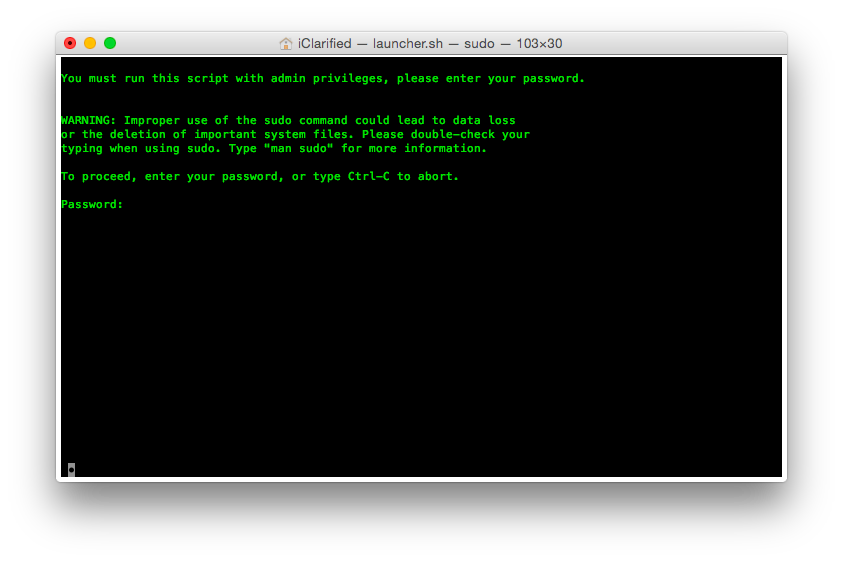
This tool makes the necessary changes to enable OS X 10.10 Continuity on compatible hardware. Continuity features activated by this tool include Application Handoff, Instant Hotspot, and Airdrop iOSOSX.
Features: ● Activate continuity: Does a Continuity compatibility check, backups the original Systems kexts, disables a Mac-model blacklist in the Buetooth kext, whitelists the Mac board-id in the Wi-Fi kext. ● System diagnostic: Produces a report of the current system parameters influencing Continuity.
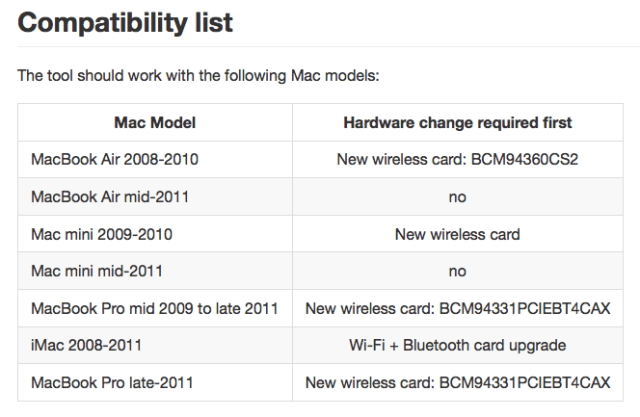
Here's a look at the Macs that require this tool and whether or not they require a hardware update.
There are also some Macs that don't need the tool but do need a hardware upgrade. More information can be found in UncleSchnitty's guide on MacRumors. The tool is not compatible with BT4 USB Dongles, it only works with the right internal Apple wireless hardware.
Apple news, rumors, tutorials, price drop alerts, in your inbox every evening, free.
Unsubscribe at any time.
Success!
You have been subscribed.
Add Comment
Would you like to be notified when someone replies or adds a new comment?
Yes (All Threads)
Yes (This Thread Only)
No
Notifications
Would you like to be notified when we post a new Apple news article or tutorial?
Yes
No
Comments (6)
Comments are closed for this article.
0
Hemel - October 24, 2014 at 4:23am
I installed this on my mid 2011 Mac Mini and it works great. Only problem I have is that everytime I restart, it now has the progress bar and installs something.
Is that normal or is something wrong?
0
iGlassGuy - October 24, 2014 at 9:14am
I think that's normal. My personal MBP Late 2011 does that which has the hardware upgrade and modified kext. My MBP Retina 2014 which has had nothing modified does the same thing.
0
Hemel - October 24, 2014 at 7:24pm
OK, thanks! The only problem with this is I couldn't get CMD+R to work at the Apple logo as progress bar is always there.
Either way, I decided to start fresh and am in the process of erasing my Mac mini and trying this from a fresh install.
Thanks for the reply!
0
iAmMe - October 25, 2014 at 4:07am
I think it looks like Yosemite now where there's now a progress bar showing while the OS loads (aka booting). ;)
0
Alejandro Iván - October 26, 2014 at 12:28am
That's normal. Now Yosemite shows a progress bar when loading the OS. It's not installing anything, it just tries to show the progress when booting (maybe because it loads slower).
0
iGlassGuy - October 24, 2014 at 2:55am
This works. Upgraded my card a few months ago. A bunch of us on the forums did this. Without the help of the smart people figuring out the kext files - wouldn't have been possible. Some great trickery they did.







![Apple Could Revert Clear Case Design for iPhone 18 Models [Rumor]](/images/news/100937/100937/100937-160.jpg "Apple Could Revert Clear Case Design for iPhone 18 Models [Rumor]")





![AirPods Pro 3 Drop to $199 Ahead of Memorial Day [Deal]](/images/news/100935/100935/100935-160.jpg "AirPods Pro 3 Drop to $199 Ahead of Memorial Day [Deal]")
![15-Inch M5 MacBook Air Drops to New All-Time Low at $1,099.99 [Deal]](/images/news/100930/100930/100930-160.jpg "15-Inch M5 MacBook Air Drops to New All-Time Low at $1,099.99 [Deal]")
![Apple's 16-Inch M5 Pro MacBook Pro Drops to a New Record Low of $2,449.99 [Deal]](/images/news/100873/100873/100873-160.jpg "Apple's 16-Inch M5 Pro MacBook Pro Drops to a New Record Low of $2,449.99 [Deal]")
![Apple 14-inch M5 Pro MacBook Pro Hits New All-Time Low at $1,983.94 [Deal]](/images/news/100736/100736/100736-160.jpg "Apple 14-inch M5 Pro MacBook Pro Hits New All-Time Low at $1,983.94 [Deal]")
![13-Inch M5 MacBook Air Drops to $949.99 on Amazon [Deal]](/images/news/100667/100667/100667-160.jpg "13-Inch M5 MacBook Air Drops to $949.99 on Amazon [Deal]")
