
How to Access Terminal (Command Line) on Your iPhone
Posted November 2, 2008 at 9:59pm by
Shalom Levytam
These are instructions on how to access a command line prompt (Terminal window) on your iPhone or iPod touch.
To follow these steps you will need to have already jailbroken your iPhone or iPod touch.
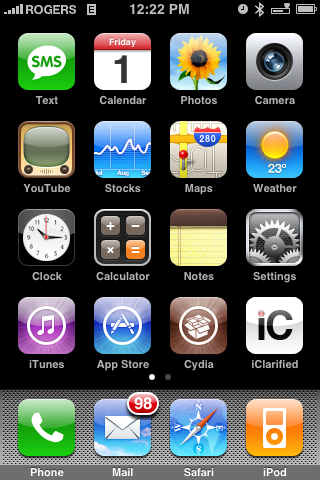
Step One
Press to launch Cydia from your iPhone's Springboard.
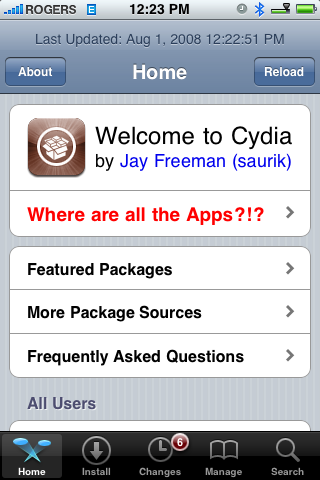
Step Two
Once Cydia opens press to select the Sections tab at the bottom of the screen.
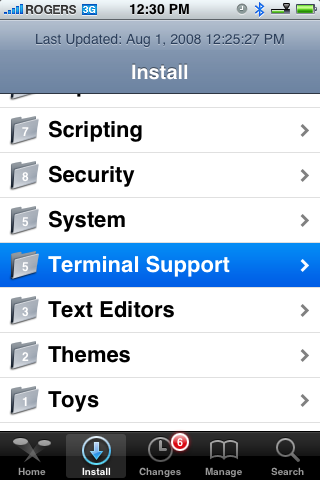
Step Three
Press to select Terminal Support from the list of Sections.
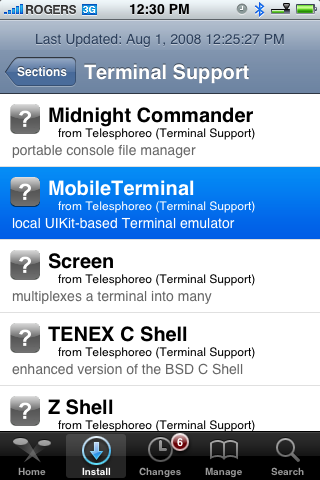
Step Four
Press to select MobileTerminal from the list of Packages available.
Step Five
Press the Install button at the top right of the screen.
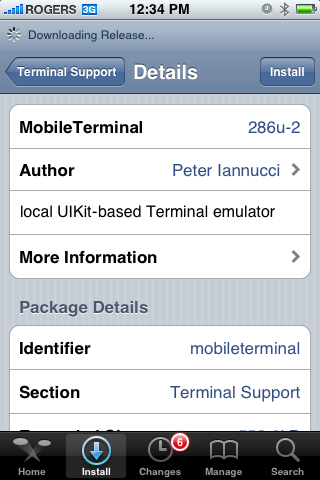
Step Six
Press the Confirm button to begin installation.
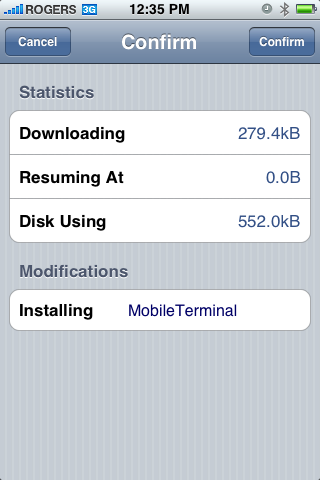
Step Seven
Once the installation has completed successfully press the large Return to Cydia or Close Window button.
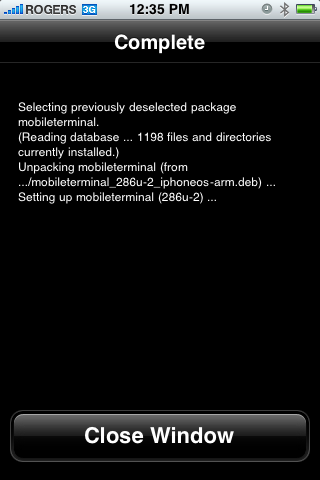
Step Eight
Press the Home button to return to your Springboard. Notice the new MobileTerminal icon. Press to launch it!
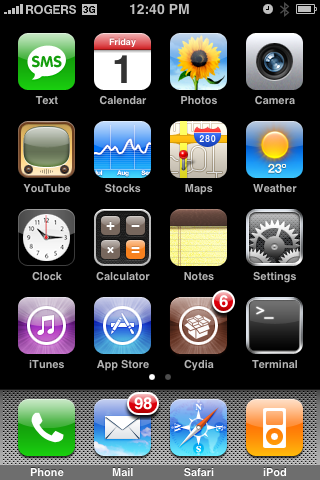
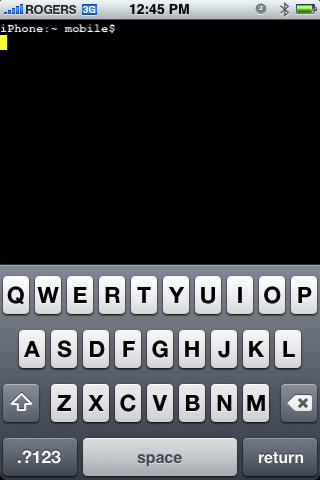
To follow these steps you will need to have already jailbroken your iPhone or iPod touch.
Step One
Press to launch Cydia from your iPhone's Springboard.
Step Two
Once Cydia opens press to select the Sections tab at the bottom of the screen.
Step Three
Press to select Terminal Support from the list of Sections.
Step Four
Press to select MobileTerminal from the list of Packages available.
Step Five
Press the Install button at the top right of the screen.
Step Six
Press the Confirm button to begin installation.
Step Seven
Once the installation has completed successfully press the large Return to Cydia or Close Window button.
Step Eight
Press the Home button to return to your Springboard. Notice the new MobileTerminal icon. Press to launch it!


![Apple Says iPhone Duo's Folding Display Has a Replaceable Cover Layer [Video]](/images/news/102525/102525/102525-160.jpg "Apple Says iPhone Duo's Folding Display Has a Replaceable Cover Layer [Video]")
![Touchscreen OLED MacBook Pro Could Debut as Early as October [Gurman]](/images/news/102519/102519/102519-160.jpg "Touchscreen OLED MacBook Pro Could Debut as Early as October [Gurman]")
![iPhone 18 Pro Sales Rise 12% in China as Apple Leads Weekly Smartphone Market [Report]](/images/news/102522/102522/102522-160.jpg "iPhone 18 Pro Sales Rise 12% in China as Apple Leads Weekly Smartphone Market [Report]")
![Apple TV Shares Trailer for 'Awkwafina: The Unlikely Cook' [Video]](/images/news/102513/102513/102513-160.jpg "Apple TV Shares Trailer for 'Awkwafina: The Unlikely Cook' [Video]")


![How To Find Your iPhone IMEI Number [Video]](/images/tutorials/83557/83557/83557-160.jpg "How To Find Your iPhone IMEI Number [Video]")


![How To Change Wallpaper on Mac [Video]](/images/tutorials/90512/90512/90512-160.jpg "How To Change Wallpaper on Mac [Video]")


![16-Inch M5 Max MacBook Pro Drops $900 to New Low of $3,499 [Deal]](/images/news/102438/102438/102438-160.jpg "16-Inch M5 Max MacBook Pro Drops $900 to New Low of $3,499 [Deal]")
![Magic Keyboard for iPad Air Drops to $200 on Amazon [Deal]](/images/news/102402/102402/102402-160.jpg "Magic Keyboard for iPad Air Drops to $200 on Amazon [Deal]")
![13-Inch M5 MacBook Air With 1TB Drops to $1,449 on Amazon [Deal]](/images/news/102345/102345/102345-160.jpg "13-Inch M5 MacBook Air With 1TB Drops to $1,449 on Amazon [Deal]")
