

These are instructions on how to take screenshots using the built in iPhone 2.0 screenshot feature.
You must have iPhone 2.0 firmware installed to follow this tutorial.
Step One
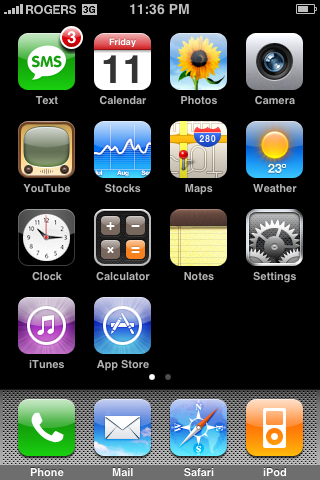
To take a screenshot simply hold down the Home button and press the Sleep/Wake button. You will notice the screen flash white.
Step Two
To view the screenshot you just took, press the Photos icon on your SpringBoard.
Step Three
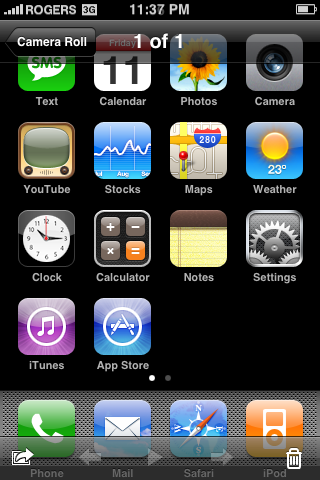
Press to select Camera Roll from the list of Photo Albums.

Step Four
Press to select the small thumbnail of your screenshot.

Step Five
Now you can see your high quality iPhone screenshot. You can easily sync this to your computer just as you would with any other photo!
You must have iPhone 2.0 firmware installed to follow this tutorial.
Step One
To take a screenshot simply hold down the Home button and press the Sleep/Wake button. You will notice the screen flash white.
Step Two
To view the screenshot you just took, press the Photos icon on your SpringBoard.
Step Three
Press to select Camera Roll from the list of Photo Albums.
Step Four
Press to select the small thumbnail of your screenshot.
Step Five
Now you can see your high quality iPhone screenshot. You can easily sync this to your computer just as you would with any other photo!



![Apple Says iPhone Duo's Folding Display Has a Replaceable Cover Layer [Video]](/images/news/102525/102525/102525-160.jpg "Apple Says iPhone Duo's Folding Display Has a Replaceable Cover Layer [Video]")
![Touchscreen OLED MacBook Pro Could Debut as Early as October [Gurman]](/images/news/102519/102519/102519-160.jpg "Touchscreen OLED MacBook Pro Could Debut as Early as October [Gurman]")
![iPhone 18 Pro Sales Rise 12% in China as Apple Leads Weekly Smartphone Market [Report]](/images/news/102522/102522/102522-160.jpg "iPhone 18 Pro Sales Rise 12% in China as Apple Leads Weekly Smartphone Market [Report]")
![Apple TV Shares Trailer for 'Awkwafina: The Unlikely Cook' [Video]](/images/news/102513/102513/102513-160.jpg "Apple TV Shares Trailer for 'Awkwafina: The Unlikely Cook' [Video]")

![How To Find Your iPhone IMEI Number [Video]](/images/tutorials/83557/83557/83557-160.jpg "How To Find Your iPhone IMEI Number [Video]")
![How To Change Wallpaper on Mac [Video]](/images/tutorials/90512/90512/90512-160.jpg "How To Change Wallpaper on Mac [Video]")




![16-Inch M5 Max MacBook Pro Drops $900 to New Low of $3,499 [Deal]](/images/news/102438/102438/102438-160.jpg "16-Inch M5 Max MacBook Pro Drops $900 to New Low of $3,499 [Deal]")
![Magic Keyboard for iPad Air Drops to $200 on Amazon [Deal]](/images/news/102402/102402/102402-160.jpg "Magic Keyboard for iPad Air Drops to $200 on Amazon [Deal]")
![13-Inch M5 MacBook Air With 1TB Drops to $1,449 on Amazon [Deal]](/images/news/102345/102345/102345-160.jpg "13-Inch M5 MacBook Air With 1TB Drops to $1,449 on Amazon [Deal]")
