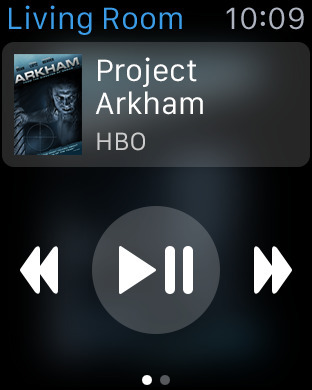
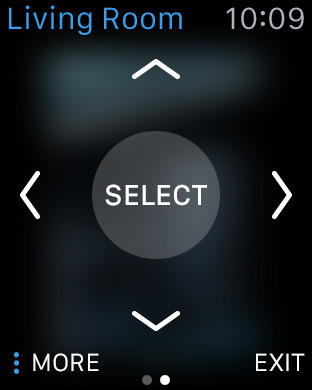
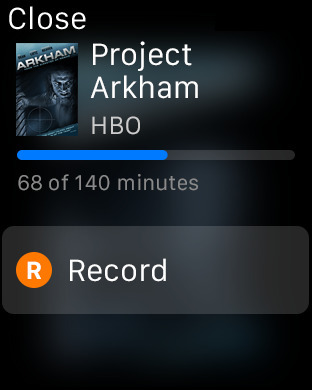
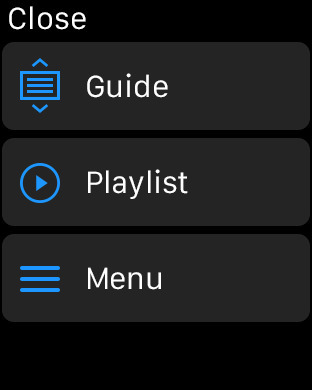
The DIRECTV app has been updated with support for using the Apple Watch to control your HD-DVR.
The ultimate video experience is just a tap away with the DIRECTV App for iPhone. Watch top TV channels live on your iPhone or iPod touch in any room of your home. You can get instant access to hit entertainment on demand from HBO, Cinemax, STARZ, Encore, Showtime, Nickelodeon, HGTV, and Comedy Central, plus the latest DIRECTV CINEMA movies and more, whenever and wherever you want—at home or on the go.
Features - Watch thousands of your favorite movies and shows On Demand at home or on the go with HBO, Cinemax, Starz, Encore, Showtime, Nickelodeon, HGTV, Comedy Central and more. - Turn your iPhone into a portable TV and watch top TV channels live in any room of your home. - Set your DVR to record your favorite shows from anywhere. - Get program descriptions, cast & crew info, photos, recommendations & parental ratings.
What's New In This Version: Now you can now control your connected HD-DVR right from your Apple Watch! - Play, pause, rewind, and fast forward Live TV, On Demand and Recorded content. - Set episode and season recordings. - Navigate and select options from the on-screen guide, playlist and menu displays on your HD-DVR.
You can download DIRECTV from the App Store for free.
Get the iClarified Daily Newsletter
Apple news, rumors, tutorials, price drop alerts, in your inbox every evening, free.
Unsubscribe at any time.
Success!
You have been subscribed.
Add Comment
Would you like to be notified when someone replies or adds a new comment?
Yes (All Threads)
Yes (This Thread Only)
No
Notifications
Would you like to be notified when we post a new Apple news article or tutorial?
Yes
No
Comments (6)
Comments are closed for this article.
0
SimonSays - May 8, 2015 at 2:26am
Tried it. Doesn't work. Says unable to retrieve current program from receiver.
0
SimonSays - May 8, 2015 at 2:41am
Tried restarting phone, watch, modem and router (time machine) still getting that error.
0
jobs432 - May 8, 2015 at 4:03am
I just tried and it works.
You need to connect your phone to the main receiver in the house. Doesn't work with Genie Minis. If the main receiver shows up on your DIRECTV Everywhere app, the watch app should work as well.
0
SimonSays - May 8, 2015 at 4:36am
It works just fine on the phone app. And it's connected to my hr22 dvr. The notes say it's compatible with hr20 and up so it should be compatible with the hr22. But no go from the watch.
0
jobs432 - May 8, 2015 at 5:23am
Weird. Are you running 8.3 on your phone? I also looked at my receiver settings - In whole home, external device, access, prgrm infor is set to allow. I am on a 34.
0
SimonSays - May 8, 2015 at 2:13pm
Setting external device access to Allow did the trick. Thanks!!!!





![Apple Targets October 27 for Touchscreen MacBook Pro and OLED iPad mini [Report]](/images/news/102696/102696/102696-160.jpg "Apple Targets October 27 for Touchscreen MacBook Pro and OLED iPad mini [Report]")
![LG Home Accessories Could Offer HomeKit-Exclusive NFC Setup Without Power [Leak]](/images/news/102687/102687/102687-160.jpg "LG Home Accessories Could Offer HomeKit-Exclusive NFC Setup Without Power [Leak]")

![Apple Names Steve Smith M&A Chief, Promotes App Store Leader [Report]](/images/news/102690/102690/102690-160.jpg "Apple Names Steve Smith M&A Chief, Promotes App Store Leader [Report]")
![How To Force Restart iPhone [Video]](/images/tutorials/95012/95012/95012-160.jpg "How To Force Restart iPhone [Video]")
![How To Turn Off iPhone [Video]](/images/tutorials/94999/94999/94999-160.jpg "How To Turn Off iPhone [Video]")
![How To Back Up Your iPhone to an External Drive on Mac [Video]](/images/tutorials/72786/72786/72786-160.jpg "How To Back Up Your iPhone to an External Drive on Mac [Video]")




![Mac mini Drops to $779.99 for Prime Big Deal Days [Deal]](/images/news/102624/102624/102624-160.jpg "Mac mini Drops to $779.99 for Prime Big Deal Days [Deal]")