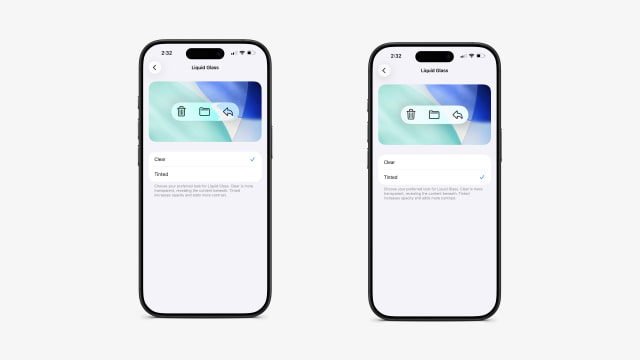
The fourth developer beta of iOS 26.1, released today alongside new seeds for iPadOS and macOS, introduces a new customization setting for the system's Liquid Glass interface. The option lets users choose between two distinct visual styles: 'Clear' and 'Tinted'.
You'll find the new menu in the Display & Brightness section of the Settings app. According to Apple's description, the 'Clear' setting keeps the default transparent look that shows content beneath UI elements, while 'Tinted' increases opacity and adds more contrast.
The preference applies system-wide. When enabled, the tinted appearance affects not only Apple's own apps but also third-party ones that have adopted the Liquid Glass design. It also extends to elements like notifications on the Lock Screen, creating a more uniform look.
The addition seems to respond to feedback from the initial iOS 26 release. After several design adjustments during the summer beta cycle, many users were still asking for a way to tone down the interface's translucency. This new toggle directly addresses that by offering a higher-contrast alternative.
The new Liquid Glass setting is now available to developers in iOS 26.1 beta 4, iPadOS 26.1 beta 4, and macOS 26.1 beta 4.



![Near-Borderless Anniversary iPhone Pro Still on Track Despite Display Tech Delays [Report]](/images/news/102375/102375/102375-160.jpg "Near-Borderless Anniversary iPhone Pro Still on Track Despite Display Tech Delays [Report]")
![Apple Developing Screenless Health and Fitness Tracker With Fabric Band [Report]](/images/news/102372/102372/102372-160.jpg "Apple Developing Screenless Health and Fitness Tracker With Fabric Band [Report]")

![Apple Releases Official Trailer for 'Where's Wanda?' Season 2 [Video]](/images/news/102360/102360/102360-160.jpg "Apple Releases Official Trailer for 'Where's Wanda?' Season 2 [Video]")





![13-Inch M5 MacBook Air With 1TB Drops to $1,449 on Amazon [Deal]](/images/news/102345/102345/102345-160.jpg "13-Inch M5 MacBook Air With 1TB Drops to $1,449 on Amazon [Deal]")




