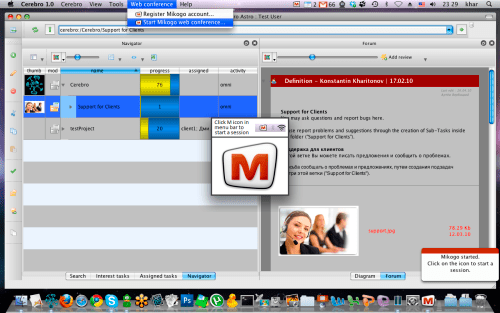
Cinesoft and BeamYourScreen have announced the integration of the Cerebro project management complex with Mikogo - the easy-to-use and cross-platform remote desktop tool ideal for web conferencing and remote support.
The Mikogo software has been implemented within both the Cerebro Mac OS X and Windows distribution kits. We have created a new "Web conference" menu within the Cerebro interface that allows users to launch Mikogo quickly and easily. All you need to do is register your Mikogo account and click on "Start Mikogo web conference". Registration is necessary only when you wish start a screen sharing session. Participants, on the other hand, are not required to register a Mikogo account and can rather sit back, relax, and enjoy the easy-to-use Cerebro Mikogo web conference. Player for saved sessions available under Windows OS.
Other Highlights of Update: * New Gantt chart mode: view tasks by users - You will be able to view tasks for more than one user at the same time! * Gantt chart improvements: * Endless date timeline scrolling by using middle mouse button * Show/hide done task button now works in Gantt chart * Work hour declaration in numbers - You can now declare the amount of work hours manually, not only using pre-set options. We thought about this for a long time and finally decided to add this option. * New Task parent Url search filter - Allows to search for tasks inside root task by name.
Apple news, rumors, tutorials, price drop alerts, in your inbox every evening, free.
Unsubscribe at any time.
Success!
You have been subscribed.
Add Comment
Would you like to be notified when someone replies or adds a new comment?
Yes (All Threads)
Yes (This Thread Only)
No
Notifications
Would you like to be notified when we post a new Apple news article or tutorial?
Yes
No
Comments (1)
Comments are closed for this article.
0
e - May 30, 2013 at 11:15am
This is also good.
The software works well, Ammyy Admin doesn't require installation or specific config, works behind gateways NAT as well as within one LAN.










![How To Change Wallpaper on Mac [Video]](/images/tutorials/90512/90512/90512-160.jpg "How To Change Wallpaper on Mac [Video]")
![How To Turn Off Always On Display on iPhone [Video]](/images/tutorials/87524/87524/87524-160.jpg "How To Turn Off Always On Display on iPhone [Video]")





![16-Inch M5 Max MacBook Pro Drops $900 to New Low of $3,499 [Deal]](/images/news/102438/102438/102438-160.jpg "16-Inch M5 Max MacBook Pro Drops $900 to New Low of $3,499 [Deal]")
![Magic Keyboard for iPad Air Drops to $200 on Amazon [Deal]](/images/news/102402/102402/102402-160.jpg "Magic Keyboard for iPad Air Drops to $200 on Amazon [Deal]")
