iOS 27.3 Beta 2 Adds Face Unlock and Lock When Closed to iPhone Duo
iPhone Duo has gained camera-based face unlocking and an option to lock when closed in iOS 27.3 beta 2.
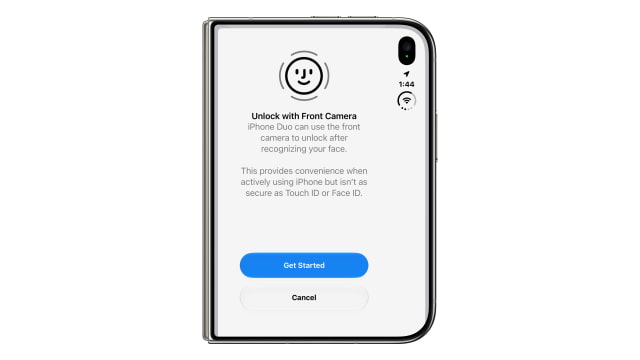
The setting, called "Unlock with Front Camera," is found under Settings > Touch ID & Passcode. It uses the camera on the outer display, not the TrueDepth hardware needed for Face ID.
During setup, Apple warns that the option is not as secure as Touch ID or Face ID. Users are asked to position their face in the camera frame and slowly turn their head left, right, up, and down.
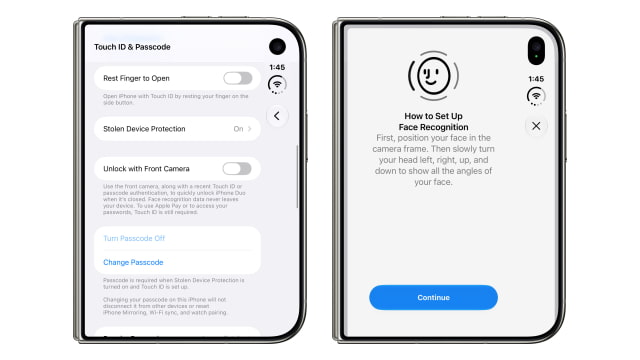
Face unlocking works only while the Duo is closed. Apple Pay and access to saved passwords still require Touch ID. Apple says the face-recognition data stays on the device.
The camera-based option also requires a recent Touch ID or passcode authentication. After about 45 minutes of inactivity, users must authenticate with one of those methods again before face unlocking becomes available.
A separate setting under Settings > Display & Brightness lets the Duo lock when it is closed. Without that option, folding the phone transfers the current content from the inner display to the outer screen.
The changes arrive in the second iOS 27.3 developer beta, build 24C5049d. The first beta introduced horizontal Reachability on iPhone Duo, allowing users to shift content toward either side of the outer display for one-handed use.


![Apple Names Corey Fugman to Lead Apple Pay and Wallet [Report] Apple Names Corey Fugman to Lead Apple Pay and Wallet [Report]](/images/news/103581/103581/103581-160.jpg)
![Apple Seeds Second Betas of watchOS 27.3 and visionOS 27.3 to Developers [Download] Apple Seeds Second Betas of watchOS 27.3 and visionOS 27.3 to Developers [Download]](/images/news/103572/103572/103572-160.jpg)
![Apple Releases iOS 27.3 Beta 2 and iPadOS 27.3 Beta 2 to Developers [Download] Apple Releases iOS 27.3 Beta 2 and iPadOS 27.3 Beta 2 to Developers [Download]](/images/news/103566/103566/103566-160.jpg)
![How To Back Up Your iPhone to an External Drive on Mac [Video] How To Back Up Your iPhone to an External Drive on Mac [Video]](/images/tutorials/72786/72786/72786-160.jpg)
![How To Sideload Apps Onto Your iPhone Using Xcode [Video] How To Sideload Apps Onto Your iPhone Using Xcode [Video]](/images/tutorials/52314/52314/52314-160.jpg)
![How To Find Your IP Address on iPhone [Video] How To Find Your IP Address on iPhone [Video]](/images/tutorials/496/496/496-160.jpg)


![15-Inch M5 MacBook Air Drops to $1,249.99 ($249 Off) [Deal] 15-Inch M5 MacBook Air Drops to $1,249.99 ($249 Off) [Deal]](/images/news/103563/103563/103563-160.jpg)
![Apple Watch Series 12 Drops to New All-Time Low of $329 ($70 Off) [Deal] Apple Watch Series 12 Drops to New All-Time Low of $329 ($70 Off) [Deal]](/images/news/103548/103548/103548-160.jpg)
![AirPods Pro 3 Drop Back to $179.99 ($69 Off) [Deal] AirPods Pro 3 Drop Back to $179.99 ($69 Off) [Deal]](/images/news/103545/103545/103545-160.jpg)

![Apple Watch Ultra 3 Drops to $549 ($250 Off) [Deal] Apple Watch Ultra 3 Drops to $549 ($250 Off) [Deal]](/images/news/103509/103509/103509-160.jpg)