Apple Meets With Thai Officials Over iPhone Spyware Alerts [Report]
Apple representatives met with Thai officials on November 11 after politicians received warnings that their iPhones may have been targeted by mercenary spyware, according to Bloomberg.
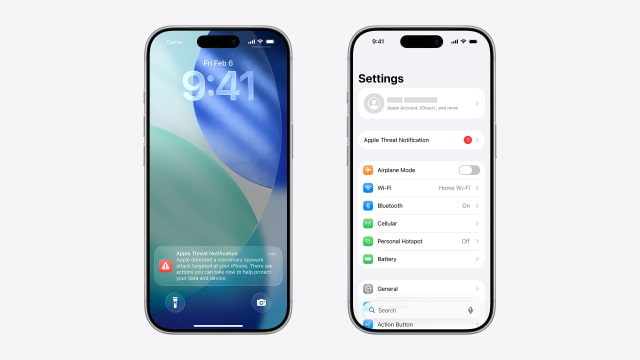
The notifications were sent on October 29 as part of a wider round of alerts to people in 99 countries. Several Thai politicians said they received the warnings, prompting questions about who had targeted them.
After meeting Apple, Digital Economy and Society Minister Chaichanok Chidchob said receiving an alert does not necessarily mean a device was successfully compromised. He also said Thai authorities had no evidence that the latest attempted attacks involved Pegasus, the spyware developed by NSO Group.
Pegasus was allegedly used against pro-democracy campaigners in Thailand in 2022. Some politicians questioned whether it was involved in the latest attempts.
Apple declined to disclose what triggers its alerts, explaining that the information could help attackers evade detection. Its threat-notification guidance describes them as high-confidence warnings that a person has been individually targeted, while acknowledging that investigations cannot achieve absolute certainty.
The October notifications followed an August round in which users in 110 countries received warnings. These alerts concern highly targeted attacks, often aimed at journalists, activists, politicians, and diplomats, rather than ordinary mass-market malware.
Recipients are advised to enable Lockdown Mode and seek expert assistance, such as the Digital Security Helpline at Access Now. On iPhone, Lockdown Mode is under Settings > Privacy & Security; enabling it limits some apps and features to reduce potential attack paths.
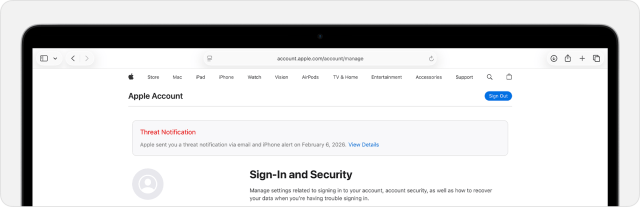
To verify an alert, sign in directly at account.apple.com and check for the banner at the top of the page. Apple says its threat notifications never ask for an Apple Account password or verification code, or ask users to install apps or profiles.