HomeView Tabletop vs. Wall-Mounted: Which $299 Model Should You Buy?
Putting HomeView on the wall frees up a kitchen counter and gives everyone a fixed place to check the doorbell or turn off the lights. But the tabletop version is easier to set up, can be moved between rooms, and has a woofer that the wall model lacks.
Both models launch November 13 with a $299 U.S. price at Apple. The tabletop HomeView includes its cable and power adapter, while the wall-mounted model needs a separate mount and power solution.
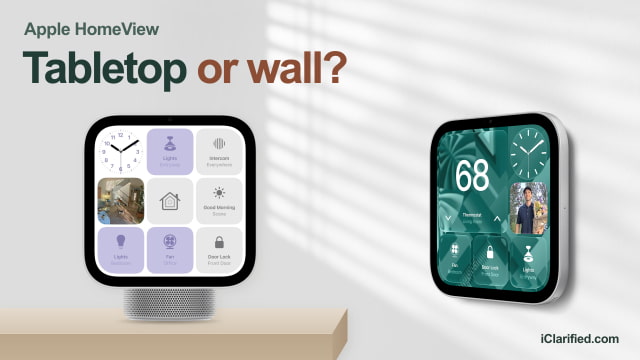
The Same Screen, in Two Different Places
Both versions of Apple HomeView have the same 7-inch square display, with 1088 × 1088 resolution, True Tone, and brightness ranging from 500 nits down to 0.3 nits. You get just as much room for home controls, photos, and video calls on either model.
The tabletop's hinge lets you tilt the display toward you, whether you're standing at a counter following a recipe or sitting down for a FaceTime call. You can also try it in different rooms before settling on a spot, as long as there's a power outlet nearby.
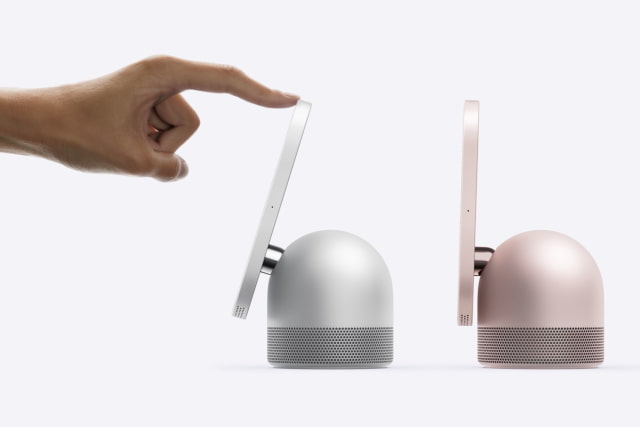
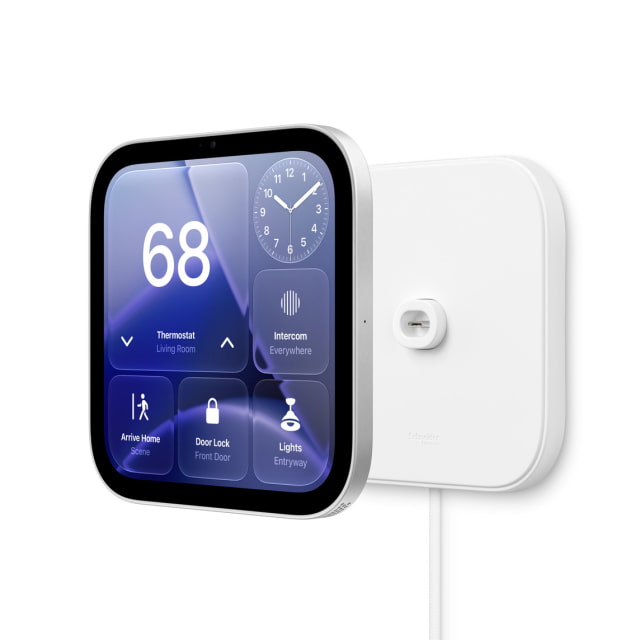
The wall model suits a spot you already know will be useful: beside the front door, for example, or in a hallway everyone passes through. Its display enclosure is 9.8mm thick before the mount is added. A screen mounted high on the wall can be hard for children to reach or awkward for seated video calls.
Neither model runs on a battery. The tabletop version can move between outlets, but it has to stay plugged in during use. The wall model attaches magnetically to its powered mount through USB-C.
The Tabletop Model Adds a Woofer
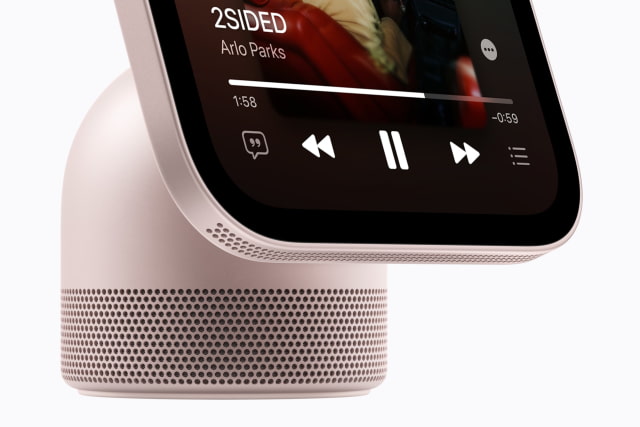
The tabletop model has a down-firing woofer and two force-cancelling passive radiators in its base, in addition to two full-range drivers in the display. The wall-mounted model has the two full-range drivers, with computational audio tuned for placement against a wall.
For regular music listening, we'd lean toward the tabletop model for its dedicated woofer. If you mainly want a hallway screen for doorbell alerts, quick questions, and home controls, the wall model's simpler speaker system is less of a compromise.
A $299 Wall Display Costs More to Set Up
As of November 12, Amazon is taking pre-orders for the space-gray tabletop HomeView at $289.99 and the space-gray wall-mounted model at $299. The tabletop includes a color-matched 1.5-meter USB-C cable and a 30W power adapter. The wall model includes neither a mount nor a power adapter.
The $59.95 Schneider Home Power Mount USB-C Wall Connector is the simplest installation option. It attaches with screws and anchors, includes a 2-meter cable, and needs a separate USB-C power adapter rated at least 20W. With the $299 display, that comes to $358.95 before tax, plus an adapter if you need one. The cable runs from the mount to a nearby outlet.
To avoid a visible power cable, the $79.95 Power Mount AC Wired connects to household wiring in a standard single-gang wall box and supplies up to 30W. The display and mount total $378.95 before tax and installation. A qualified electrician should handle the line-voltage wiring.
The $129.95 Power Mount PoE Wired is still planned for early 2027, so it is not an option for a launch-day installation. It carries power and a wired network connection over one Ethernet cable, using a compatible Power over Ethernet switch. The display and mount would total $428.95 before tax, networking equipment, and installation.
What You Get With Either Model
Both HomeViews use the A18 chip, a 12MP Center Stage camera, and four microphones. They share Wi-Fi 6E, Bluetooth 6, Thread, temperature and humidity sensing, and the ability to recognize up to six household members by their faces. You can use either for FaceTime, shared photos, music, and compatible Apple Home accessories.
Setup requires an iPhone with iOS 27.2 or later, or an iPad with iPadOS 27.2 or later. To enable Siri AI, the person listed as the owner in the Home app needs an Apple Intelligence-capable iPhone or iPad running the latest software, with Siri AI turned on in a supported language. Other household members can then ask general questions without each owning an AI-capable device. Personal requests, such as looking up messages or calendar information, need that person's own eligible paired device. These requirements apply to both models.
The tabletop version comes in silver, starlight, rose pink, and space gray. The wall model offers silver or space gray.
HomeView Specifications Compared
| Feature | Tabletop | Wall-mounted |
|---|---|---|
| Apple U.S. price | $299, cable and adapter included | $299, mounting and power extra |
| Display | 7-inch square LCD; 1088 × 1088, 220 ppi | 7-inch square LCD; 1088 × 1088, 220 ppi |
| Brightness | 500 nits maximum; 0.3 minimum; True Tone | 500 nits maximum; 0.3 minimum; True Tone |
| Speakers | Two full-range drivers, woofer, two passive radiators | Two full-range drivers |
| Placement | Built-in tilt hinge | Magnetic attachment to separate powered mount |
| Dimensions | W: 145.5mm; H: 136.7–173.2mm; D: 96–130.2mm | 145.5 × 145.5 × 9.8mm, excluding mount |
| Weight | 952g | 286g, excluding mount |
| Power | Wired; 1.5m USB-C cable and 30W adapter included | Wired; separate mount and power solution required |
| Chip | A18 | A18 |
| Camera | 12MP Center Stage, f/2.4 | 12MP Center Stage, f/2.4 |
| Microphones | Four far-field microphones | Four far-field microphones |
| Wireless | Wi-Fi 6E, Bluetooth 6, Thread | Wi-Fi 6E, Bluetooth 6, Thread |
| Sensors | Light, temperature, humidity, accelerometer | Light, temperature, humidity, accelerometer |
| Setup | iOS 27.2+ or iPadOS 27.2+ | iOS 27.2+ or iPadOS 27.2+ |
| Colors | Silver, Starlight, Rose Pink, Space Gray | Silver or Space Gray |
| Availability | November 13 | November 13 |
Which HomeView Should You Buy?
We'd buy the tabletop HomeView for most homes. It includes everything needed to power it, has the extra bass hardware, and is easy to move if the first spot you choose doesn't work out. At the current $289.99 Amazon price for space gray, it's also cheaper than the wall display before you buy a mount.
The wall-mounted HomeView is worth the extra setup when you want a permanent control panel and would rather keep the counter clear. Choose the USB-C mount if a visible cable is fine, or the AC mount if you're having an electrician wire it in. If you specifically want Ethernet, wait for the PoE mount.
For reviewers' impressions of HomeView's hardware, sound, and Siri, see our HomeView review roundup.
You can compare current offers for the tabletop HomeView and wall-mounted HomeView in our Apple Home price tracker, including pricing and availability from tracked retailers.