Apple's U.S. website is now available in Spanish, giving customers a localized way to browse its products and services at apple.com/us-es. The change covers the main website, while the online store remains in English.
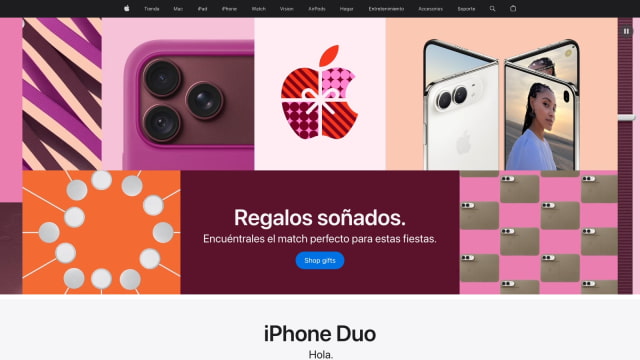
The Spanish site includes translated navigation, product information, and promotional pages. Its current homepage features the holiday gift guide, iPhone Duo, iPhone 18 Pro, HomeView, and other products, while some shopping links and financial information remain in English.
Anyone can switch through Apple's country and region selector, choosing "Estados Unidos (Español)" under the United States and Canada section. The existing English U.S. site remains available alongside it.
Selecting a store link brings up a Spanish notice explaining that the destination is currently available only in English. Customers who prefer to shop in Spanish can call 1-800-692-7753 for personalized assistance from an Apple Specialist.
The homepage also labels Apple Card and Apple Trade In information as available only in English, making clear that the new language option does not yet extend to every part of the U.S. site.
Apple already offers a Spanish-language U.S. support site for help with its products and services.