iOS 27.3 beta 2 expands Siri AI with access to Health data and full webpages in Safari, while adding new locking options for iPhone Duo and changes to several built-in apps.
The second developer beta arrived today with build number 24C5049d. Here are the changes in this release.
Siri AI: Health, Safari, and Home
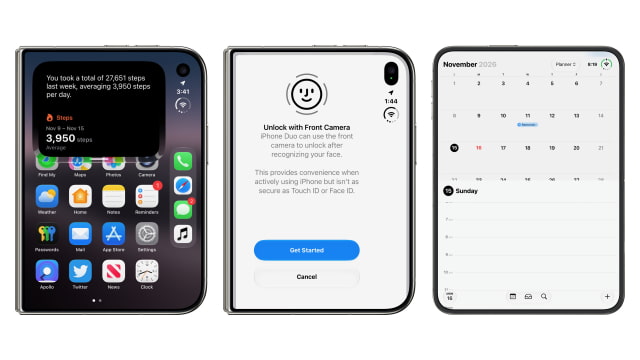
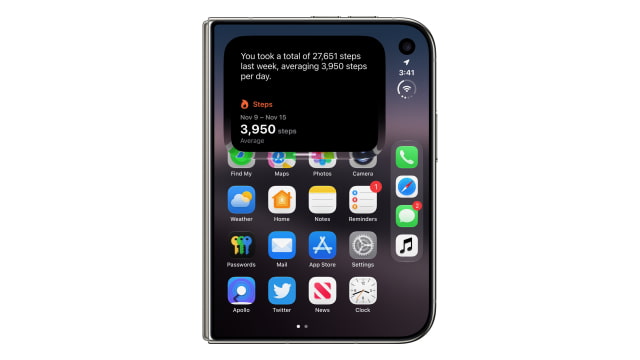
Siri AI can now access Health data with permission and answer questions about it. For example, asking about steps from the previous week produces a total and a daily average, with a Health data card showing the result.
In Safari, a new Ask About Page feature lets Siri use the full contents of a webpage, including material outside the visible portion of the screen. It can answer questions about that content or use it to help with a task, such as putting together a packing list from a travel guide.
Common Home and Intercom requests can also be processed on-device through new app actions, rather than being handed back to the older Siri system.
Apple Intelligence Usage Limits
The update introduces daily limits for advanced Siri AI requests and other Apple Intelligence features that use server-side models, following Apple's earlier confirmation that paid expanded access was coming. Everyday Siri requests, such as setting timers, remain available after the advanced-request limit is reached.
Eligible iCloud+ plans increase access: 200GB provides up to twice the standard device limit, 2TB up to five times, 6TB up to ten times, and 12TB up to twenty times. The free allowance is per device, while the additional allowance is shared across devices and family members using the plan. Regional restrictions apply, including no expanded access in the EU, UK, Brazil, or South Korea. Apple explains the tiers and affected features in its iCloud+ support document.
iPhone Duo Face Unlock and Close to Lock
iPhone Duo gains Unlock with Front Camera, which uses the outer-display camera to recognize a face while the phone is closed. It requires a recent Touch ID or passcode authentication, and Apple warns that it is less secure than Touch ID or Face ID. Apple Pay and access to saved passwords still require Touch ID.
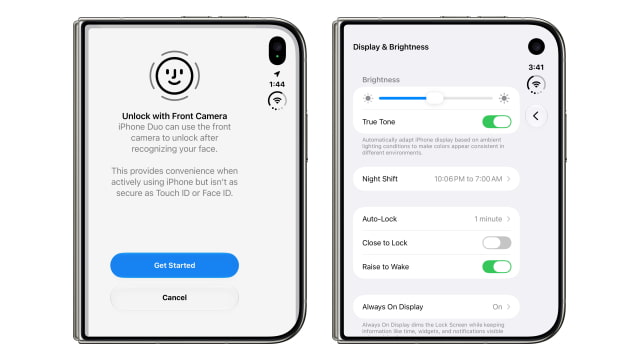
A separate Close to Lock switch under Settings > Display & Brightness lets folding the phone lock it, rather than transferring the current content to the outer display.
Calendar Controls
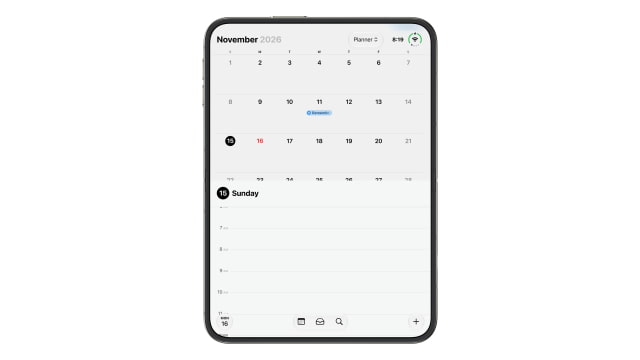
Calendar moves search and the add-event button to the bottom of the app. The button for returning to today now displays the day and date, while calendar and inbox controls sit alongside search. The Planner view remains available from the selector at the top.
Home Guest Restrictions
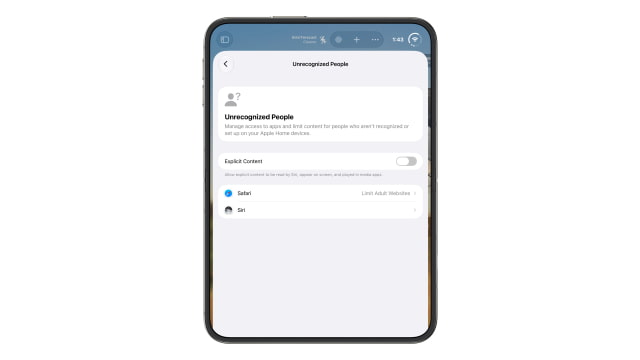
The Home app adds an Unrecognized People section for managing access to apps and content on Apple Home devices. It includes an Explicit Content switch, Safari website restrictions, and Siri settings for people who are not recognized or set up on those devices.
Video Podcasts in the TV App
The TV app gains a free video podcasts section, bringing video episodes into another Apple app beyond Podcasts. A subscription to Apple's streaming service is not required. Developer testing begins with this round of updates ahead of a wider public rollout.
News+ Puzzles in More Regions
Apple News+ subscribers in Australia gain a daily quick crossword, crossword mini, Sudoku, Quartiles, and Emoji Game. The UK gets the quick crossword, crossword mini, and Sudoku, while French-Canadian subscribers gain Quartiles and Emoji Game.
Other Changes
Smaller discoveries include ten new weather-condition symbols and an application icon for Siri Recap. Findings shared by pdfu show the Weather assets in the beta, though they do not appear to be in use yet.
There is also unfinished work on Apple Music album release countdowns. The feature flags are enabled, but the service has not activated the countdowns. A softer scroll-edge effect for navigation bars is being tested behind a disabled flag, so it is not a visible change for users yet.
Developers can install the beta through Settings > General > Software Update with iOS 27 Developer Beta selected under Beta Updates.