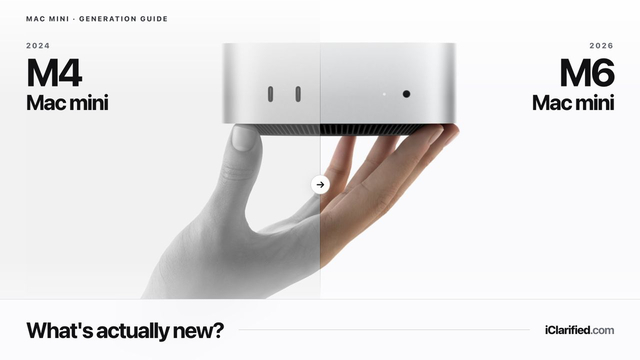
Apple's new Mac mini with M6 and M5 Pro keeps the same five-by-five-inch design as the M4 generation, but changes almost everything inside. The headline upgrades are faster CPU, graphics, and AI performance, higher memory bandwidth, faster storage, Wi-Fi 7, Bluetooth 6, and 2.5Gb Ethernet as standard.
The harder part is the price. The M6 Mac mini starts at $899 with 16GB of memory and a 256GB SSD. That is $100 more than the revised $799 price Apple charged for the same M4 base configuration immediately before this update, and $300 more than the M4 model's original $599 launch price. M5 Pro starts at $1,699, which is $100 above M4 Pro's final $1,599 Apple price and $300 above its original launch price.
So is the new Mac mini worth it, and should M4 owners upgrade? Here is the complete comparison.
The best value for everyday work, coding, media, and light creative tasks
A clearance price well below the new $899 starting price
The same compact enclosure, port layout, and support for up to three displays
Choose the M6 Mac mini if you want:
Stronger CPU and graphics performance, especially for newer AI and ray-traced workloads
Neural Accelerators in every GPU core and a Dual 16-core Neural Engine
Wi-Fi 7, Bluetooth 6, Thread, and faster 2.5Gb Ethernet as standard
Faster storage, newer display capabilities, and USB-C genlock support
Choose the M5 Pro Mac mini if you want:
Up to an 18-core CPU, 20-core GPU, and 64GB of unified memory
Thunderbolt 5 and substantially more memory bandwidth for pro workflows
A smaller, less expensive alternative to Mac Studio
The 7 Biggest Changes in 30 Seconds
$100 higher than the revised prices: M6 starts at $899 versus the final $799 M4 price, while M5 Pro starts at $1,699 versus the final $1,599 M4 Pro price.
Same base configuration: Apple restored the 16GB/256GB M4 model at a revised $799 price in June. The new M6 model keeps 16GB/256GB and costs $100 more.
More CPU cores: M6 moves from a 10-core to 12-core CPU. M5 Pro starts with 15 cores and can be configured with 18, up from 12 and 14 on M4 Pro.
New AI hardware: M6 adds GPU Neural Accelerators and a Dual 16-core Neural Engine. M5 Pro also includes Neural Accelerators in every GPU core.
Higher memory bandwidth: M6 provides 153GB/s with 16GB of memory and 170GB/s with 24GB or 32GB, up from 120GB/s on M4. M5 Pro reaches 307GB/s, up from 273GB/s on M4 Pro.
New wireless: Wi-Fi 7, Bluetooth 6, and Thread replace Wi-Fi 6E and Bluetooth 5.3.
Faster wired networking: 2.5Gb Ethernet is now standard instead of Gigabit Ethernet; 10Gb Ethernet remains optional.
Apple says the M6 Mac mini delivers up to 40 percent faster CPU performance and twice the graphics performance of the M4 model. In Apple's application tests, M6 was up to 4.8 times faster for LLM prompt processing in LM Studio, up to 1.5 times faster for spreadsheet calculations in Excel, and up to twice as fast for ray-traced gaming in Cyberpunk 2077: Ultimate Edition.
Those figures describe specific Apple tests, not a universal speed increase. Everyday tasks such as web browsing, email, office work, and streaming were already fast on M4, so owners may notice less of a difference there than in AI, rendering, gaming, or other sustained workloads.
The M5 Pro comparison is more nuanced. Its base CPU rises from 12 cores to 15, while the top configuration rises from 14 cores to 18. The base and maximum GPU core counts remain 16 and 20, but the newer GPU adds Neural Accelerators, an enhanced shader core, and third-generation ray tracing.
Apple reports up to four times faster LLM prompt processing, 1.4 times faster ray-traced rendering in Blender, and 1.5 times faster image processing in Affinity than M4 Pro. CPU-heavy developers and creators should see the clearest conventional performance gain from the higher core counts.
AI Performance and Unified Memory
AI is the main architectural reason to choose the new generation. M6 places a Neural Accelerator in every one of its 12 GPU cores and pairs them with a Dual 16-core Neural Engine. Apple says this produces up to four times faster AI performance and up to twice the Neural Engine performance of M4 in its tests.
M5 Pro adds the same per-GPU-core Neural Accelerators and raises memory bandwidth from 273GB/s to 307GB/s. The M6 bandwidth increase depends on memory configuration: the 16GB models provide 153GB/s, while configurations with 24GB or 32GB provide 170GB/s. That should help workloads such as local LLM inference, photo and video upscaling, and diffusion-based image generation.
Memory capacity does not increase. M6 still tops out at 32GB and M5 Pro at 64GB, exactly like the previous generation. If a local model or professional project needs more than 64GB, the meaningful upgrade is not another Mac mini configuration—it is the new Mac Studio, which supports as much as 512GB.
Connectivity and Display Support
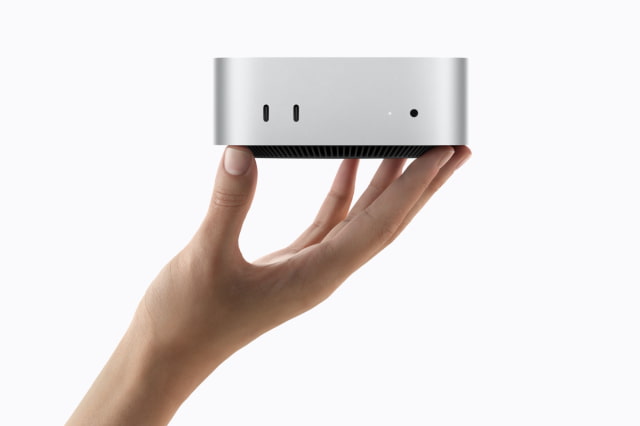
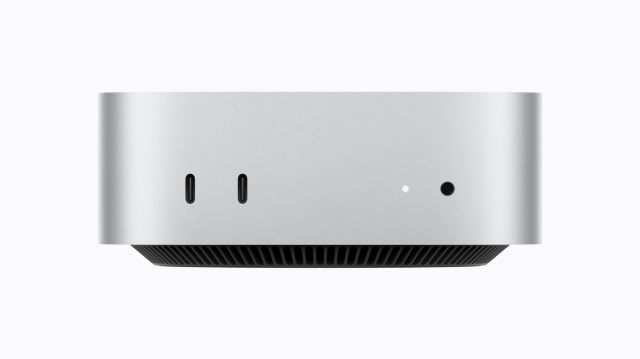
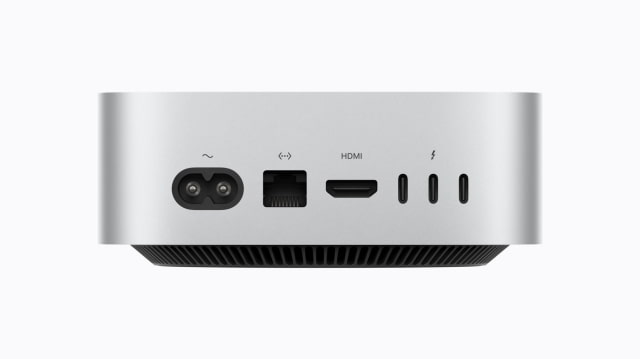
The port layout is familiar: two 10Gb/s USB-C ports and a headphone jack on the front, plus three Thunderbolt ports, HDMI, and Ethernet on the back. M6 continues to use Thunderbolt 4, while M5 Pro retains Thunderbolt 5.
The useful upgrades are around those ports. Every new Mac mini includes 2.5Gb Ethernet, up from Gigabit Ethernet, and Apple's N1 networking chip adds Wi-Fi 7, Bluetooth 6, and Thread. USB-C genlock is also new, allowing precise synchronization between a display and camera, including iPhone 17 Pro.
Both generations support up to three external displays, but the new models add more flexible high-refresh configurations. M6 can drive two 4K displays at up to 165Hz in a three-display setup, or one display at up to 8K/60Hz, 5K/120Hz, or 4K/240Hz in a two-display setup. M5 Pro can drive three displays through a single Thunderbolt port and reaches 5K at 120Hz or 4K at 200Hz for the second display in supported two-display arrangements.
Design: Exactly the Same Size
There is no external redesign. Both generations measure 5 inches wide, 5 inches deep, and 2 inches tall. The M6 model weighs 1.5 pounds, while M5 Pro weighs 1.6 pounds. The power button remains on the bottom of the enclosure, and the front and rear port placement is unchanged.
That continuity is good news for desks, racks, mounts, and accessories built around the M4 chassis. It also means buyers should make this decision on performance, connectivity, storage, and price—not appearance.
Price and Value: The Most Important Difference
The generational price comparison needs context because Apple changed prices before launching M6.
The new M6 model starts at $899 with the same 16GB/256GB base configuration Apple was selling for $799 immediately before the update. The direct replacement therefore costs $100 more. Compared with the M4 model's original launch price, the increase is $300, or about 50 percent.
M5 Pro starts at $1,699. That is $100 above its final Apple price and $300 above the M4 Pro launch price, with the same 24GB of memory and 512GB SSD.
Should You Upgrade From M4 to M6?
If you already own an M4 Mac mini: Probably not. The M4 model uses the same enclosure, supports the same number of displays, offers the same maximum memory capacity, and remains more than fast enough for most everyday and creative work. Upgrade only if your workload specifically benefits from the new AI hardware, faster graphics, Wi-Fi 7, 2.5Gb Ethernet, genlock, or faster storage.
If you own an M4 Pro Mac mini: The higher CPU core counts make M5 Pro more attractive for code compilation and other multithreaded work, but unchanged GPU core counts and memory limits make this a targeted upgrade rather than an automatic one. Wait for independent benchmarks unless one of Apple's highlighted AI workflows maps directly to your work.
If you own an M1, Intel, or older Mac mini: The new generation is a substantial upgrade in performance, memory, display support, and connectivity. M6 is the better long-term choice, but an M4 clearance deal may deliver much better value.
If you are buying your first Mac mini: Choose M6 for the newest architecture and connectivity. Choose M4 if it is meaningfully discounted and you mainly need a compact desktop for general productivity, development, media, or light creative work. The M5 Pro model is for buyers who already know they need more CPU performance, Thunderbolt 5, or up to 64GB of memory.
The new Mac mini is available to preorder now and begins arriving September 22.
Track Mac mini Prices and Availability
Before ordering, compare current retailer pricing and availability with the iClarified Mac Price Tracker. You can follow each new Mac mini configuration here:



![Apple-LG Home Accessories Could Offer Dynamic Island Proximity Controls [Leak]](/images/news/102711/102711/102711-160.jpg "Apple-LG Home Accessories Could Offer Dynamic Island Proximity Controls [Leak]")




![How To Force Restart iPhone [Video]](/images/tutorials/95012/95012/95012-160.jpg "How To Force Restart iPhone [Video]")
![How To Turn Off iPhone [Video]](/images/tutorials/94999/94999/94999-160.jpg "How To Turn Off iPhone [Video]")
![How To Back Up Your iPhone to an External Drive on Mac [Video]](/images/tutorials/72786/72786/72786-160.jpg "How To Back Up Your iPhone to an External Drive on Mac [Video]")





![Mac mini Drops to $779.99 for Prime Big Deal Days [Deal]](/images/news/102624/102624/102624-160.jpg "Mac mini Drops to $779.99 for Prime Big Deal Days [Deal]")