Carnation Software has announced the release of MacWise Version 12.05 for Macintosh. MacWise terminal emulation software now supports picture displays. The pictures can reside on the Mac or a server, and can be placed anywhere on the screen under host control. They can also be sized and scaled to specific dimensions or can retain their original aspect ratio. Windows PC servers are also supported for storing pictures.
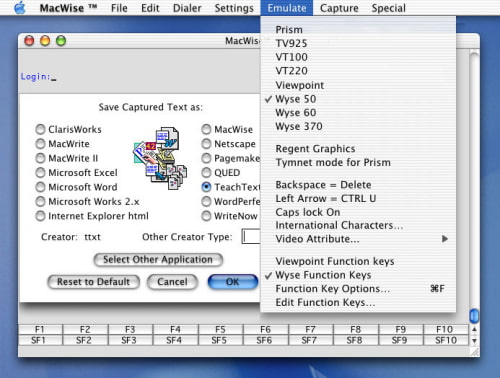
MacWise allows a Macintosh to be used as a terminal, connected to a host computer directly, by modem, local area network or over the Internet with telnet or ssh secure shell. MacWise emulates ADDS Viewpoint, Wyse 50, Wyse 60, Wyse 370, Televideo TV 925, DEC VT100, VT220 and Prism terminals. Supports ANSI and SCO ANSI color. Esprit III color is also supported in Wyse 370 mode. AppleScript is also supported. Works with Intel or PowerPC Macs, MacBooks, Powerbooks and desktops. Connect to the host via serial, modem, telnet, ssh, via the internet or local connection.
Connectivity: * Built-in Modem * Telnet / TCP/IP * SSH Secure Shell * Kermit * Serial ports via USB to Serial adaptor * Also communicates directly with the Mac Unix Shell * Special iPhone sized window for use with third-party VNC software
Scroll Back: You can scroll back to the past 40 pages of data. MacWise remembers the last 40 pages that appear on your screen, regardless of whether the data has scrolled across the screen or the screen has cleared. Video attributes such as inverse and underline are also saved, including colors. This means that you can use the scroll bar to scroll back to previous screens to look at the data or print a scrolled-back page or copy a selection into the clipboard.
AppleScript Support: MacWise supports AppleScript commands. Many functions of MacWise can be controlled by a script (such as transferring data to and from the host, sending commands to the host and messages to the MacWise user). Scripts compiled as applications can be run from "Run AppleScript" under the Special Menu. For instance, you can write a script to transfer data from the host to a file on your Macintosh and then tell another application to open that file.
File Transfers: * Kermit * Accuterm * FTP * Text
Other Features: * Multiple-session support for up to ten windows simultaneously * The user can connect to several different hosts, or run multiple sessions simultaneously with one host * Transparent windows. Transparency is adjustable by the user * On-screen text can be copied into the clipboard as an object or as editable text * Clipboard can be pasted back to the host computer * Programmable function keys * Large font option for easier reading * Host menu item selection by mouse-click on screen * Connection scripts automate the login process * Page forward/back capability * Supports ANSI color and Wyse 370 Esprit Color * Capture text and save to a file * Send a text file to the host * FTP and Kermit file transfers * Secure settings for company managers to prevent users from making changes * A separate telnet tool is no longer required. MacWise version 11 has telnet built-in * AppleScript support - over thirty AppleScript commands available to use * ANSI and SCO ANSI ( SCO-ANSI) * Wyse keys programmable by the host or user * Localized for English and French Menus * Slave (Aux) printing prints host data to your Mac printer * Screen saves and restores using protocols for Accuterm, HostAccess and System Builder * Display pictures using Accuterm escape sequences









![How To Change Wallpaper on Mac [Video]](/images/tutorials/90512/90512/90512-160.jpg "How To Change Wallpaper on Mac [Video]")
![How To Turn Off Always On Display on iPhone [Video]](/images/tutorials/87524/87524/87524-160.jpg "How To Turn Off Always On Display on iPhone [Video]")





![16-Inch M5 Max MacBook Pro Drops $900 to New Low of $3,499 [Deal]](/images/news/102438/102438/102438-160.jpg "16-Inch M5 Max MacBook Pro Drops $900 to New Low of $3,499 [Deal]")
![Magic Keyboard for iPad Air Drops to $200 on Amazon [Deal]](/images/news/102402/102402/102402-160.jpg "Magic Keyboard for iPad Air Drops to $200 on Amazon [Deal]")
