OpenAI has begun rolling out GPT-6 in ChatGPT's Chat tab, introducing a new 'Intelligent UI' feature that combines text with interactive visuals and tools. The update works across web and mobile.
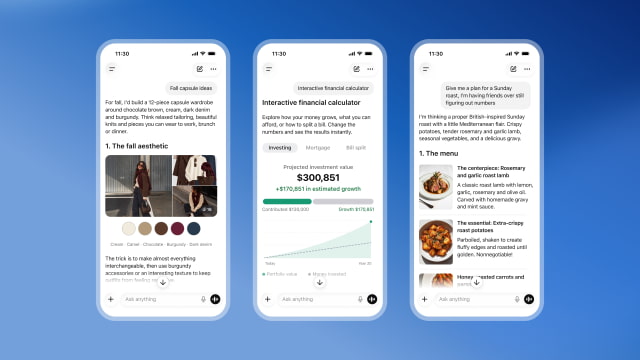
Responses can include tappable buttons, forms, charts, and diagrams that users can explore within the conversation. A bicycle explanation, for example, can let someone select different parts to learn how they work. The format changes with the question, and straightforward requests can still receive a plain text answer.
For more practical tasks, the assistant can create a savings calculator, split a dinner bill, or build a game to play in the chat. Its interface elements appear progressively as the response is generated, rather than waiting for the entire answer to finish.
That approach extends to reasoning. The model can begin answering while it continues thinking, adding useful information in stages. OpenAI says GPT-6 Instant starts responding to questions that need web search 44% sooner, on average, than GPT-5.6 Instant.
The rollout starts globally today for Plus, Pro, Business, and Enterprise users, whose Chat experience runs on GPT-6 Sol. Free and Go users will begin getting the update tomorrow, October 8, using GPT-6 Luna. Enterprise access depends on workplace administrator settings.
The Sol and Luna models debuted on September 22 in ChatGPT Work, Codex, and the API, following the earlier launch of GPT-6 Astra. Today's release applies to Chat and does not change the models powering Work or Codex.




![Apple Watch Series 12 and Ultra 4 Score 4/10 in iFixit Teardown [Video]](/images/news/102633/102633/102633-160.jpg "Apple Watch Series 12 and Ultra 4 Score 4/10 in iFixit Teardown [Video]")
![Apple Partnering With LG on Smart Lock, Doorbell, Thermostat, and Cameras [Report]](/images/news/102627/102627/102627-160.jpg "Apple Partnering With LG on Smart Lock, Doorbell, Thermostat, and Cameras [Report]")
![How To Force Restart iPhone [Video]](/images/tutorials/95012/95012/95012-160.jpg "How To Force Restart iPhone [Video]")
![How To Turn Off iPhone [Video]](/images/tutorials/94999/94999/94999-160.jpg "How To Turn Off iPhone [Video]")
![How To Back Up Your iPhone to an External Drive on Mac [Video]](/images/tutorials/72786/72786/72786-160.jpg "How To Back Up Your iPhone to an External Drive on Mac [Video]")


![Mac mini Drops to $779.99 for Prime Big Deal Days [Deal]](/images/news/102624/102624/102624-160.jpg "Mac mini Drops to $779.99 for Prime Big Deal Days [Deal]")