Readdle announces the release of PDF Expert 2.3, its iPad application focused on annotating PDF documents and filling PDF forms. A new version features the complete set of tools related to adding stamps, logos and text notes to PDF documents. The update was designed for business and education-related users who need to approve, confirm or review documents on the iPad. All edits in the document can be flattened making it readable on any desktop or mobile device.
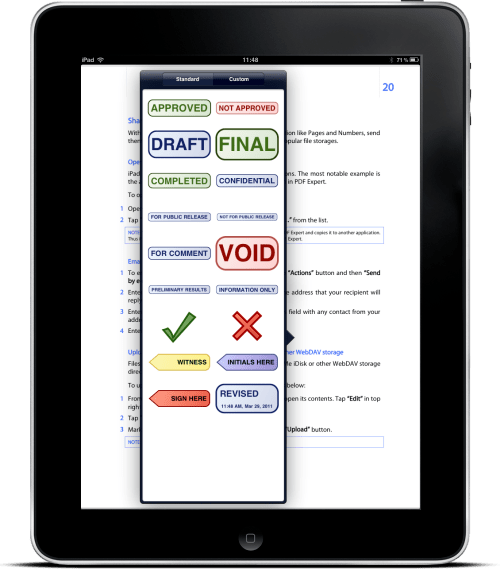
New to PDF Expert 2.3 for iPad is the stamping tool that allows to insert predefined stamps, labels, logos or add new custom stamps right to the PDF file. Lawyers, legal professionals or government agents now can add stamps and comments to the document within seconds. PDF Expert supports all standard stamps available in Adobe Acrobat and lets add custom ones from the iPad photo library.
"We have learned that people often share documents immediately after signing them" explains Igor Zhadanov, Readdle CEO. "Since you may not know how this document will be used, there is a necessity to finalize your signature, annotations and stamps before sharing. With the current update we have combined stamps and flatten, making it easy to stamp a document, save a flattened copy, then share the PDF directly from the iPad."
Pricing and Availability: PDF Expert for iPad 2.3 is available on the Apple App Store for $9.99 for new customers and as a free upgrade for existing PDF Expert owners. Enterprise licensing is available upon request.
Get the iClarified Daily Newsletter
Apple news, rumors, tutorials, price drop alerts, in your inbox every evening, free.
Unsubscribe at any time.
Success!
You have been subscribed.
Add Comment
Would you like to be notified when someone replies or adds a new comment?
Yes (All Threads)
Yes (This Thread Only)
No
Notifications
Would you like to be notified when we post a new Apple news article or tutorial?








![How To Change Wallpaper on Mac [Video]](/images/tutorials/90512/90512/90512-160.jpg "How To Change Wallpaper on Mac [Video]")
![How To Turn Off Always On Display on iPhone [Video]](/images/tutorials/87524/87524/87524-160.jpg "How To Turn Off Always On Display on iPhone [Video]")





![16-Inch M5 Max MacBook Pro Drops $900 to New Low of $3,499 [Deal]](/images/news/102438/102438/102438-160.jpg "16-Inch M5 Max MacBook Pro Drops $900 to New Low of $3,499 [Deal]")
![Magic Keyboard for iPad Air Drops to $200 on Amazon [Deal]](/images/news/102402/102402/102402-160.jpg "Magic Keyboard for iPad Air Drops to $200 on Amazon [Deal]")
