Apple may launch an AirPort Utility app for iOS alongside the release of iOS 5.
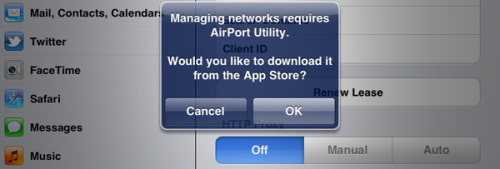
A MacTalk forum member noticed that in the W-Fi settings of the latest beta there is a button to 'Manage this network' that prompts you to download the app.
Go to the network in Wi-Fi settings, and scroll to the bottom - there's a button 'Manage this network' that prompts you to download the AirPort Utility app from the App Store. Hitting 'OK' bounces you through the App Store app to iTunes, which proceeds to tell you "Your request could not be completed."
Earlier betas of iOS 5 let users set up their new AirPort Base Station or Time Capsule directly within the mobile operating system; however, it looks like Apple is planning to release these features as a separate App Store app.
Apple news, rumors, tutorials, price drop alerts, in your inbox every evening, free.
Unsubscribe at any time.
Success!
You have been subscribed.
Add Comment
Would you like to be notified when someone replies or adds a new comment?
Yes (All Threads)
Yes (This Thread Only)
No
Notifications
Would you like to be notified when we post a new Apple news article or tutorial?
Yes
No
Comments (3)
Comments are closed for this article.
0
Hu - October 8, 2011 at 4:13pm
Can someone please explain what this means? What's the benefit...I'm new to Apple stuff.
0
PReaper - October 8, 2011 at 5:59pm
It means that you can access you AirPort router and change the settings on it from your iOS 5 device without having to start your Mac to start the AirPort Utility.. Basically :)





![Pro Photographer Austin Mann Tests iPhone 18 Pro Camera [Video]](/images/news/102297/102297/102297-160.jpg "Pro Photographer Austin Mann Tests iPhone 18 Pro Camera [Video]")

![Apple Releases Xcode 27.1 Beta With iPhone Duo SDKs and Simulator [Download]](/images/news/102276/102276/102276-160.jpg "Apple Releases Xcode 27.1 Beta With iPhone Duo SDKs and Simulator [Download]")
![Apple Shares 'new trick' Shot on iPhone 18 Pro Ad Featuring ROSÉ [Video]](/images/news/102273/102273/102273-160.jpg "Apple Shares 'new trick' Shot on iPhone 18 Pro Ad Featuring ROSÉ [Video]")









![Apple Studio Display XDR Hits All-Time Low of $2,969.99 ($329 Off) [Deal]](/images/news/101976/101976/101976-160.jpg "Apple Studio Display XDR Hits All-Time Low of $2,969.99 ($329 Off) [Deal]")
