The Find My iPhone app has been updated with a new Lost Mode, Battery Charge Indicator, and Forever Login.
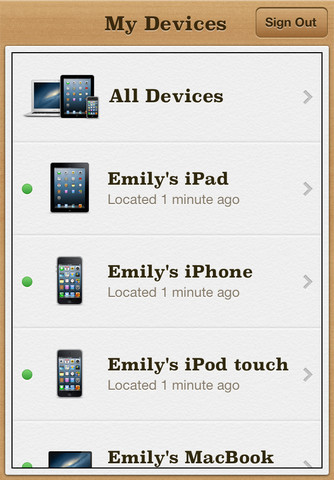
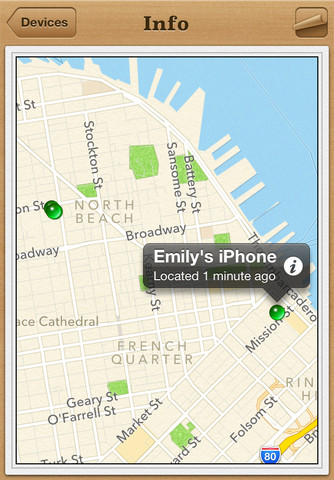
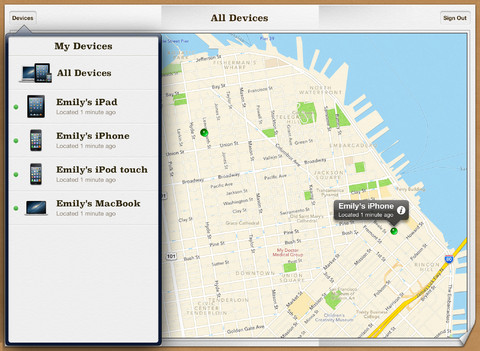
If you misplace your iPhone, iPad, iPod touch, or Mac, the Find My iPhone app will let you use another iOS device to find it and protect your data. Simply install this free app on another iOS device, open it, and sign in with your Apple ID. Find My iPhone will help you locate your missing device on a map, play a sound, display a message, remotely lock your device, or erase all the data on it.
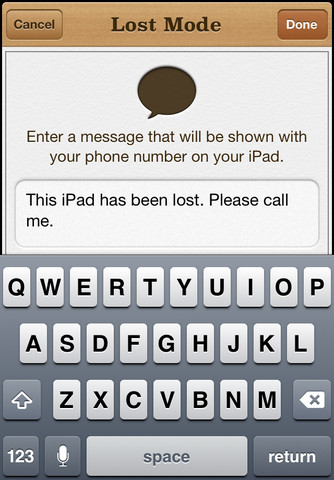
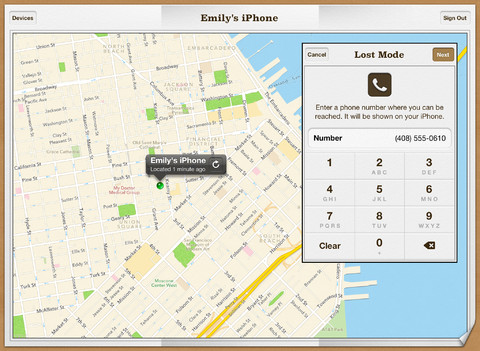
If the iPhone, iPad, or iPod touch you want to locate is running iOS 6, Find My iPhone also includes Lost Mode. Lost Mode locks your missing device with a 4-digit passcode and can display a contact phone number right on the lock screen. And while in Lost Mode, your device will keep track of where it has been and display its recent location history when you check in with the Find My iPhone app. Please note that Find My iPhone must be enabled in the iCloud settings on your device for you to locate it with this app.
Features: • Locate your iPhone, iPad, iPod touch, or Mac on a map • Display a custom message on the screen • Play a sound for two minutes at full volume (even if your device is set to silent) • Remotely lock your device • Remotely wipe your device to erase your personal data • Lost Mode (for devices running iOS 6 or later)
What's New In This Version: • Lost Mode (available on devices running iOS 6 or later) • Battery Charge indicator • Forever login (On iOS 6, if the account used to log in is the same as the iCloud account configured on the device and the device has passcode enabled on it.)
You can download Find My iPhone from the App Store for free.
Apple news, rumors, tutorials, price drop alerts, in your inbox every evening, free.
Unsubscribe at any time.
Success!
You have been subscribed.
Add Comment
Would you like to be notified when someone replies or adds a new comment?
Yes (All Threads)
Yes (This Thread Only)
No
Notifications
Would you like to be notified when we post a new Apple news article or tutorial?
Yes
No
Comments (5)
Comments are closed for this article.
0
Gina - October 20, 2012 at 8:35am
As I type this, having trawled the internet all night trying to find out what will happen if I put my iPhone in lost mode, whether it will need to be unlocked by Apple, or whether I can just deal with it myself, an advert for Blackberry popped up on the left here. Ah, the good old days. After three Blackberrys, I chose iPhone. I am counting the hours till the end of my contract.
0
Glenn - October 7, 2012 at 4:43pm
Tap on the device location on the map and then tap on the reload symbol for that device.
0
Elise - September 27, 2012 at 7:37pm
How do you "update" this new version when it is stuck in "old location" and you know the vehicle has moved.
0
Joe - October 7, 2012 at 3:17pm
hey, just sign out then back in
0
Gina - October 20, 2012 at 8:31am
If it doesn't have a sim card, it will stick in old location until it has network access. This app could do with some serious tweaking. With a few little improvements, Apple could make it impractical for anyone to steal an iPhone, iPad or iPod Touch. It wouldn't take much!




![Mac mini With M6 and M5 Pro Review Roundup [Video]](/images/news/102318/102318/102318-160.jpg "Mac mini With M6 and M5 Pro Review Roundup [Video]")
![Apple Releases macOS 27.2 Golden Gate Beta 2 to Developers [Download]](/images/news/102327/102327/102327-160.jpg "Apple Releases macOS 27.2 Golden Gate Beta 2 to Developers [Download]")
![Apple Seeds Second Betas of watchOS 27.2, tvOS 27.2, and visionOS 27.2 to Developers [Download]](/images/news/102324/102324/102324-160.jpg "Apple Seeds Second Betas of watchOS 27.2, tvOS 27.2, and visionOS 27.2 to Developers [Download]")
![Apple Releases iOS 27.2 Beta 2 and iPadOS 27.2 Beta 2 to Developers [Download]](/images/news/102321/102321/102321-160.jpg "Apple Releases iOS 27.2 Beta 2 and iPadOS 27.2 Beta 2 to Developers [Download]")
![Mac Studio With M5 Max and M5 Ultra Review Roundup [Video]](/images/news/102315/102315/102315-160.jpg "Mac Studio With M5 Max and M5 Ultra Review Roundup [Video]")









![Apple Studio Display XDR Hits All-Time Low of $2,969.99 ($329 Off) [Deal]](/images/news/101976/101976/101976-160.jpg "Apple Studio Display XDR Hits All-Time Low of $2,969.99 ($329 Off) [Deal]")
