RiP Dev has released InstallerApp 1.0 for Windows to install applications onto your iPhone using USB.
It took much longer than we have anticipated, but the Microsoft Windows version of InstallerApp is finally out. It works on anything from XP to Seven, and requires an installed iTunes. Otherwise, give it a go. License purchased ties to the devices, not the app itself, so it doesn't matter which platform you use - the activation codes will work regardless.
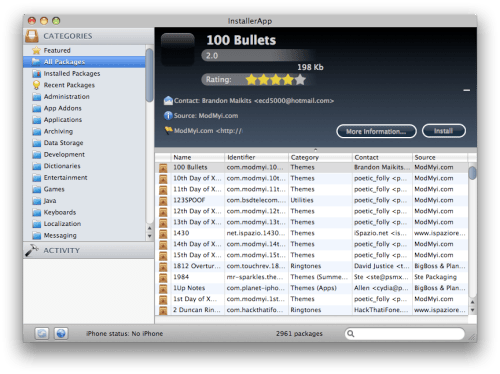
InstallerApp is an application that allows you easily download applications from Installer and Cydia directly onto your computer, and install them to the iPhone connected with USB cable.
[Mac Screenshot]
Get the iClarified Daily Newsletter
Apple news, rumors, tutorials, price drop alerts, in your inbox every evening, free.
Unsubscribe at any time.
Success!
You have been subscribed.
Add Comment
Would you like to be notified when someone replies or adds a new comment?
Yes (All Threads)
Yes (This Thread Only)
No
Notifications
Would you like to be notified when we post a new Apple news article or tutorial?
Yes
No
Comments (2)
Comments are closed for this article.
0
Todd - May 5, 2009 at 2:07pm
I think I'll stick with cyder. It works and it's free.










![How To Change Wallpaper on Mac [Video]](/images/tutorials/90512/90512/90512-160.jpg "How To Change Wallpaper on Mac [Video]")
![How To Turn Off Always On Display on iPhone [Video]](/images/tutorials/87524/87524/87524-160.jpg "How To Turn Off Always On Display on iPhone [Video]")





![16-Inch M5 Max MacBook Pro Drops $900 to New Low of $3,499 [Deal]](/images/news/102438/102438/102438-160.jpg "16-Inch M5 Max MacBook Pro Drops $900 to New Low of $3,499 [Deal]")
![Magic Keyboard for iPad Air Drops to $200 on Amazon [Deal]](/images/news/102402/102402/102402-160.jpg "Magic Keyboard for iPad Air Drops to $200 on Amazon [Deal]")
