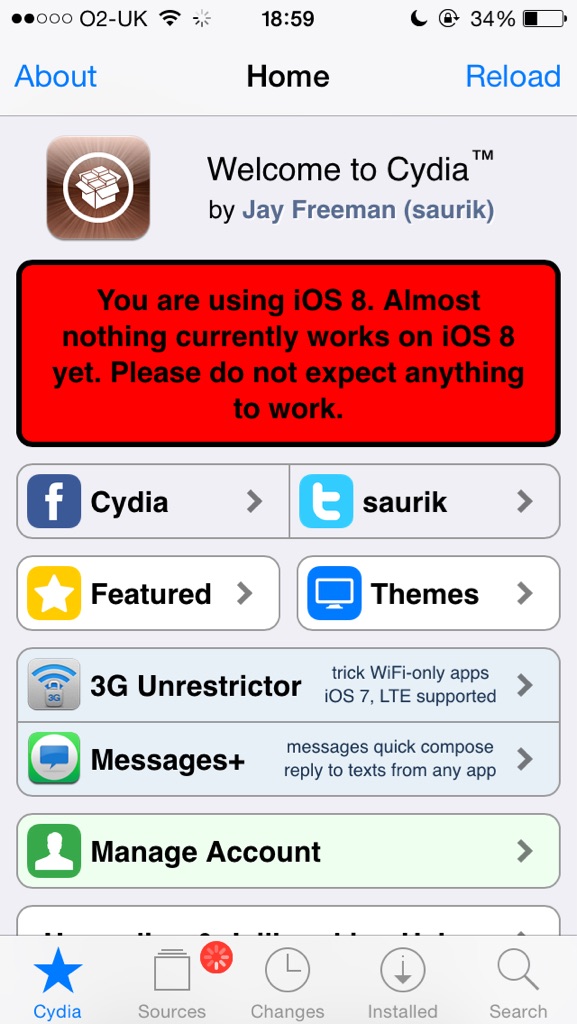
I've given a new version of Cydia Installer in the form of a standard jailbreak bootstrap for inclusion in a new version of their jailbreak. I've also pushed the .deb of the iOS 8 version of Cydia to apt.saurik.com for manual download, but not yet to my repository. A lot of thanks goes out to limneos, who tested the new build for me, as I was at an airport (and now am frantically typing this message while they figure out how to retract the jetbridge from the plane I'm on that is about to take off).
The Pangu8 jailbreak was released for Windows only, without a compatible version of Cydia. You can download the jailbreak from here.
It's likely that the Pangu8 jailbreak utility will be updated to include Cydia very shortly. If it's not, we may post a detailed tutorial to help those who aren't familiar with SSH.
Please follow iClarified on X, Facebook, or RSS for updates.
[Image via Spydar007]
Get the iClarified Daily Newsletter
Apple news, rumors, tutorials, price drop alerts, in your inbox every evening, free.
Unsubscribe at any time.
Success!
You have been subscribed.
Add Comment
Would you like to be notified when someone replies or adds a new comment?
Yes (All Threads)
Yes (This Thread Only)
No
Notifications
Would you like to be notified when we post a new Apple news article or tutorial?
Yes
No
Comments (42)
Comments are closed for this article.
0
giu84 - October 28, 2014 at 3:24pm
in quale cartella va cydia
0
Lilly Quintana - October 25, 2014 at 1:00am
competed the whole process after rebooting the cydia icon is not there not sure what I'm doing wrong? Jailbroke it opened Pangu downloaded SSH, copied files to command on Winscp n rebooted and nothing! Someone Help Me Please
0
BrunoTurek - October 25, 2014 at 11:12am
Well, I had the same problem and saved myself by doing this:
Do what iClarified said
Open the Pangu app, goto manager then remove.
Click on the trash next to Pangu and yes
While it is doing it's job press the home button wait 5 secs go back to Pangu app and click force remove.
Respring
Open Cydia
Enjoy
0
Lilly Quintana - October 27, 2014 at 6:03am
Thank you Bruno Turek! It worked
0
J.B - October 30, 2014 at 1:31pm
Thanks to Bruno Turek for the info. Keep up the good work
0
iphonefanboy - October 24, 2014 at 5:31pm
Open SSH won't complete. it says "No such File or Directory"
0
Nuessly - October 24, 2014 at 5:10pm
Confirmed working. Have been running since initial substrate update.
*unlocked 6 plus 128gb on 8.1.
Confirmed working:
Moviebox
Barrel
Zep.
iTunes Radio unlimited
Flex
I cleaner pro
Mx tube
Musicbox
Winter board installs.
Noslowanimations
Virtualhome
Blurredmusicapp
F.lux
Anyone have any others?
0
Vimal Mohan - October 24, 2014 at 4:37pm
installed winterboard & some other working tweaks..was on a phone call..battery drained fully & now after charging for an hour, it is in boot loop..only showing apple logo..restored back to stock now..i don't recommend installing cydia using ssh after using pangi 1.0.1..let us wait for a stable version of tool and cydia substrate
0
mohsinmmp - October 24, 2014 at 2:33pm
its 100% working for me
0
Malcolm Hall - October 24, 2014 at 12:41pm
I installed and Lydia is in \Applications but the icon is not appearing. Already rebooted 3 times. Any other way to make the icon appear? I suppose I can try copying the Respring app from another phone.
0
vanimox - October 24, 2014 at 6:34am
This is a better code for installing cydia, the one posted may cause "serious errors".
dpkg --install cydia-lproj_1.1.12_iphoneos-arm.deb cydia_1.1.13_iphoneos-arm.deb
0
iObligated - October 23, 2014 at 11:17am
It would be a bad idea to do this early, Cydia isn't compatible with iOS 8 entirely, and most of the stuff will NOT work, it would be best to wait until you can download it from the Pangu application.
0
iObligated - October 24, 2014 at 3:38am
Not only that, I tested it just a few hours ago, it will crash at times, and there is a possibility that your iDevice may slow down. DO NOT INSTALL EARLY.
0
bleh - October 23, 2014 at 10:45am
I was able to get Cydia installed no problem via AutoInstall.
JB with Pangu
Install OpenSSH
SCP via WinSCP onto the device
Go to /var/root/Media/
Create folder Cydia
Create Folder AutoInstall
copy the two .deb files in there
reboot
0
kaiser7803 - October 23, 2014 at 11:38am
it is still not working
0
Me - October 23, 2014 at 10:17pm
confirmed this works
0
kaiser7803 - October 23, 2014 at 7:33am
its not working for my iphone 6 and on windows
0
kaiser7803 - October 23, 2014 at 6:50am
install ssh thru pangu but its not showing any effect whatsoever
0
Dainius - October 23, 2014 at 10:32am
Its not an app, its utility, it lets you to connect to your phones filesystem with WinsCP program. go to iphone settings, then in to wifi , and press small i circle i right, then write down your ip address...
open winscp,
Chose SFTP as File protocol.
enter your ip address e.g. 192.168.0.101 in to HOST NAME field.
Port number will be 22
User name is root
Password is alpine
Press Login, if you will be prompted for certificate questions press Update or Yes,,, it should now open a filesystem for you.
copy files in to /private/var/root
then press Black square symbol/ terminal symbol in toolbar of winsCP and issue those commands.
0
kaiser7803 - October 23, 2014 at 10:48am
i did all that all it keeps saying access denied
0
Dainius - October 23, 2014 at 7:32pm
once you copy files you need to go to that directory, and run terminal black box icon in winscp, access is denied because your files dont have a right permisions...
so just write:
chmod 777 cydia-lproj_1.1.12_iphoneos-arm.deb
and then another one:
chmod 777 cydia_1.1.13_iphoneos-arm.deb
terminal will show you nothing. but you notice that no errors poped up. once you done this step, go to steps you have tryed before, now it should install..
afetr install reboot phone.. sometimes you need to reboot twice...
0
kaiser7803 - October 23, 2014 at 10:33pm
i am saying that winscp cant even have access into root
0
Dainius - October 26, 2014 at 10:03am
maybe you forgot to install OpenSSH ?
0
Freeloaderz985 - October 23, 2014 at 5:30am
Movie box works!
0
diver432 - October 23, 2014 at 5:26am
mine seems its trying to download loads of data for step two any ideas? as it won't stop saying downloading I've left it for about 10 mins now it says about 500mb out of 2gb then it will finish and change to something about 1gb?
0
Rill - October 23, 2014 at 3:23am
i can't intall the cydia using SSH with below link given.
> dpkg -i cydia-lproj_1.1.12_iphoneos-arm.deb
> dpkg -i cydia_1.1.13_iphoneos-arm.deb
Kindly help.
0
John B. - October 23, 2014 at 12:15pm
In fact it doesn't work, you have to type "dpkg -i cydia*" in order to install both at the same time
0
Andres Rormoser - October 22, 2014 at 11:39pm
There is a dependency problem when you tried to install. You should do:
dpkg --ignore-depends cydia -i cydialproj_1.1.12_iphoneos-arm.deb
dpkg -i cydia_1.1.13_iphoneos-arm.deb
0
majortom - October 22, 2014 at 10:23pm
Hy,
good job from pangu team, thx!!
Igot the pangu app on my iphone6 but when trying to install openssh/openssl I got an install error ("error domain=com.pangu.loader.deb-install code=2")
any idea?
thx tom
0
PatrickPepin - October 26, 2014 at 3:42am
Have same problem... But with my iphone 5s When I try to install OpenSSH, I got an install error ("error domain=com.pangu.loader.deb-install code=2") Someone know how to fix it ??
Thanks !
0
Nddn - October 22, 2014 at 10:06pm
Please what does it mean command to install Cydia I just transferred both files on my iPhone but I don't have Cydia PLEASE HELP
0
AceWynn - October 22, 2014 at 10:23pm
Advanced users can then SSH into their iDevice, copy over the files, and issue the following commands to install Cydia.
> dpkg -i cydia-lproj_1.1.12_iphoneos-arm.deb
> dpkg -i cydia_1.1.13_iphoneos-arm.deb
0
Brattman - October 22, 2014 at 9:10pm
Really nice work! Tanx for all The good work!
0
odedoo1 - October 22, 2014 at 8:31pm
better wait you guys that are still on iOS 7.1.2 because even if everything works out and you get Cydia installed the tweaks have not been upgraded so nothing will work on iOS 8.






![iFixit Investigates iPhone Duo Screen Failures, Points to Possible Hinge Issue [Video]](/images/news/103038/103038/103038-160.jpg "iFixit Investigates iPhone Duo Screen Failures, Points to Possible Hinge Issue [Video]")
![Apple's Touchscreen MacBook Pro to Cost 'Significantly' More [Gurman]](/images/news/103035/103035/103035-160.jpg "Apple's Touchscreen MacBook Pro to Cost 'Significantly' More [Gurman]")
![Apple Stores Get iPhone Scanner to Fight Return Fraud [Report]](/images/news/103029/103029/103029-160.jpg "Apple Stores Get iPhone Scanner to Fight Return Fraud [Report]")
![Apple TV Shares 'Full Throttle' With F1 Drivers and Vince Young Ahead of U.S. Grand Prix [Video]](/images/news/103023/103023/103023-160.jpg "Apple TV Shares 'Full Throttle' With F1 Drivers and Vince Young Ahead of U.S. Grand Prix [Video]")
![How To Turn Off iPhone [Video]](/images/tutorials/94999/94999/94999-160.jpg "How To Turn Off iPhone [Video]")
![How To Back Up Your iPhone to an External Drive on Mac [Video]](/images/tutorials/72786/72786/72786-160.jpg "How To Back Up Your iPhone to an External Drive on Mac [Video]")

![How To Find Your IP Address on iPhone [Video]](/images/tutorials/496/496/496-160.jpg "How To Find Your IP Address on iPhone [Video]")

![Beats Headphones, Earbuds, and Pill Speaker Are Up to 41% Off [Deal]](/images/news/103026/103026/103026-160.jpg "Beats Headphones, Earbuds, and Pill Speaker Are Up to 41% Off [Deal]")

![New Fire TV Stick 4K Drops to $29.99 (50% Off) [Deal]](/images/news/102984/102984/102984-160.jpg "New Fire TV Stick 4K Drops to $29.99 (50% Off) [Deal]")
![Apple's iPhone 18 Pro and Pro Max Cases Are Up to 37% Off [Deal]](/images/news/102978/102978/102978-160.jpg "Apple's iPhone 18 Pro and Pro Max Cases Are Up to 37% Off [Deal]")
![16-Inch MacBook Pro With M5 Pro Drops to $2,429 ($570 Off), Lowest Price We've Seen [Deal]](/images/news/102957/102957/102957-160.jpg "16-Inch MacBook Pro With M5 Pro Drops to $2,429 ($570 Off), Lowest Price We've Seen [Deal]")
