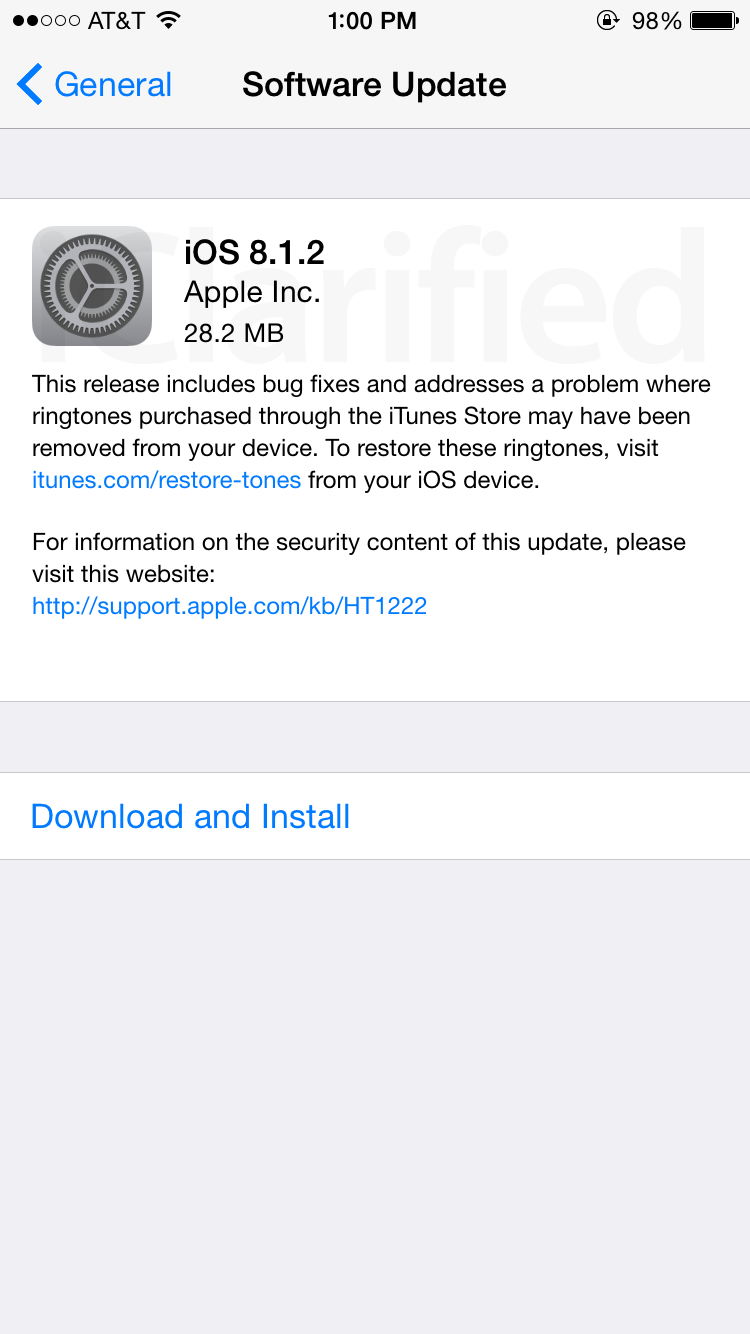
Apple has released iOS 8.1.2 bringing a fix for an issue that could cause ringtones to be removed from your device.
What's New In This Version: This release includes bug fixes and addresses a problem where ringtones purchased through the iTunes Store may have been removed from your device. To restore these ringtones, visit itunes.com/restore-tones from your iOS device.
You can follow iClarified on X, Facebook, or RSS for updates.
Get the iClarified Daily Newsletter
Apple news, rumors, tutorials, price drop alerts, in your inbox every evening, free.
Unsubscribe at any time.
Success!
You have been subscribed.
Add Comment
Would you like to be notified when someone replies or adds a new comment?
Yes (All Threads)
Yes (This Thread Only)
No
Notifications
Would you like to be notified when we post a new Apple news article or tutorial?
Yes
No
Comments (16)
Comments are closed for this article.
0
najaf363 - December 10, 2014 at 1:18pm
im trying to restore my ipad mini 1st gen, i put it in DFu mode and did a shift+restore but now its stuck on itunes logo and everytime i try to restore it itunes gives me error 14
0
6e16326 - December 12, 2014 at 5:14pm
hope you got it working. for restore problems you might see if apple is still signing the firmware you are tying to restore. If yes and still problems try restarting your computer and only open iTunes then restore. Don't use any other applications or programs before doing what you need to do. Good luck.
0
johny7941 - January 10, 2015 at 1:12pm
I have a similar problem with the iPad 4th generation. After many attempts and even taking to the Apple store, I couldn't resolve it. Then, yesterday morning (2 weeks had passed), I tried again by restoring with the 8.1.2 ipsw file. I GOT IT RESTORED. Then, I tried to recover from the latest backup from the iCloud. Then, iPad was struck in the middle showing just the Apple icon showing. So, I tried to restore again using the same method. I CANNOT RESTORE IT.
Previously, Apple support tried to tell me that it was a hardware issue and tried to sell me a new device. The error code 14 indicates an error with USB communication. I have proven that it is not a hardware issue. It is a SOFTWARE issue.
I am going to continue to try again. One thing that I noted when I had restored successfully is that my iPad battery was almost drained. Since then I charged. So, I may try again after draining my battery.
0
Jan - December 10, 2014 at 8:42am
Well noticed a lil glitch after upgrading and I got iPhone 6.. The glitch is making a call and it won't let you make it. So just turn off ur phone then back on and it will work fine.
0
gamerscul9870 - December 10, 2014 at 10:57am
off and on always works.
0
ih8sn0w - December 9, 2014 at 10:24pm
VERIFIED: iOS 8.1.2 is able to be jailbroken by TaiG Jailbreak v1.1.0. Spread the word!
0
gamerscul9870 - December 9, 2014 at 10:21pm
agreed 101% justyou. I see not a thing wrong and sluggish free. Even if I continued to have app crashes, not much of a problem to deal with. Some of us may have the stable system but some people may have said it's just the phone like the nand flash in the 128gb iphone for example because of how old components don't support new things or just made faulty.
0
Verdama - December 9, 2014 at 9:39pm
+1 with Guest, agreed at 100%! We want a stable system and to stop ridiculous updates!
0
Avais Hussain - December 9, 2014 at 8:30pm
Still hasn't fixed the iOS 8 Keyboard shortcuts bug when signed in to iCloud. When signed out, then you can access it. Haven't checked on iOS 8.2 beta but if it's fixed that would be great!
0
Guest - December 9, 2014 at 6:35pm
Apple, we want a stable system.
0
NoGoodNick - December 9, 2014 at 6:19pm
I don't think I'll waste time upgrading (and re-jailbreaking) just to restore a couple ringtones I could restore on my own.
0
NoGoodNick - December 9, 2014 at 6:23pm
Didn't get a chance to finish: I think I'll wait to see if there's anything else new in this release before investing much time on it. Newer isn't always better!
0
sel - December 9, 2014 at 6:18pm
i use 8.2 beta1, where is 8.2 or 8.2 beta2 .)
0
Non jail breaker - December 9, 2014 at 6:17pm
I used to jailbreak but I don't anymore but I still keep an eye on what's going on and the Chinese people that are releasing the jailbreaks immediately after an update in my opinion have to stop because they are burning through a lot of exploits and soon it's going to be that they won't be able to jailbreak possibly for a long time until they find more vulnerabilities.
0
Sadra - December 9, 2014 at 6:13pm
What a major release!! I was expecting that the next iOS version would fix a lot of issues I am facing right now on my iPhone 4S. iOS 8.1.1 got my device slower than ever!




![Apple Releases Xcode 27.1 Beta With iPhone Duo SDKs and Simulator [Download]](/images/news/102276/102276/102276-160.jpg "Apple Releases Xcode 27.1 Beta With iPhone Duo SDKs and Simulator [Download]")
![Apple Shares 'new trick' Shot on iPhone 18 Pro Ad Featuring ROSÉ [Video]](/images/news/102273/102273/102273-160.jpg "Apple Shares 'new trick' Shot on iPhone 18 Pro Ad Featuring ROSÉ [Video]")
![iPhone 18 Pro Teardown Shows Under-Display Face ID Camera and Larger Vapor Chamber [Video]](/images/news/102270/102270/102270-160.jpg "iPhone 18 Pro Teardown Shows Under-Display Face ID Camera and Larger Vapor Chamber [Video]")











![Apple Studio Display XDR Hits All-Time Low of $2,969.99 ($329 Off) [Deal]](/images/news/101976/101976/101976-160.jpg "Apple Studio Display XDR Hits All-Time Low of $2,969.99 ($329 Off) [Deal]")
