Posted September 9, 2009 at 3:55pm by
Yoav Levytam
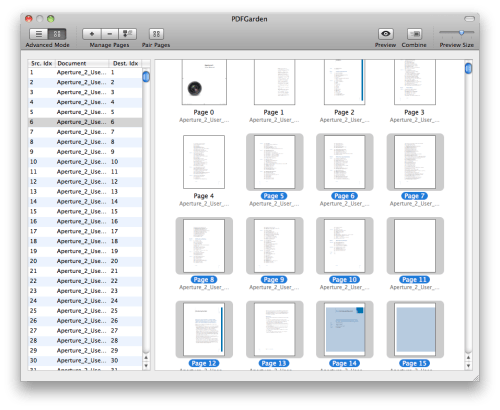
SQLabs has announced PDFGarden 3.0, their PDF management solution for Mac OS X. With a focus on ease-of-use, PDFGarden is a very powerful utility that lets anyone perform useful operations on PDF files. Via Drag & Drop, effortlessly combine, transform, arrange and reorder PDF documents.
PDFGarden takes advantage of Leopard's Quartz Rendering Technology and fully compatible with Apple's Preview. It features a very small application footprint (only 2 MB), and can efficiently work with thousands of PDF files and/or with PDF documents that contain thousands of pages.
Feature Highlights: * Automatic pair pages support * Dynamically rearrange files with real-time preview * Delete, combine, split functionality * Import one or more pages from another PDF without importing the entire file * Supports all QuickTime formats (PDF, JPEG, TIFF, PNG, PSD, PostScript, GIF and more) * File list supports Drag & Drop, reordering, sorting and more * Select individual or multiple pages from PDF and TIFF files * Preview window shows page contents for easy selection * Support for PDF bleed and trim boxes * Blazing speed thank to GPU support
"We felt there was a need for an easy to use application that can perform a lot of common operations on pdf files." said Marco Bambini, founder of SQLabs LLC. "We believe that PDFGarden has the potential to become the swiss army knife for pdf related actions."
Pricing and Availability: PDFGarden 3.0 is priced at $19.00 (USD) for a single-user license. A fully functional demo is available. The unregistered version has no time limit and allows the use of every feature of the registered version.
Get the iClarified Daily Newsletter
Apple news, rumors, tutorials, price drop alerts, in your inbox every evening, free.
Unsubscribe at any time.
Success!
You have been subscribed.
Add Comment
Would you like to be notified when someone replies or adds a new comment?
Yes (All Threads)
Yes (This Thread Only)
No
Notifications
Would you like to be notified when we post a new Apple news article or tutorial?









![How To Change Wallpaper on Mac [Video]](/images/tutorials/90512/90512/90512-160.jpg "How To Change Wallpaper on Mac [Video]")
![How To Turn Off Always On Display on iPhone [Video]](/images/tutorials/87524/87524/87524-160.jpg "How To Turn Off Always On Display on iPhone [Video]")





![16-Inch M5 Max MacBook Pro Drops $900 to New Low of $3,499 [Deal]](/images/news/102438/102438/102438-160.jpg "16-Inch M5 Max MacBook Pro Drops $900 to New Low of $3,499 [Deal]")
![Magic Keyboard for iPad Air Drops to $200 on Amazon [Deal]](/images/news/102402/102402/102402-160.jpg "Magic Keyboard for iPad Air Drops to $200 on Amazon [Deal]")
