With the release of iPhone OS 4, Pocket Watch will continue to bring you new and exciting features to let you print. Whether you use an iPhone, an iPad, an iPod touch, or all of the above you will be able to print from it with ActivePrint. With your iPhone, iPad, or iPod touch you can print many of the popular office documents such as word processor files (.doc, .docx, .rtf, and others), spreadsheets (.xls and .xlsx), presentations (.ppt and .pptx), and PDF documents.
Add to that the ability to print photos, contacts, notes, web pages, and more to any printer that you can connect to a Windows PC! It doesn't matter what printer you have. Print while you're on the go with ActivePrint on your iPhone OS 4 device!
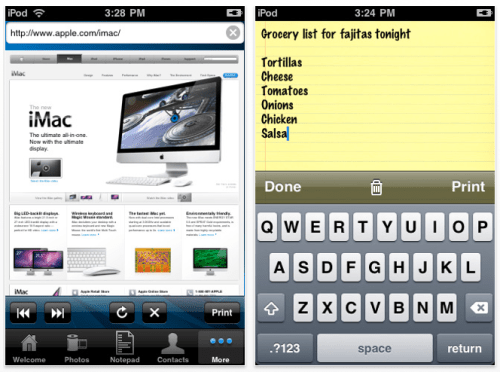
Here are some of the features available in this new version of ActivePrint 7 for your iPhone, iPod touch, or iPad: * Print office documents like word processor documents, spreadsheets, presentations, and more * Print photos from your photo album or your device's camera * Print the contents of your device's clipboard, letting you easily print content from other apps! * Print contacts from the address book and web pages * Print plain text from a built in notepad screen * Support for multiple copies, portrait/landscape printing, different quality of printing, and color or black & white printing * Print via any internet connect (Wi-Fi or EDGE/3G network) * Support for practically any printer available in the market
Pricing and Availability: A free lite version of ActivePrint 7.3 will be available worldwide exclusively through the AppStore in the Productivity category. Unlock the full features through an InApp purchase for only $3.99 (USD).
Get the iClarified Daily Newsletter
Apple news, rumors, tutorials, price drop alerts, in your inbox every evening, free.
Unsubscribe at any time.
Success!
You have been subscribed.
Add Comment
Would you like to be notified when someone replies or adds a new comment?
Yes (All Threads)
Yes (This Thread Only)
No
Notifications
Would you like to be notified when we post a new Apple news article or tutorial?
Yes
No
Comments (1)
Comments are closed for this article.
0
Al - April 9, 2010 at 12:42pm
They really need to be up front (instead of hiding it on their website) that this only works with Windows.




![John Ternus Emerges as Apple's De Facto Design Chief [Gurman]](/images/news/102555/102555/102555-160.jpg "John Ternus Emerges as Apple's De Facto Design Chief [Gurman]")





![How To Turn Off Always On Display on iPhone [Video]](/images/tutorials/87524/87524/87524-160.jpg "How To Turn Off Always On Display on iPhone [Video]")
![How To Change Wallpaper on Mac [Video]](/images/tutorials/90512/90512/90512-160.jpg "How To Change Wallpaper on Mac [Video]")





![16-Inch M5 Max MacBook Pro Drops $900 to New Low of $3,499 [Deal]](/images/news/102438/102438/102438-160.jpg "16-Inch M5 Max MacBook Pro Drops $900 to New Low of $3,499 [Deal]")
![Magic Keyboard for iPad Air Drops to $200 on Amazon [Deal]](/images/news/102402/102402/102402-160.jpg "Magic Keyboard for iPad Air Drops to $200 on Amazon [Deal]")
