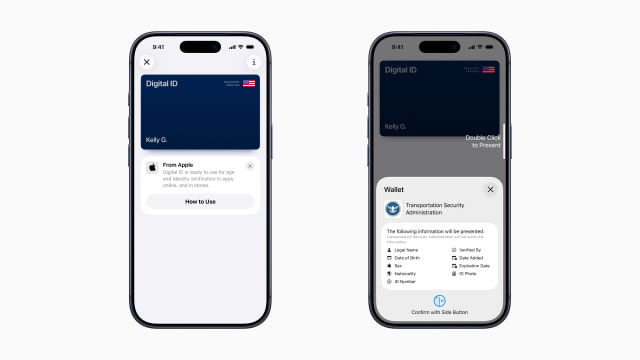
Apple has launched Digital ID, a new feature for Apple Wallet that lets users create and present a digital version of their identity using their U.S. passport. The new option offers a secure and private way to verify identity with an iPhone or Apple Watch.
At launch, Digital ID will roll out in beta at TSA checkpoints in over 250 U.S. airports for domestic travel. Apple notes that the feature is not a replacement for a physical passport and cannot be used for international travel. In the future, users will be able to present their Digital ID at other select businesses and organizations for identity and age verification in person, in apps, and online.
Adding a Digital ID involves scanning the photo page of a physical passport, reading the embedded chip with an iPhone's NFC, and taking a verification selfie that includes a series of head movements. Once verified, the Digital ID is stored securely in the Wallet app.
To present their ID, users can double-click the side or Home button to open Apple Wallet. After holding their iPhone or Apple Watch near an identity reader and reviewing what information is being requested, they can authorize the transfer using Face ID or Touch ID, without needing to unlock or hand over their device.
Apple says the feature is built on the privacy and security foundation of the iPhone. All passport data is encrypted and stored on-device, and Apple cannot see when or where a user presents their ID. Biometric authentication ensures only the device owner can share their information.
The launch expands on Apple's existing capability to add a driver's license or state ID to Apple Wallet, which is currently available in 12 states and Puerto Rico, and recently launched internationally in Japan with the My Number Card.
Take a look a the videos below for more details...
Get the iClarified Daily Newsletter
Apple news, rumors, tutorials, price drop alerts, in your inbox every evening, free.
Unsubscribe at any time.
Success!
You have been subscribed.
Add Comment
Would you like to be notified when someone replies or adds a new comment?
Yes (All Threads)
Yes (This Thread Only)
No
Notifications
Would you like to be notified when we post a new Apple news article or tutorial?





![Tim Cook Expected at White House State Dinner for Xi Jinping [Report]](/images/news/102260/102260/102260-160.jpg "Tim Cook Expected at White House State Dinner for Xi Jinping [Report]")
![Apple Debuts Official Trailer for 'Knife Edge: Chasing Michelin Stars' Season 2 [Video]](/images/news/102258/102258/102258-160.jpg "Apple Debuts Official Trailer for 'Knife Edge: Chasing Michelin Stars' Season 2 [Video]")









![Apple Studio Display XDR Hits All-Time Low of $2,969.99 ($329 Off) [Deal]](/images/news/101976/101976/101976-160.jpg "Apple Studio Display XDR Hits All-Time Low of $2,969.99 ($329 Off) [Deal]")
