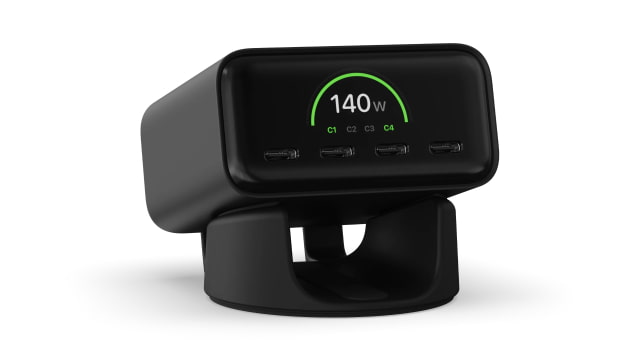
Satechi has launched the ChargeView 140W Desktop Charger, a four-port USB-C charging hub aimed at simplifying desk setups while adding real-time wattage monitoring.
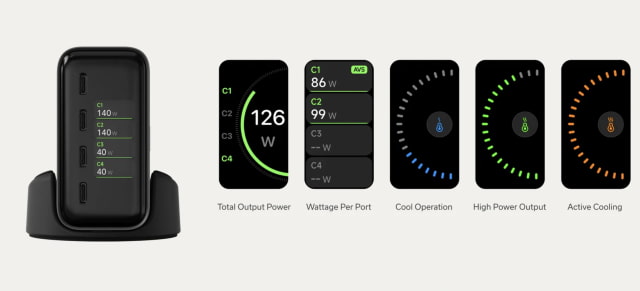
The charger uses gallium nitride technology and comes in a Space Black finish meant to sit on a desk rather than plug directly into a wall. There's a small LCD screen on the front that shows how much power each port is outputting. You can quickly see what each device is pulling, especially when multiple devices are connected at once. A modular stand is included, so it can be used vertically or laid flat depending on how you want it positioned.
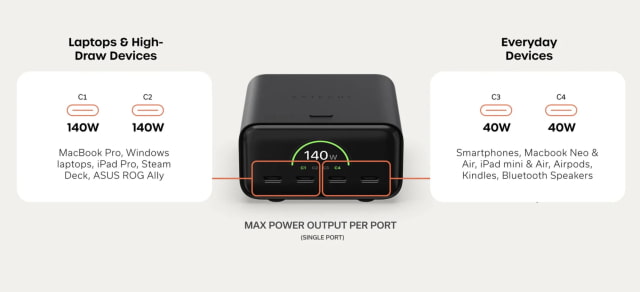
It provides up to 140W of total output across four USB-C ports and supports charging multiple devices at the same time. Power is shared between ports based on what's connected, and it adjusts automatically as devices are added or removed. The main port supports USB PD 3.2 with Adjustable Voltage Supply, while the other three ports use USB PD 3.1 with Programmable Power Supply. If you're charging a laptop, it makes sense to use the primary port.
Satechi says the idea here is to replace a pile of separate chargers with one unit. It works with USB-C and Thunderbolt devices, including laptops, tablets, and phones, and doesn't require any setup.
The ChargeView can handle a MacBook Pro along with smaller devices like an iPhone or Apple Watch at the same time. It's backed by a two-year limited warranty and is available now for $99.99.
Get the iClarified Daily Newsletter
Apple news, rumors, tutorials, price drop alerts, in your inbox every evening, free.
Unsubscribe at any time.
Success!
You have been subscribed.
Add Comment
Would you like to be notified when someone replies or adds a new comment?
Yes (All Threads)
Yes (This Thread Only)
No
Notifications
Would you like to be notified when we post a new Apple news article or tutorial?










![How To Change Wallpaper on Mac [Video]](/images/tutorials/90512/90512/90512-160.jpg "How To Change Wallpaper on Mac [Video]")
![How To Turn Off Always On Display on iPhone [Video]](/images/tutorials/87524/87524/87524-160.jpg "How To Turn Off Always On Display on iPhone [Video]")




![16-Inch M5 Max MacBook Pro Drops $900 to New Low of $3,499 [Deal]](/images/news/102438/102438/102438-160.jpg "16-Inch M5 Max MacBook Pro Drops $900 to New Low of $3,499 [Deal]")
![Magic Keyboard for iPad Air Drops to $200 on Amazon [Deal]](/images/news/102402/102402/102402-160.jpg "Magic Keyboard for iPad Air Drops to $200 on Amazon [Deal]")
![13-Inch M5 MacBook Air With 1TB Drops to $1,449 on Amazon [Deal]](/images/news/102345/102345/102345-160.jpg "13-Inch M5 MacBook Air With 1TB Drops to $1,449 on Amazon [Deal]")
