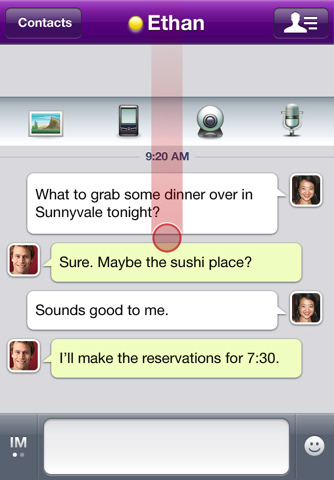
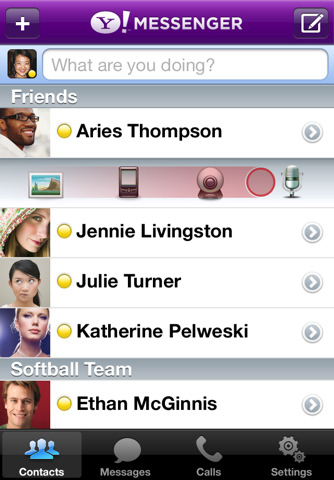
Yahoo has updated their Messenger app for iOS with the ability to make video calls and stream live video one-to-one.
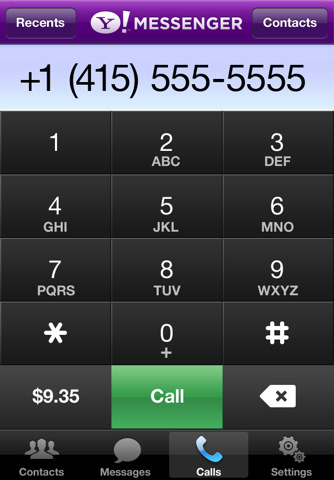
Features: • NEW - Video calls: Use Yahoo! Messenger to make video calls and stream live video one-to-one † • NEW - Voice calls: Make free voice calls to your Yahoo! Messenger friends • NEW - Low cost voice calls: Talk to your friends on their landline or mobile phone, and make low cost international calls with Yahoo! Voice Phone Out account. †† • NEW - Multitasking: Work with other iPhone apps while Yahoo! Messenger runs in the background† • Send free SMS messages via Yahoo! Messenger ††† • From iPhone to desktop and more: Connect with your IM friends in any way you want—mobile app to PC, mobile app to mobile app • Get notified for every message: Know when a new message arrives whether the app is running, in the background, or even if it's not open • Show and tell: Capture and share iPhone photos and video in real-time, with your Yahoo! Messenger buddies • Bring your friends in one place: Add your Windows Live Messenger contacts to your buddy list • Be creative: Use rich text and personal expressions, like emoticons and avatars, to update your friends • Enhanced performance: Get a simpler, faster, richer Yahoo! Messenger experience at your fingertips
† Available for iPhone 3GS/4 users running iOS 4.1 †† Available to premium users in select countries ††† Recipients of SMS may be charged by their carriers
Select Yahoo! Messenger for iPhone features are available as follows: • Video calling: For the optimal experience, an iPhone 3GS or iPhone 4, iOS 4.1 & WiFi is recommended •Voice calls to land line or mobile phone: Must be a Yahoo! Voice Phone Out subscriber in these select markets: US, France, Germany, Spain and Singapore •Multitasking: Available on iPhone 3GS or iPhone 4, iOS 4.1
You can download Yahoo! Messenger from the App Store for free.
Get the iClarified Daily Newsletter
Apple news, rumors, tutorials, price drop alerts, in your inbox every evening, free.
Unsubscribe at any time.
Success!
You have been subscribed.
Add Comment
Would you like to be notified when someone replies or adds a new comment?
Yes (All Threads)
Yes (This Thread Only)
No
Notifications
Would you like to be notified when we post a new Apple news article or tutorial?
Yes
No
Comments (5)
Comments are closed for this article.
0
obmaz - October 11, 2010 at 10:52pm
Update:
I got the video working when calling a Yahoo! messenger 10 running on Windows, but not when calling a Yahoo! messenger 3 running on Os X. So it is probibly an issue with the Messenger for Mac.
0
obmaz - October 11, 2010 at 10:34pm
I tried it, but could not choose the camera icon in the app to start a videocall.
The icon is there, but greyed out.
The problem is not the on the reciving part either, since it works from desktop to desktop.
Anyone else made it?
0
Frank - October 11, 2010 at 10:09pm
I guess you have to use a mirrow with a 3GS since it does not have a front facing camera.
0
jordan - October 11, 2010 at 8:17pm
Is this for 4.1 only? The iPhone to Computer video calling?






![Mac mini With M6 and M5 Pro Review Roundup [Video]](/images/news/102318/102318/102318-160.jpg "Mac mini With M6 and M5 Pro Review Roundup [Video]")
![Apple Releases macOS 27.2 Golden Gate Beta 2 to Developers [Download]](/images/news/102327/102327/102327-160.jpg "Apple Releases macOS 27.2 Golden Gate Beta 2 to Developers [Download]")
![Apple Seeds Second Betas of watchOS 27.2, tvOS 27.2, and visionOS 27.2 to Developers [Download]](/images/news/102324/102324/102324-160.jpg "Apple Seeds Second Betas of watchOS 27.2, tvOS 27.2, and visionOS 27.2 to Developers [Download]")
![Apple Releases iOS 27.2 Beta 2 and iPadOS 27.2 Beta 2 to Developers [Download]](/images/news/102321/102321/102321-160.jpg "Apple Releases iOS 27.2 Beta 2 and iPadOS 27.2 Beta 2 to Developers [Download]")









![Apple Studio Display XDR Hits All-Time Low of $2,969.99 ($329 Off) [Deal]](/images/news/101976/101976/101976-160.jpg "Apple Studio Display XDR Hits All-Time Low of $2,969.99 ($329 Off) [Deal]")
