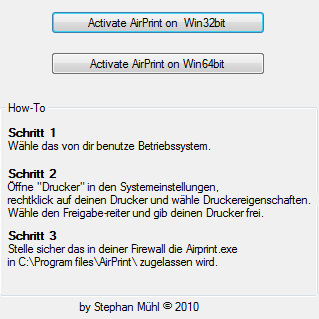
AirPrint Activator is a new tool by Stephan Muhl for those looking to use AirPrint with Windows.
Just download the one-click tool, install and activate AirPrint for Windows 32bit or 64bit. Then you have to have the printer in System Preferences (printer properties) to share. Already, all printer under Windows 32-bit or Windows 64-bit for IOS 4.2.1 and AirPrint available. Please note Step 3: AirPrint.exe must be enabled in Windows Firewall.
Apple news, rumors, tutorials, price drop alerts, in your inbox every evening, free.
Unsubscribe at any time.
Success!
You have been subscribed.
Add Comment
Would you like to be notified when someone replies or adds a new comment?
Yes (All Threads)
Yes (This Thread Only)
No
Notifications
Would you like to be notified when we post a new Apple news article or tutorial?
Yes
No
Comments (5)
Comments are closed for this article.
0
Stephan Mühl - November 28, 2010 at 8:19am
Hi,
im the developer.
ive opened a blog with an updated version of my Activator with english language
0
Matej - November 25, 2010 at 5:58pm
Works great. I have a 5 years old HP psc 1210 multidevice(printer,scanner) connected through usb to Pc with win 7. Of course i have wifi router at home and the Airpirint on iphone finds the printer and in works great!! Nice to have that feature.
0
vvp - November 25, 2010 at 5:47pm
can thisbe used to connect my iphone to my wirless printer which is connected to my windows laptop
0
Jess - September 26, 2011 at 6:36pm
I got the AirPrint installed and my pad sees my printer but when I pick one it insists on user name/password. As I run my main computer as admin with no password and my print shares are not supposed to be passworded I can't figure out how to fix things:(
0
larry - December 31, 2012 at 10:41pm
you have to set a password and user name as in admin










![How To Change Wallpaper on Mac [Video]](/images/tutorials/90512/90512/90512-160.jpg "How To Change Wallpaper on Mac [Video]")
![How To Turn Off Always On Display on iPhone [Video]](/images/tutorials/87524/87524/87524-160.jpg "How To Turn Off Always On Display on iPhone [Video]")





![16-Inch M5 Max MacBook Pro Drops $900 to New Low of $3,499 [Deal]](/images/news/102438/102438/102438-160.jpg "16-Inch M5 Max MacBook Pro Drops $900 to New Low of $3,499 [Deal]")
![Magic Keyboard for iPad Air Drops to $200 on Amazon [Deal]](/images/news/102402/102402/102402-160.jpg "Magic Keyboard for iPad Air Drops to $200 on Amazon [Deal]")
