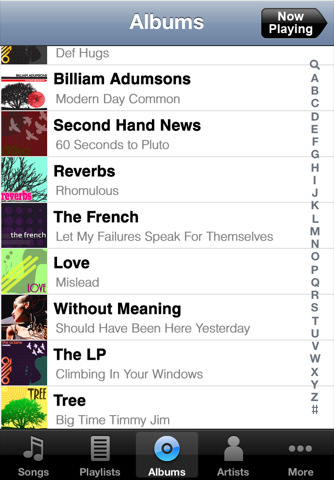
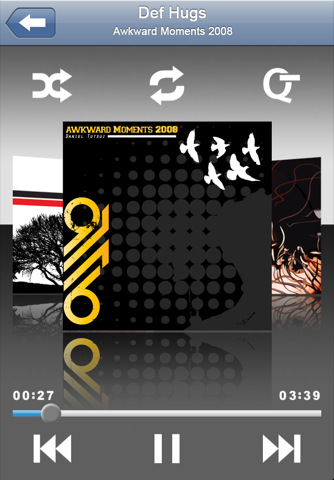
Apple has approved the new mSpot Music app that lets you take your entire iTunes library and stream it from the cloud.
Enjoy your music anywhere– in two easy steps: 1. Go to www.mSpot.com and put your iTunes collection from your PC/Mac into your own personal music locker on the Internet. Once you've uploaded your music "into the Cloud" – you can access it anytime, anywhere from your iPhone or any PC/Mac. 2. Download the mSpot Music app for your iPhone.
All your online music will magically be there already! Throw away your USB cord and say goodbye to manual syncing – mSpot does it all auto-magically for you.
Benefits? No work. No Cables. Stream your music, without using phone storage. Get song lyrics on your phone – along with all your playlists and cover art from iTunes.
You can download mSpot Music from the App Store for free. The service lets you store 2GB of music free and offers a paid plan of 40GB, enough for approximately 32,000 songs, for $3.99/month.
Get the iClarified Daily Newsletter
Apple news, rumors, tutorials, price drop alerts, in your inbox every evening, free.
Unsubscribe at any time.
Success!
You have been subscribed.
Add Comment
Would you like to be notified when someone replies or adds a new comment?
Yes (All Threads)
Yes (This Thread Only)
No
Notifications
Would you like to be notified when we post a new Apple news article or tutorial?










![How To Change Wallpaper on Mac [Video]](/images/tutorials/90512/90512/90512-160.jpg "How To Change Wallpaper on Mac [Video]")
![How To Turn Off Always On Display on iPhone [Video]](/images/tutorials/87524/87524/87524-160.jpg "How To Turn Off Always On Display on iPhone [Video]")





![16-Inch M5 Max MacBook Pro Drops $900 to New Low of $3,499 [Deal]](/images/news/102438/102438/102438-160.jpg "16-Inch M5 Max MacBook Pro Drops $900 to New Low of $3,499 [Deal]")
![Magic Keyboard for iPad Air Drops to $200 on Amazon [Deal]](/images/news/102402/102402/102402-160.jpg "Magic Keyboard for iPad Air Drops to $200 on Amazon [Deal]")
