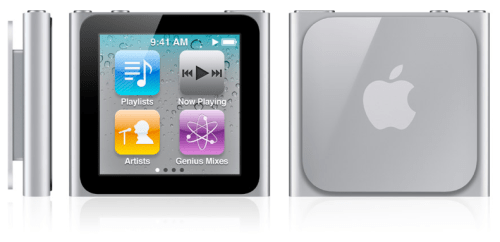
Apple has released an update to the sixth generation iPod nano that lets you turn it off
With iPod software update version 1.1 for iPod nano (6th generation), you will be able to: ● Completely turn off the iPod, rather than just put the device to sleep. ● Control music or radio playback using the Sleep/Wake button without having to look at the device.
Turning iPod nano off completely and turning it on again ● Hold down the Sleep/Wake button for several seconds to turn iPod nano off completely.
Controlling audio playback with the Sleep/Wake button You can double-click the Sleep/Wake button to play the next audio track, or change the setting so that double-clicking pauses or plays the current track. To set the Sleep/Wake button for audio playback: ● On the Home screen, tap Settings. ● Tap Music, and then tap the Sleep/Wake Button. ● Tap the On/Off switch. ● Tap either Next Track or Play/Pause.
Get the iClarified Daily Newsletter
Apple news, rumors, tutorials, price drop alerts, in your inbox every evening, free.
Unsubscribe at any time.
Success!
You have been subscribed.
Add Comment
Would you like to be notified when someone replies or adds a new comment?
Yes (All Threads)
Yes (This Thread Only)
No
Notifications
Would you like to be notified when we post a new Apple news article or tutorial?









![How To Change Wallpaper on Mac [Video]](/images/tutorials/90512/90512/90512-160.jpg "How To Change Wallpaper on Mac [Video]")
![How To Turn Off Always On Display on iPhone [Video]](/images/tutorials/87524/87524/87524-160.jpg "How To Turn Off Always On Display on iPhone [Video]")





![16-Inch M5 Max MacBook Pro Drops $900 to New Low of $3,499 [Deal]](/images/news/102438/102438/102438-160.jpg "16-Inch M5 Max MacBook Pro Drops $900 to New Low of $3,499 [Deal]")
![Magic Keyboard for iPad Air Drops to $200 on Amazon [Deal]](/images/news/102402/102402/102402-160.jpg "Magic Keyboard for iPad Air Drops to $200 on Amazon [Deal]")
