VMware View Client for iPad makes it easy to access your Windows virtual desktop from your iPad with the best possible user experience on the Local Area Network (LAN) or across a Wide Area Network (WAN).
WORK THE WAY YOU WANT TO Work on your Windows based VMware View virtual desktop right from your iPad giving you on the go access from any location. Support for the PCoIP display protocol means your desktop is fast and responsive regardless of where you are.
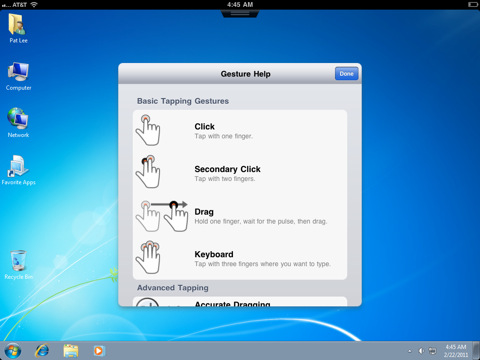
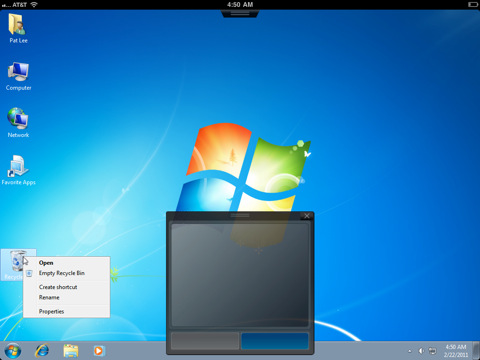
BEST OF BOTH WORLDS Feel right at home with support for native iPad gestures for quick and easy navigation around your desktop. Need to do something more complex? Call up the trackpad for better mouse targeting or the keyboard for efficient text input.
SIMPLE CONNECTIVITY Tightly integrated with the VMware View 4.6 release for simple setup and connectivity. Quickly reconnect to you desktop by selecting from the recent desktop list.
UNMATCHED PERFORMANCE The adaptive capabilities of the PCoIP protocol are optimized to deliver the best user experience even over low bandwidth and high latency connections.
SECURE FROM ANY LOCATION At your desk or away from the office you're always secure. Access your View desktop over WiFi or 3G and with tight VMware View 4.6 integration your desktop is delivered securely to you wherever you are.
You can download VMware View for iPad from the App Store for free.
Get the iClarified Daily Newsletter
Apple news, rumors, tutorials, price drop alerts, in your inbox every evening, free.
Unsubscribe at any time.
Success!
You have been subscribed.
Add Comment
Would you like to be notified when someone replies or adds a new comment?
Yes (All Threads)
Yes (This Thread Only)
No
Notifications
Would you like to be notified when we post a new Apple news article or tutorial?










![How To Change Wallpaper on Mac [Video]](/images/tutorials/90512/90512/90512-160.jpg "How To Change Wallpaper on Mac [Video]")
![How To Turn Off Always On Display on iPhone [Video]](/images/tutorials/87524/87524/87524-160.jpg "How To Turn Off Always On Display on iPhone [Video]")





![16-Inch M5 Max MacBook Pro Drops $900 to New Low of $3,499 [Deal]](/images/news/102438/102438/102438-160.jpg "16-Inch M5 Max MacBook Pro Drops $900 to New Low of $3,499 [Deal]")
![Magic Keyboard for iPad Air Drops to $200 on Amazon [Deal]](/images/news/102402/102402/102402-160.jpg "Magic Keyboard for iPad Air Drops to $200 on Amazon [Deal]")
