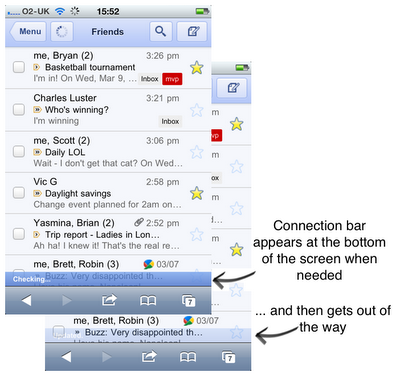
Google has introduced a new 'Connection Bar' in Gmail for iPhone that lets you know the status of your connection and mail activity.
Using Gmail in Safari on your iPhone gives you access to fast search, conversation view, stars, labels, and more. But it's sometimes frustrating not knowing whether your email has been sent or whether your phone has a functioning internet connection at all. To address this, we recently introduced the "connection bar." The connection bar appears at the bottom of the screen when needed to give you the info you want— and then gets out of the way.
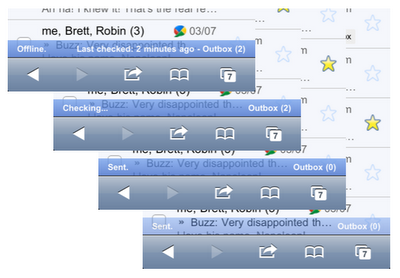
The connection bar appears when the app launches and is checking for new mail. It also appears when your phone is offline, back online and sending, and then again when it finishes sending all messages.
Take a look by visiting gmail.com on your iPhone.
Get the iClarified Daily Newsletter
Apple news, rumors, tutorials, price drop alerts, in your inbox every evening, free.
Unsubscribe at any time.
Success!
You have been subscribed.
Add Comment
Would you like to be notified when someone replies or adds a new comment?
Yes (All Threads)
Yes (This Thread Only)
No
Notifications
Would you like to be notified when we post a new Apple news article or tutorial?



![OpenAI Launches Dots, Personal AI Agents That Work in the Background [Video]](/images/news/102489/102489/102489-160.jpg "OpenAI Launches Dots, Personal AI Agents That Work in the Background [Video]")
![AirPods 5 Earn 2/10 Repairability Score in iFixit Teardown [Video]](/images/news/102486/102486/102486-160.jpg "AirPods 5 Earn 2/10 Repairability Score in iFixit Teardown [Video]")
![Apple CEO John Ternus Pushes Faster Launches, Leaner Management [Report]](/images/news/102483/102483/102483-160.jpg "Apple CEO John Ternus Pushes Faster Launches, Leaner Management [Report]")




![How To Find Your iPhone IMEI Number [Video]](/images/tutorials/83557/83557/83557-160.jpg "How To Find Your iPhone IMEI Number [Video]")



![16-Inch M5 Max MacBook Pro Drops $900 to New Low of $3,499 [Deal]](/images/news/102438/102438/102438-160.jpg "16-Inch M5 Max MacBook Pro Drops $900 to New Low of $3,499 [Deal]")
![Magic Keyboard for iPad Air Drops to $200 on Amazon [Deal]](/images/news/102402/102402/102402-160.jpg "Magic Keyboard for iPad Air Drops to $200 on Amazon [Deal]")
![13-Inch M5 MacBook Air With 1TB Drops to $1,449 on Amazon [Deal]](/images/news/102345/102345/102345-160.jpg "13-Inch M5 MacBook Air With 1TB Drops to $1,449 on Amazon [Deal]")

