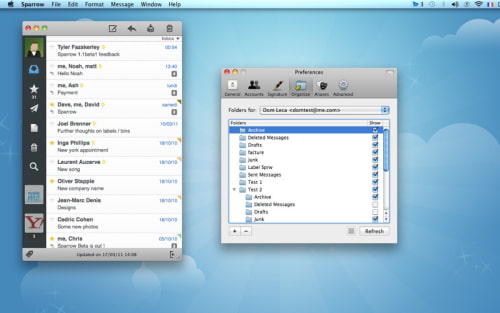
Sparrow an email client for Mac OS X has been updated with general IMAP support.
Discover a new way to handle mails on your Mac. Sparrow is a minimalist mail application designed to keep things simple and efficient. No fancy stuff here... just your mail and nothing else.
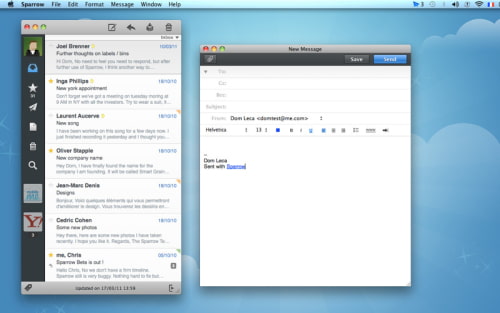
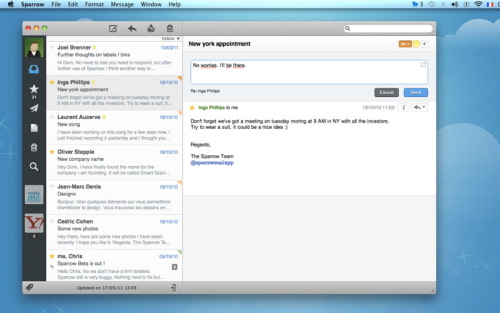
Features: ● Threads: Quickly flick through threaded conversations on your mac like never before. ● Labels and Folders: Create and edit Labels and Folders straight from within Sparrow. Easily keep a clean and tidy inbox. ● Quick reply: Responding to your mails as never been so simple. Click, write and send in the same window. ● Formatting Bar: Change fonts, font size, add bulleted or numbered list. Sparrow makes it easy. ● Multitouch: Sparrow takes advantage of the power of multitouch gestures on the desktop ● Quicklook: Simply tap space to preview all your attachments ● Inline attachments: Drag & drop images and documents straight into your mail ● Notifications: Stay up to date with your mail stream on selected accounts. ● Menu Bar: Always keep an eye on your inbox. ● Alias: Sending mails from different addresses has never been that easy. ● Priority Inbox: If you use Gmail, Sparrow supports Priority Inbox. ● Minimal mode: Hide message previews and see more mail in a glimpse.
What's New In This Version: ● General IMAP support: you can now use Gmail, Mobile Me, Yahoo, AOL and any custom IMAP account you want with Sparrow ● Priority Inbox: all the power of Gmail's Priority Inbox is now integrated straight in Sparrow ● Unread View: a dedicated view to browse your unread mails. ● Per Alias signature: you can now have a signature for each of your avatars ● Formatting bar: choose your font, font size, text color, quote level and more directly from the compose window ● Minimal mode: allows you to hide the message previews in the message list ● Multitouch gestures ● Contact group support ● Gravatar support ● Bug fixes
You can purchase Sparrowfrom the App Store for $9.99.
Get the iClarified Daily Newsletter
Apple news, rumors, tutorials, price drop alerts, in your inbox every evening, free.
Unsubscribe at any time.
Success!
You have been subscribed.
Add Comment
Would you like to be notified when someone replies or adds a new comment?
Yes (All Threads)
Yes (This Thread Only)
No
Notifications
Would you like to be notified when we post a new Apple news article or tutorial?









![How To Change Wallpaper on Mac [Video]](/images/tutorials/90512/90512/90512-160.jpg "How To Change Wallpaper on Mac [Video]")
![How To Turn Off Always On Display on iPhone [Video]](/images/tutorials/87524/87524/87524-160.jpg "How To Turn Off Always On Display on iPhone [Video]")





![16-Inch M5 Max MacBook Pro Drops $900 to New Low of $3,499 [Deal]](/images/news/102438/102438/102438-160.jpg "16-Inch M5 Max MacBook Pro Drops $900 to New Low of $3,499 [Deal]")
![Magic Keyboard for iPad Air Drops to $200 on Amazon [Deal]](/images/news/102402/102402/102402-160.jpg "Magic Keyboard for iPad Air Drops to $200 on Amazon [Deal]")
