Adobe has released a new iPad app entitled 'Adobe Nav' that lets you control and interact with Photoshop CS5.
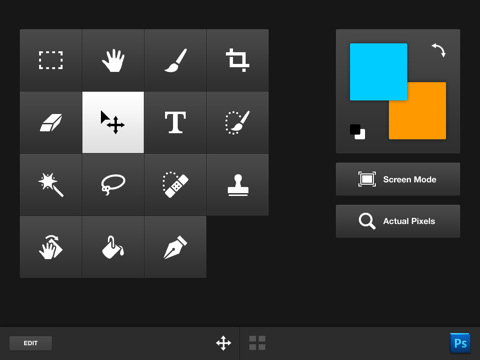
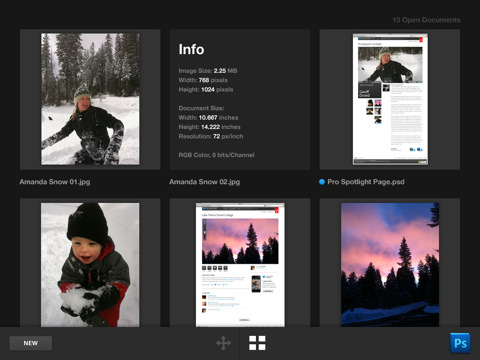
With Adobe Nav—a Photoshop Touch app for Adobe Photoshop CS5 software (version 12.0.4 or later required)—you can now use your iPad to activate Photoshop tools and browse and select open Photoshop documents. As long as you have a network connection between your iPad and computer, you can customize the Photoshop CS5 toolbar on your iPad to easily access the tools you use most. Browse, reorder, view, and zoom in on up to 200 open Photoshop documents on your iPad. Tap a document on your iPad to immediately make it active in Photoshop CS5. And use your iPad to easily share and review files you are working on in Photoshop CS5 while you are away from your desk or computer.
Features: •Use your fingertips to select Photoshop CS5 tools from your iPad screen. •Customize the way the Photoshop CS5 toolbar appears on your iPad screen to make your most-used tools easily accessible. You can save one Adobe Nav toolbar configuration with up to 16 tools. •Browse, reorder, view, and zoom in on up to 200 open Photoshop documents on your iPad screen. •Tap any open document in Photoshop on your iPad to make it the active document in Photoshop CS5.
You can purchase Adobe Nav from the App Store for $1.99.
Get the iClarified Daily Newsletter
Apple news, rumors, tutorials, price drop alerts, in your inbox every evening, free.
Unsubscribe at any time.
Success!
You have been subscribed.
Add Comment
Would you like to be notified when someone replies or adds a new comment?
Yes (All Threads)
Yes (This Thread Only)
No
Notifications
Would you like to be notified when we post a new Apple news article or tutorial?










![How To Change Wallpaper on Mac [Video]](/images/tutorials/90512/90512/90512-160.jpg "How To Change Wallpaper on Mac [Video]")
![How To Turn Off Always On Display on iPhone [Video]](/images/tutorials/87524/87524/87524-160.jpg "How To Turn Off Always On Display on iPhone [Video]")





![16-Inch M5 Max MacBook Pro Drops $900 to New Low of $3,499 [Deal]](/images/news/102438/102438/102438-160.jpg "16-Inch M5 Max MacBook Pro Drops $900 to New Low of $3,499 [Deal]")
![Magic Keyboard for iPad Air Drops to $200 on Amazon [Deal]](/images/news/102402/102402/102402-160.jpg "Magic Keyboard for iPad Air Drops to $200 on Amazon [Deal]")
