Apple has updated GarageBand for iPad with audio out support over AirPlay, Bluetooth, and HDMI.
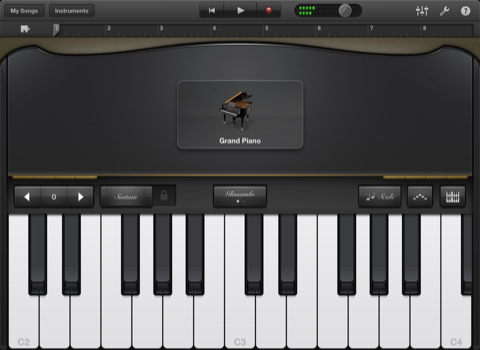
GarageBand turns your iPad into a collection of Touch Instruments and a full-featured recording studio — so you can make music anywhere you go. Use Multi-Touch gestures to play pianos, organs, guitars, drums, and basses on your iPad. They sound and play like their counterparts, but let you do things you could never do on a real instrument. Enjoy a full range of Smart Instruments that make you sound like a pro — even if you've never played a note before. Plug an electric guitar into your iPad and play through classic amps and stompbox effects. Use the built-in microphone or a guitar to record, or capture any performance. Then mix up to eight tracks to create a song you can share.
Play your iPad like a musical instrument. • Perform on dozens of musical instruments on the innovative Multi-Touch keyboard. • Tap out beats from the seat of acoustic and electronic drum kits. • Recreate legendary guitar rigs on your iPad with 9 amps and 10 stompbox effects. • Record your voice using the built-in microphone, and apply fun sound effects. • Use the Sampler to create an instrument from sounds you record, then play them on a keyboard.
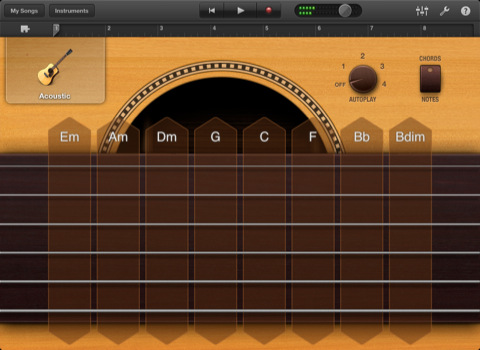
Sound like a virtuoso with Smart Instruments. • Tap chords to instantly create keyboard grooves with the Smart Keyboard. • Strum chords on acoustic and electric Smart Guitars, or trigger fingerpicking patterns for popular chords. • Groove with an onscreen electric or upright Smart Bass by tapping on chords. • Drag drum instruments onto a grid to create your own beats with the Smart Drums.
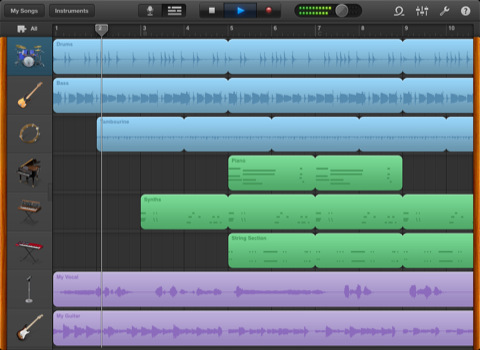
Create a song anywhere you go. • Arrange and mix your song with up to eight tracks using Touch Instruments, audio recordings, and loops. • Trim and place musical regions exactly where you want them to play. • Use the Mixer to fine-tune each track's volume – solo or mute any track, or adjust pan, reverb, and echo. • Use over 250 professionally prerecorded loops as a backing band to your song.
Share your songs. • Email songs right from your iPad (AAC). • Export your song and add it to the iTunes library on your Mac or PC. • Send a project to your Mac and open it in GarageBand to continue refining your song.
What's New In This Version: • Support for audio output over AirPlay, Bluetooth devices and HDMI with the Apple Digital AV Adapter. • Import of AIFF, WAV, CAF audio files and Apple Loops (16 bit, 44.1 kHz). • Allows copy and paste of audio from supported apps into GarageBand. • Addresses occurrences of GarageBand freezing while playing Smart Instruments. • Improves overall stability and addresses a number of minor issues.
You can purchase GarageBand from the App Store for $4.99.








![How To Change Wallpaper on Mac [Video]](/images/tutorials/90512/90512/90512-160.jpg "How To Change Wallpaper on Mac [Video]")
![How To Turn Off Always On Display on iPhone [Video]](/images/tutorials/87524/87524/87524-160.jpg "How To Turn Off Always On Display on iPhone [Video]")





![16-Inch M5 Max MacBook Pro Drops $900 to New Low of $3,499 [Deal]](/images/news/102438/102438/102438-160.jpg "16-Inch M5 Max MacBook Pro Drops $900 to New Low of $3,499 [Deal]")
![Magic Keyboard for iPad Air Drops to $200 on Amazon [Deal]](/images/news/102402/102402/102402-160.jpg "Magic Keyboard for iPad Air Drops to $200 on Amazon [Deal]")
