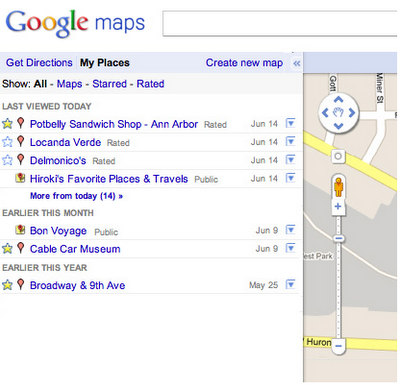
Google today unveiled a new My Places tab on Google Maps, which helps you quickly view and interact with your saved maps, starred locations, and rated businesses.
The My Places tab replaces the My Maps tab in the Google Maps toolbar. Items are organized by date with your most recent activity at the top, and filters make it easy to sort and view only your maps, starred locations or rated places. And of course, you can still create and share personalized My Maps through the "Create new map" link.
My Places also simplifies your ability to manage the locations that make up your personalized maps experience. Using the drop-down arrow next to each location in your list, you can easily delete any of your saved maps, stars or Google Places ratings. These personalization changes will automatically be synchronized across all other Google properties including Google Places, Google Maps, and Google Maps for mobile.
You can try it out at the link below...
Get the iClarified Daily Newsletter
Apple news, rumors, tutorials, price drop alerts, in your inbox every evening, free.
Unsubscribe at any time.
Success!
You have been subscribed.
Add Comment
Would you like to be notified when someone replies or adds a new comment?
Yes (All Threads)
Yes (This Thread Only)
No
Notifications
Would you like to be notified when we post a new Apple news article or tutorial?









![How To Change Wallpaper on Mac [Video]](/images/tutorials/90512/90512/90512-160.jpg "How To Change Wallpaper on Mac [Video]")
![How To Turn Off Always On Display on iPhone [Video]](/images/tutorials/87524/87524/87524-160.jpg "How To Turn Off Always On Display on iPhone [Video]")





![16-Inch M5 Max MacBook Pro Drops $900 to New Low of $3,499 [Deal]](/images/news/102438/102438/102438-160.jpg "16-Inch M5 Max MacBook Pro Drops $900 to New Low of $3,499 [Deal]")
![Magic Keyboard for iPad Air Drops to $200 on Amazon [Deal]](/images/news/102402/102402/102402-160.jpg "Magic Keyboard for iPad Air Drops to $200 on Amazon [Deal]")
