GitHub, a website for hosting software development projects that use the Git revision control system, has released an application for Mac.
GitHub for Mac lets you Share code on github.com, Clone repositories, Browse history, Commit changes, and Branch code.
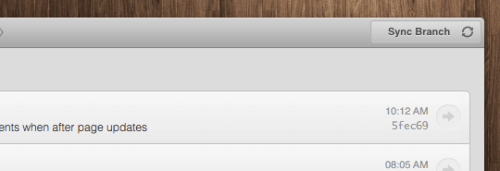
Synchronize branches The sync button pushes your changes to GitHub and pulls down other's changes in one operation. It notifies you when you have changes you haven't pushed or there are new changes on GitHub you haven't pulled down.
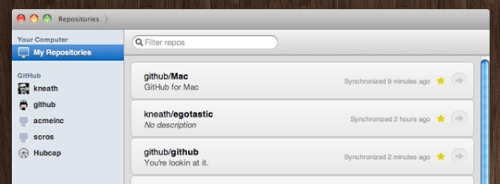
Clone repositories in one click When you add repositories to GitHub for Mac, we automatically match them up with any organizations you belong to. Want to pull down a repository from GitHub.com? Check out the Clone in Mac button on the website.
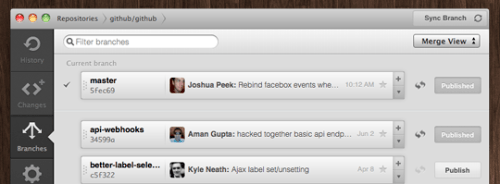
Powerfully simple branching Branching is one of Git's best features. We've made it easy to try out remote branches, create new local branches and publish branches to share with others.
You can download GitHub for Mac from the link below...
[via Vinnie]
Get the iClarified Daily Newsletter
Apple news, rumors, tutorials, price drop alerts, in your inbox every evening, free.
Unsubscribe at any time.
Success!
You have been subscribed.
Add Comment
Would you like to be notified when someone replies or adds a new comment?
Yes (All Threads)
Yes (This Thread Only)
No
Notifications
Would you like to be notified when we post a new Apple news article or tutorial?









![How To Change Wallpaper on Mac [Video]](/images/tutorials/90512/90512/90512-160.jpg "How To Change Wallpaper on Mac [Video]")
![How To Turn Off Always On Display on iPhone [Video]](/images/tutorials/87524/87524/87524-160.jpg "How To Turn Off Always On Display on iPhone [Video]")





![16-Inch M5 Max MacBook Pro Drops $900 to New Low of $3,499 [Deal]](/images/news/102438/102438/102438-160.jpg "16-Inch M5 Max MacBook Pro Drops $900 to New Low of $3,499 [Deal]")
![Magic Keyboard for iPad Air Drops to $200 on Amazon [Deal]](/images/news/102402/102402/102402-160.jpg "Magic Keyboard for iPad Air Drops to $200 on Amazon [Deal]")
