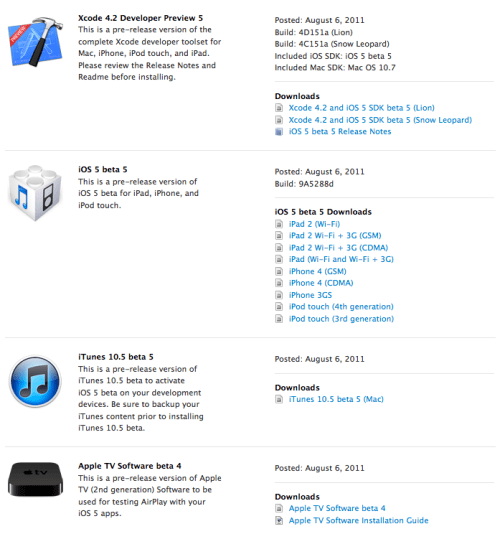
Apple has just released iOS 5 Beta 5 to developers for download. Alongside the new firmware comes Xcode 4.2 Developer Preview 5 and iTunes 10.5 beta 5. To update OTA, you must first erase all content and settings on your device. The delta update is 128MB.
Let us know in the comments what you find!
Get the iClarified Daily Newsletter
Apple news, rumors, tutorials, price drop alerts, in your inbox every evening, free.
Unsubscribe at any time.
Success!
You have been subscribed.
Add Comment
Would you like to be notified when someone replies or adds a new comment?
Yes (All Threads)
Yes (This Thread Only)
No
Notifications
Would you like to be notified when we post a new Apple news article or tutorial?
Yes
No
Comments (10)
Comments are closed for this article.
0
Rob - August 8, 2011 at 4:57am
The official dev site said to delete settings only if you update OTA. I suspect you can alt-restore no problem (which is what many did).
0
Miguel - August 8, 2011 at 4:18am
Did not erase data and settings, straight alt restore with perviously jailbroken 4.32 iPad 1. Not one glitch yet. And zippy too
0
Momo - August 7, 2011 at 10:38am
I read in iclarified And do it
Works great
0
ricardo - August 6, 2011 at 11:22pm
I just updated my phone and its awesome ! it did not erase anything that i had is less buggy , they fix the wifi issue that hotspot will not over over wifi. is faster. the screen does not take long to go to bright . is pretty good not
0
raksasok - August 7, 2011 at 7:38pm
hi , how do you upgrade iOS 5 ? i have iPhone 3gs . can i upgrade too.
thank you
0
nixx - August 6, 2011 at 11:14pm
it woks for me without erase my data. ios 5 beta 5 is really really fast on my phone. wow
0
t11chb - August 6, 2011 at 8:03pm
I never erased my contents and settings!
0
Andrew - August 6, 2011 at 8:38pm
Combatting the non Dev with that move. Erase content on your daily use phone... Checkmate Apple
0
digihead - August 6, 2011 at 10:46pm
oh, c'mon! guys are developers! just they are not decided jet what to develop! :p
0
digihead - August 7, 2011 at 9:47pm
oh, that's good one! :D you mast be one hell of dev! :D it just feels in every word you say! :D:D:D










![How To Change Wallpaper on Mac [Video]](/images/tutorials/90512/90512/90512-160.jpg "How To Change Wallpaper on Mac [Video]")
![How To Turn Off Always On Display on iPhone [Video]](/images/tutorials/87524/87524/87524-160.jpg "How To Turn Off Always On Display on iPhone [Video]")





![16-Inch M5 Max MacBook Pro Drops $900 to New Low of $3,499 [Deal]](/images/news/102438/102438/102438-160.jpg "16-Inch M5 Max MacBook Pro Drops $900 to New Low of $3,499 [Deal]")
![Magic Keyboard for iPad Air Drops to $200 on Amazon [Deal]](/images/news/102402/102402/102402-160.jpg "Magic Keyboard for iPad Air Drops to $200 on Amazon [Deal]")
