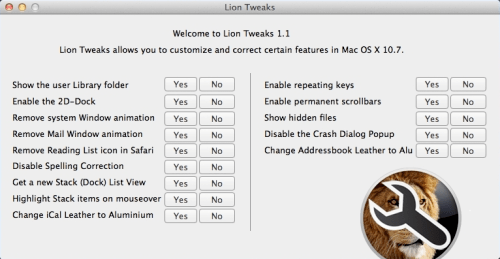
Lion Tweaks is a new app by Fredrik W that lets you 'correct certain annoying new features in Mac OS X 10.7.'
Here is the list of toggles that Lion Tweaks lets you easily set: ● Show th use Library folder ● Enable the 2D-Dock ● Remove system Window animation ● Remove Mail Window animation ● Remove Reading List icon in Safari ● Disable Spelling Correction ● Get a new Stack (Dock) List View ● Highlight Stack items on mouseover ● Change iCal Leather to Aluminium ● Enable repeating keys ● Enable permanent scrollbars ● Show hidden files ● Disable the Crash Dialog Popup ● Change Addressbook Leather to Aluminium
You can download Lion Tweaks 1.1 for free from the developer's website at the link below...
Apple news, rumors, tutorials, price drop alerts, in your inbox every evening, free.
Unsubscribe at any time.
Success!
You have been subscribed.
Add Comment
Would you like to be notified when someone replies or adds a new comment?
Yes (All Threads)
Yes (This Thread Only)
No
Notifications
Would you like to be notified when we post a new Apple news article or tutorial?
Yes
No
Comments (2)
Comments are closed for this article.
0
74tz - August 9, 2011 at 10:01pm
For a future update to this application, the how about adding the ability to change the horrible new grey-scale Finder Sidebar icons back to the colour ones as found in 10.6 & prior, change the Sidebar background back to blue and change all the grey scrollbars back to blue [system-wide] - Finder's appearance in Lion looks so drab now. I could just about accept the colour scheme changes made to iTunes not long ago but not system-wide... :-/
0
Fredrik - August 10, 2011 at 11:04pm
Thanks for the tip, maybe I will!
- Fredrik (the developer)










![How To Change Wallpaper on Mac [Video]](/images/tutorials/90512/90512/90512-160.jpg "How To Change Wallpaper on Mac [Video]")
![How To Turn Off Always On Display on iPhone [Video]](/images/tutorials/87524/87524/87524-160.jpg "How To Turn Off Always On Display on iPhone [Video]")





![16-Inch M5 Max MacBook Pro Drops $900 to New Low of $3,499 [Deal]](/images/news/102438/102438/102438-160.jpg "16-Inch M5 Max MacBook Pro Drops $900 to New Low of $3,499 [Deal]")
![Magic Keyboard for iPad Air Drops to $200 on Amazon [Deal]](/images/news/102402/102402/102402-160.jpg "Magic Keyboard for iPad Air Drops to $200 on Amazon [Deal]")
