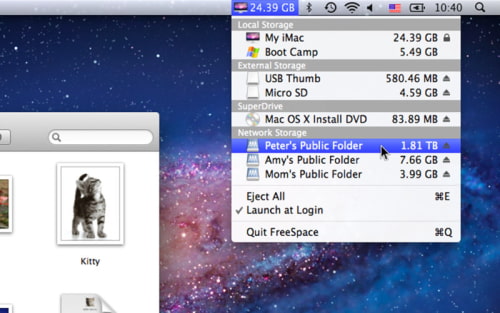
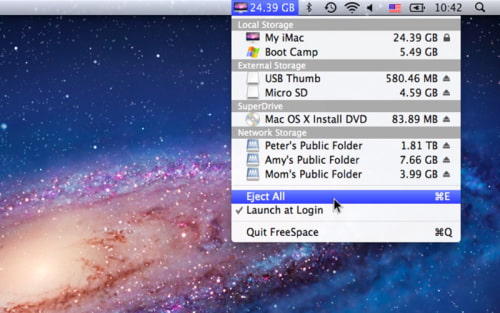
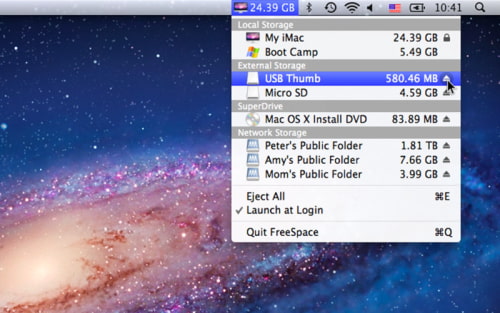
FreeSpace is a menu bar utility that lets you manage your connected drives.
✔ FreeSpace combines many status bar apps into one - Eject All by 1-click - Display free spaces of all connected drives - Mount and Eject completion indicator
✔ Detail Features - Eject all external drives and disk images by 1-click or ⌘E - Display the free spaces of all your connected drives on the menu - Display the free space of any local drive on the status bar - Drives are grouped and displayed in their own categories - Eject any single external drive or disk image - Open any drive in Finder by clicking the menu - Drives information are updated in realtime
✔ Ultra Efficient - Ultra-low CPU and memory consumption - Ultra-fast auto-launch when login
✔ Language Support - English, 日本語, 正體中文, 簡體中文
✔ Mac Requirement - OSX 10.6.8 or above
You can purchase FreeSpace from the App Store for $0.99.









![How To Change Wallpaper on Mac [Video]](/images/tutorials/90512/90512/90512-160.jpg "How To Change Wallpaper on Mac [Video]")
![How To Turn Off Always On Display on iPhone [Video]](/images/tutorials/87524/87524/87524-160.jpg "How To Turn Off Always On Display on iPhone [Video]")





![16-Inch M5 Max MacBook Pro Drops $900 to New Low of $3,499 [Deal]](/images/news/102438/102438/102438-160.jpg "16-Inch M5 Max MacBook Pro Drops $900 to New Low of $3,499 [Deal]")
![Magic Keyboard for iPad Air Drops to $200 on Amazon [Deal]](/images/news/102402/102402/102402-160.jpg "Magic Keyboard for iPad Air Drops to $200 on Amazon [Deal]")
