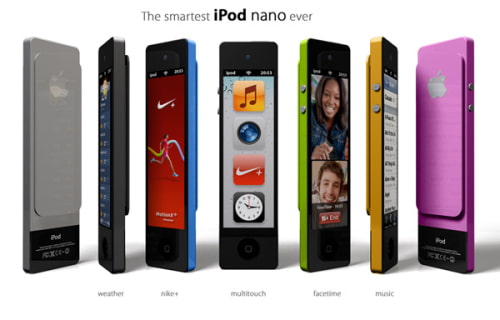
Designer Enrico Penello has posted images of his concept for the iPod Nano Touch, reports Yanko Design.
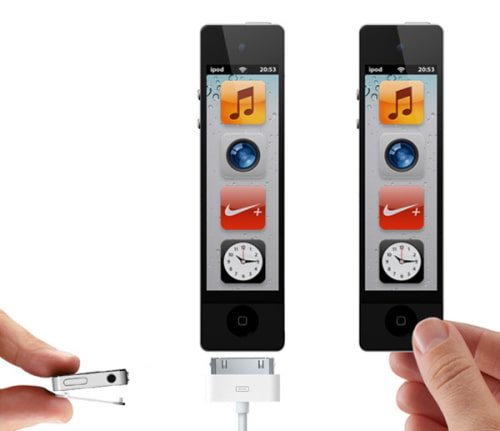
Presenting the iPod Nano Touch Concept: Extended and Smarter! The concept includes juicy features like WiFi, front facing camera that enables Facetime calls, weather status, ability to record Nike+ exercise results, classic apps like time, music, radio, images & podcasts.
Enrico describes his design saying, "this concept shows a bigger clip on the back side, a lower black part containing the WiFi antenna, central home button, side volume buttons and on/off top button, making this device really close to our everyday iPhone."
Apple news, rumors, tutorials, price drop alerts, in your inbox every evening, free.
Unsubscribe at any time.
Success!
You have been subscribed.
Add Comment
Would you like to be notified when someone replies or adds a new comment?
Yes (All Threads)
Yes (This Thread Only)
No
Notifications
Would you like to be notified when we post a new Apple news article or tutorial?
Yes
No
Comments (6)
Comments are closed for this article.
0
Izzy - May 11, 2012 at 10:54pm
So cool put it on the market
0
Breix - March 31, 2012 at 1:24pm
Interesting but.. If ur gonna do facetime in this baby it's a bad idea..
0
Nirjhar - March 31, 2012 at 2:45am
Very bad design. Apple won't have anything like this. See the back side. Extra battery like thing is the worst.
0
Vb - March 31, 2012 at 3:32pm
Yeah....its called a clip sunshine.
0
mavrik101 - March 30, 2012 at 11:12pm
It's a concept. And I appreciate what Enrico has shared here.
Nano getting bigger - no way. Smaller or thinner.
Adding a camera is interesting. Apple should make the Nano into a watch.
Though others have done so already - Lets see Apples solution.
0
obican70 - March 30, 2012 at 6:42pm
Its interesting and realistic approach but I hope for more radical solution.










![How To Change Wallpaper on Mac [Video]](/images/tutorials/90512/90512/90512-160.jpg "How To Change Wallpaper on Mac [Video]")
![How To Turn Off Always On Display on iPhone [Video]](/images/tutorials/87524/87524/87524-160.jpg "How To Turn Off Always On Display on iPhone [Video]")





![16-Inch M5 Max MacBook Pro Drops $900 to New Low of $3,499 [Deal]](/images/news/102438/102438/102438-160.jpg "16-Inch M5 Max MacBook Pro Drops $900 to New Low of $3,499 [Deal]")
![Magic Keyboard for iPad Air Drops to $200 on Amazon [Deal]](/images/news/102402/102402/102402-160.jpg "Magic Keyboard for iPad Air Drops to $200 on Amazon [Deal]")
