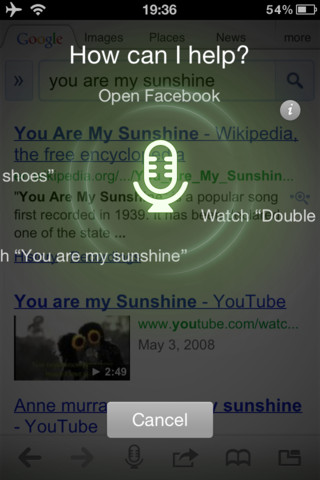
The Dolphin Browser for iPhone has been updated with the ability to search by voice, night mode, and the ability to save images to your camera roll.
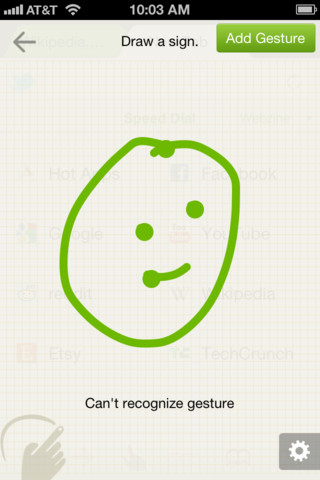
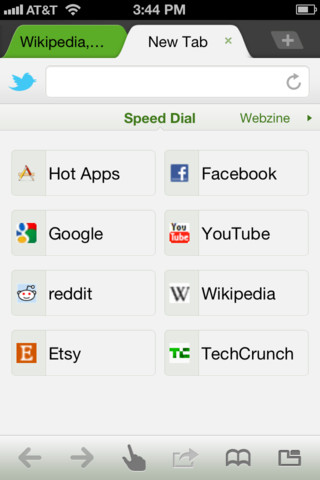
Features: ★ Dolphin Sonar – Dolphin listens and lets you use your voice to search on the Internet, share on your favorite social networks, bookmark your favorite website, navigate and more. ★ Webzine - Fast loading, without ads; Webzine simplifies the way you read your favorite news, blogs and websites. ★ Gesture - Let your inner artist out and create a personal symbol to access the websites you use the most. ★ One-click share via Twitter/Facebook - Taking the work out of being social. ★ Speed Dial - Visit you favorite sites on the go with one touch. ★ Tabbed browsing - No need to toggle between screens, tabbed browsing lets you open and switch between pages fast as lightening. ★ SideBars - Make the best of mobile interface via Dolphin SideBar. ★ MenuBar - The fastest way to customize, share and find information.
What's New In This Version: 1.Dolphin Sonar: Dolphin listens and lets you use your voice to search on the Internet, share on your favorite social networks, bookmark your favorite website, navigate and more. Dolphin Sonar is so easy to use; you may just forget how to type. Shake or press button to activate. 2.Keyboard: Back by popular demand, the URL keyboard! 3.Search engine options: Switch between 4 different search engines to get the type of information you want fast. 4.Font Size: Now get 3 font size options for easier browsing. 5.Night Mode: Dim the screen with one button. 6.Saved Images: Your saved images go directly to your phone's photo album. 7.Stability: Various stability and performance improvements.
You can download Dolphin Browser from the App Store for free.
Get the iClarified Daily Newsletter
Apple news, rumors, tutorials, price drop alerts, in your inbox every evening, free.
Unsubscribe at any time.
Success!
You have been subscribed.
Add Comment
Would you like to be notified when someone replies or adds a new comment?
Yes (All Threads)
Yes (This Thread Only)
No
Notifications
Would you like to be notified when we post a new Apple news article or tutorial?










![Apple Says iPhone Duo's Folding Display Has a Replaceable Cover Layer [Video]](/images/news/102525/102525/102525-160.jpg "Apple Says iPhone Duo's Folding Display Has a Replaceable Cover Layer [Video]")
![How To Find Your iPhone IMEI Number [Video]](/images/tutorials/83557/83557/83557-160.jpg "How To Find Your iPhone IMEI Number [Video]")

![How To Change Wallpaper on Mac [Video]](/images/tutorials/90512/90512/90512-160.jpg "How To Change Wallpaper on Mac [Video]")




![16-Inch M5 Max MacBook Pro Drops $900 to New Low of $3,499 [Deal]](/images/news/102438/102438/102438-160.jpg "16-Inch M5 Max MacBook Pro Drops $900 to New Low of $3,499 [Deal]")
![Magic Keyboard for iPad Air Drops to $200 on Amazon [Deal]](/images/news/102402/102402/102402-160.jpg "Magic Keyboard for iPad Air Drops to $200 on Amazon [Deal]")
![13-Inch M5 MacBook Air With 1TB Drops to $1,449 on Amazon [Deal]](/images/news/102345/102345/102345-160.jpg "13-Inch M5 MacBook Air With 1TB Drops to $1,449 on Amazon [Deal]")
