Sparrow, a popular email client, has updated its iPhone application introducing a built-in web browser, send & archive, empty trash & spam, dock badge preferences, and more.
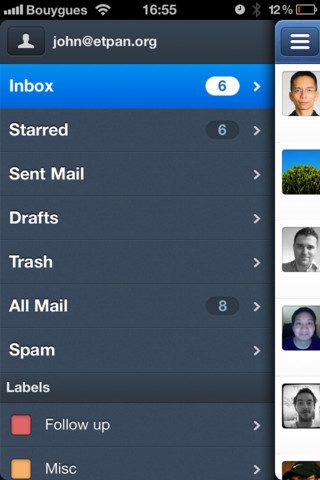
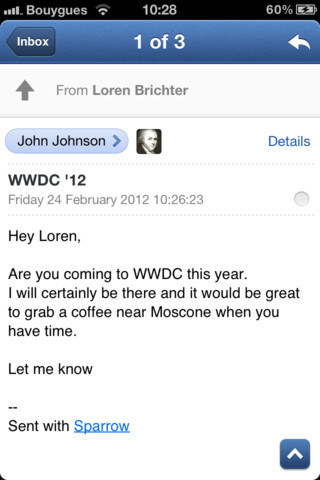
Sparrow is an iPhone mail client designed with love to provide you with an efficient and pleasant mailing experience. With its pane navigation, its new threading system and many new features, you'll never look back.
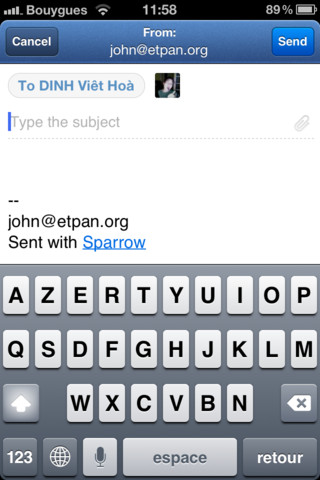
FEATURES: - Full IMAP support - Unified Inbox - Attachments - Up & down your conversations - Everything is a swipe away - Faces - Message swipe - Smart contacts - Send & Archive - Built-in web browser - Quick mailbox switch - Mark all as read - Thread view - Pull to refresh - Priority Inbox support - Alias - Powerful search - Quick sender switch in compose window - Mark all as read - Read/unread with a long press on a message cell - Reply all quick switch...
What's New In This Version: New features: - Built-in web browser - Send & archive - Empty trash - Empty spam - Dock badge preferences by account - Show/hide labels and folders - Choice to include attachments when forwarding messages
Bug fix: - Compatibility with mail servers - Improved mail servers detection (gApps login error, self-signed certificates) - Composer wrapping behavior - Custom SMTP for alias - Issue with SMTP without password - Message view behavior with email that do not scroll - Swipe gesture to add custom account - Refresh starred / unread using pull to refresh - Fixed account list scrolling with more than 10 accounts - Video attachments are shown fullscreen
What's Up With Push Notifications: Thanks to your amazing support, we feel confident that Apple might revise its position on the Push API. We'll submit a first version of Sparrow 1.2 including it. This might delay Sparrow 1.2 validation but we're already working with some partners to include Push in future versions of Sparrow without needing Apple clearance.
Push is coming. With or without Apple.
You can purchase Sparrow from the App Store for $2.99.
Get the iClarified Daily Newsletter
Apple news, rumors, tutorials, price drop alerts, in your inbox every evening, free.
Unsubscribe at any time.
Success!
You have been subscribed.
Add Comment
Would you like to be notified when someone replies or adds a new comment?
Yes (All Threads)
Yes (This Thread Only)
No
Notifications
Would you like to be notified when we post a new Apple news article or tutorial?
Yes
No
Comments (5)
Comments are closed for this article.
0
iJoke - April 4, 2012 at 7:29pm
WARNING: if you have the cydia push don't update the app as it breaks the push. Reinstalling, restarting and springing wont fix it.
0
kaboom - April 4, 2012 at 8:12pm
Nice to know!! thanks for the info man
0
iJoke - April 4, 2012 at 6:30pm
I'm loving this app with cydia's push.
Just wish they supported POP3
0
joyz - April 4, 2012 at 4:33pm
How can sparrow have push by circumventing Apple without jailbreak??
0
kaboom - April 4, 2012 at 4:28pm
There is a tweak on cydia ..once you downloaded sparrow at app store add a sparrow push on cydia by Big Boss..dont need to wait for apple ..
Thats the best for the jailbreak..
Hope this helps






![Apple Debuts 'Nocturne' Trailer Ahead of October 30 Premiere [Video]](/images/news/102471/102471/102471-160.jpg "Apple Debuts 'Nocturne' Trailer Ahead of October 30 Premiere [Video]")


![Apple Releases visionOS 27.0.1 for Apple Vision Pro [Download]](/images/news/102459/102459/102459-160.jpg "Apple Releases visionOS 27.0.1 for Apple Vision Pro [Download]")
![Boot Speed Test: iPhone 18 Pro Max vs iPhone 17 Pro Max vs iPhone 16 Pro Max [Video]](/images/news/102462/102462/102462-160.jpg "Boot Speed Test: iPhone 18 Pro Max vs iPhone 17 Pro Max vs iPhone 16 Pro Max [Video]")


![How To Find Your iPhone IMEI Number [Video]](/images/tutorials/83557/83557/83557-160.jpg "How To Find Your iPhone IMEI Number [Video]")



![16-Inch M5 Max MacBook Pro Drops $900 to New Low of $3,499 [Deal]](/images/news/102438/102438/102438-160.jpg "16-Inch M5 Max MacBook Pro Drops $900 to New Low of $3,499 [Deal]")
![Magic Keyboard for iPad Air Drops to $200 on Amazon [Deal]](/images/news/102402/102402/102402-160.jpg "Magic Keyboard for iPad Air Drops to $200 on Amazon [Deal]")
![13-Inch M5 MacBook Air With 1TB Drops to $1,449 on Amazon [Deal]](/images/news/102345/102345/102345-160.jpg "13-Inch M5 MacBook Air With 1TB Drops to $1,449 on Amazon [Deal]")

