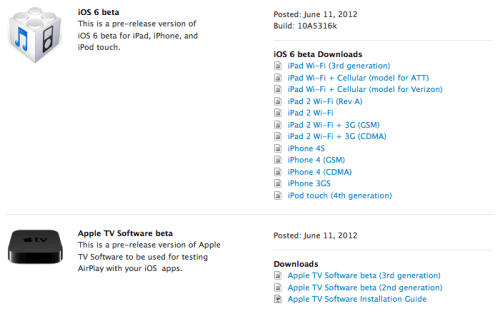
Apple has posted iOS 6 for developers to download from the iOS Dev Center.
The build number is 10A5316k and it supports the following devices: ● iPad Wi-Fi (3rd generation) ● iPad Wi-Fi + Cellular (model for ATT) ● iPad Wi-Fi + Cellular (model for Verizon) ● iPad 2 Wi-Fi (Rev A) ● iPad 2 Wi-Fi ● iPad 2 Wi-Fi + 3G (GSM) ● iPad 2 Wi-Fi + 3G (CDMA) ● iPhone 4S ● iPhone 4 (GSM) ● iPhone 4 (CDMA) ● iPhone 3GS ● iPod touch (4th generation)
You can download the ipsw firmware file for your device from here.
Get the iClarified Daily Newsletter
Apple news, rumors, tutorials, price drop alerts, in your inbox every evening, free.
Unsubscribe at any time.
Success!
You have been subscribed.
Add Comment
Would you like to be notified when someone replies or adds a new comment?
Yes (All Threads)
Yes (This Thread Only)
No
Notifications
Would you like to be notified when we post a new Apple news article or tutorial?
Yes
No
Comments (3)
Comments are closed for this article.
0
PReaper - June 12, 2012 at 12:15pm
How staböe/unstable is the Beta at this stage?
0
Chris - June 11, 2012 at 11:21pm
Can you downgrade to 5.1.1 after you installed the iOS 6 beta?
Do I have to save the SHSH blobs to do that?
0
James - June 12, 2012 at 3:41pm
Always save your SHSH blobs anyway.
It's a beta for developers not for the public. It'll be a little unstable at this stage (day 1). Probably best to wait.
If you do get a developer to give you beta access know that you'll need to upgrade along with the betas as these expire. So you'll need to get beta 2 when that comes out and so on.
Downgrade I would think would be possible and fine (so long as you have your SHSH). The only problem may be if there is a later baseband in iOS6 it may cause problems when downgrading.
Probably best to wait a little while.




![iPhone 18 Pro Teardown Shows Under-Display Face ID Camera and Larger Vapor Chamber [Video]](/images/news/102270/102270/102270-160.jpg "iPhone 18 Pro Teardown Shows Under-Display Face ID Camera and Larger Vapor Chamber [Video]")


![Tim Cook Expected at White House State Dinner for Xi Jinping [Report]](/images/news/102260/102260/102260-160.jpg "Tim Cook Expected at White House State Dinner for Xi Jinping [Report]")









![Apple Studio Display XDR Hits All-Time Low of $2,969.99 ($329 Off) [Deal]](/images/news/101976/101976/101976-160.jpg "Apple Studio Display XDR Hits All-Time Low of $2,969.99 ($329 Off) [Deal]")
