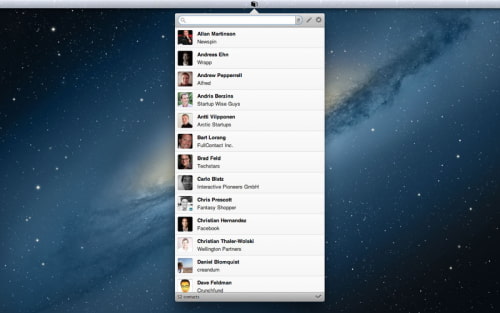
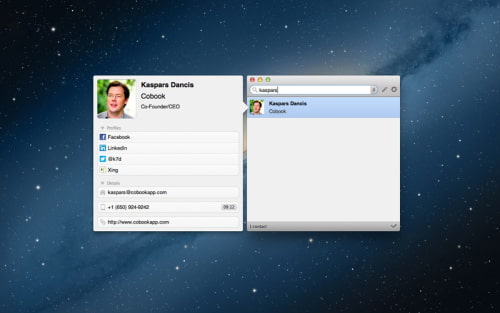
Cobook, a smart address book for your Mac, has been updated with Retina Display support, Google Contacts sync, Xing sync, and more.
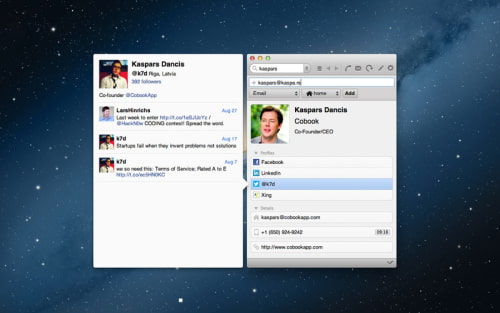
Highlights: - 100% privacy, Cobook stores all your contact information on your computer only and does NOT upload any personal data to servers - Syncs with OS X standard Address Book / Contacts application as well as Google Contacts - Quick access via menu bar - Can automatically update or import your contacts from Facebook, LinkedIn, Twitter and Xing - Tags makes it easier to organize contacts - "Quick Add" helps adding contact details faster
What's New In This Version: - Retina graphics - Full Google Contacts sync (including tags/groups and all fields supported by Cobook) - Xing sync - Show local time for phone numbers and addresses - Search field is now always present on top of window - Prefix tag with "-" for inverse tag search (ie. find contacts that do not belong to this tag) - Reorder contact detail sections via Preferences - Configure default label for each field via Preferences - Support for name title and suffix fields - Support for additional dates field - Status bar with contact counter and synchronization status indicator - Edit contact image - Any tag can now be configured as Home View - More flexible contact Quick Add; now you can use it to add anything - Design updates - Streamlined setup dialog - It's now possible to disable confirmation popup for default phone action
You can download Cobook from the App Store for free.
Get the iClarified Daily Newsletter
Apple news, rumors, tutorials, price drop alerts, in your inbox every evening, free.
Unsubscribe at any time.
Success!
You have been subscribed.
Add Comment
Would you like to be notified when someone replies or adds a new comment?
Yes (All Threads)
Yes (This Thread Only)
No
Notifications
Would you like to be notified when we post a new Apple news article or tutorial?









![How To Change Wallpaper on Mac [Video]](/images/tutorials/90512/90512/90512-160.jpg "How To Change Wallpaper on Mac [Video]")
![How To Turn Off Always On Display on iPhone [Video]](/images/tutorials/87524/87524/87524-160.jpg "How To Turn Off Always On Display on iPhone [Video]")





![16-Inch M5 Max MacBook Pro Drops $900 to New Low of $3,499 [Deal]](/images/news/102438/102438/102438-160.jpg "16-Inch M5 Max MacBook Pro Drops $900 to New Low of $3,499 [Deal]")
![Magic Keyboard for iPad Air Drops to $200 on Amazon [Deal]](/images/news/102402/102402/102402-160.jpg "Magic Keyboard for iPad Air Drops to $200 on Amazon [Deal]")
